

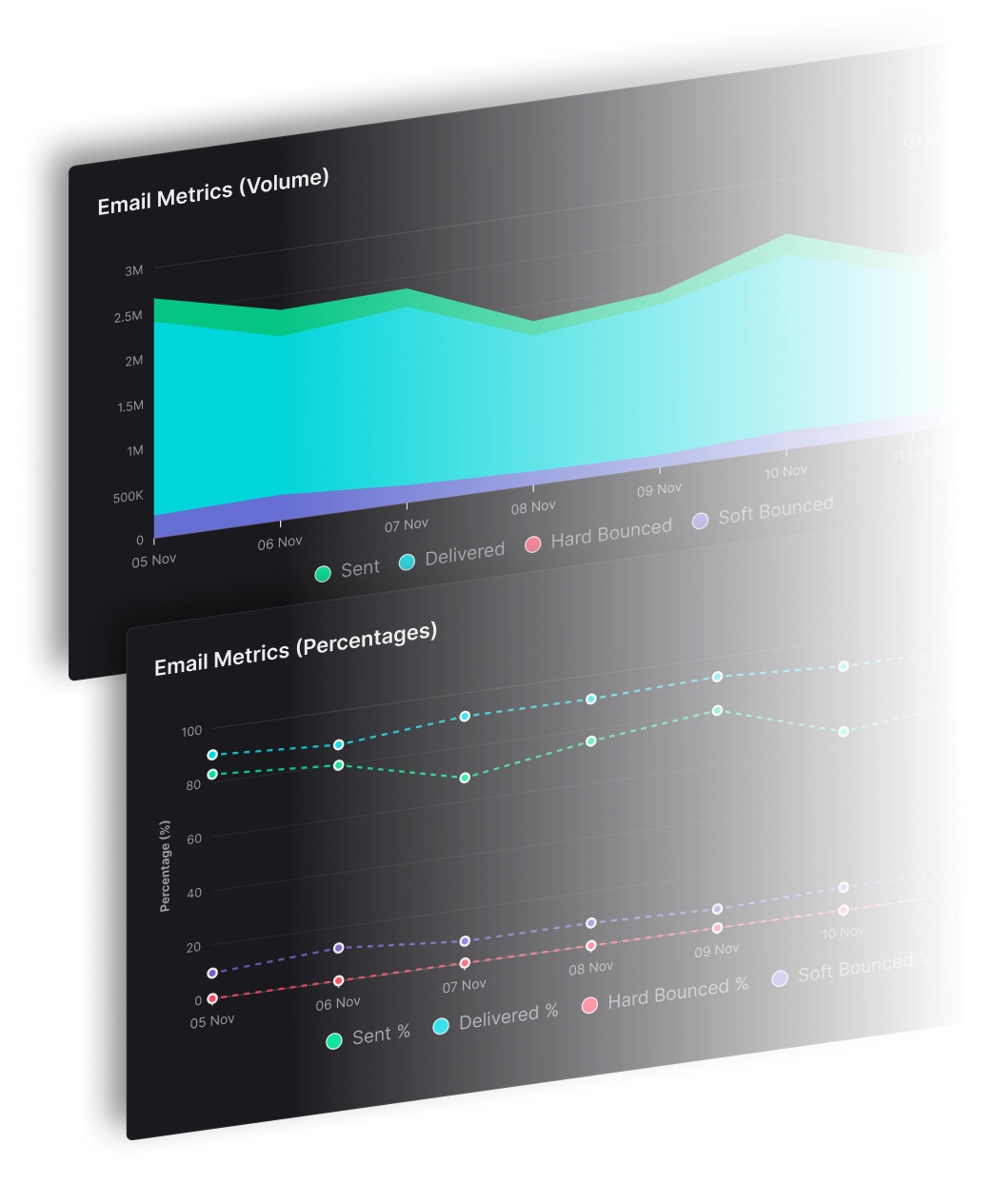


An email API is a programmable interface that lets software create, submit, and track email through standard HTTP requests, so no person has to work inside a mailbox. A successful response means the provider accepted the message for processing. It does not mean the message reached the inbox.
Sending receipts from one application is simple. Sending for dozens of brands or clients at volume is where a single endpoint stops being enough, and SendX Infrastructure is the managed delivery engine built for that case. The rest of this guide covers the request path, where apps use it, when SMTP still fits, the numbers mailbox providers watch, and how one API can serve many brands without mixing reputations.
What an Email API Is and How a Request Works
Think of a courier pickup counter. You hand over a parcel, the clerk checks the label, and the counter stamp says accepted. The truck, the sorting office, and the recipient's building still decide what happens next. An email API is that counter for software.
An email API is a programmable interface that lets software create, submit, and manage email through standard network requests, instead of a person working in a mailbox. Most modern ones use HTTP and follow REST. Your application sends recipients, sender information, subject, body, a template, or metadata, and the service answers accepted or failed.
REST is the reason those calls look the same across languages. Roy Fielding presented it in his 2000 University of California, Irvine doctoral dissertation, which describes stateless requests and uniform interfaces. You don't keep a mail session open. Each call carries what the service needs.
What one send request contains
A typical send is an authenticated HTTP POST. The body names who it is for, who it is from, the subject, the text or HTML, and often a template id. The response is a structured acceptance, with a message id, or a validation error. Store that id. Later events use it to tell you what happened after the stamp.
CRMs, commerce systems, publishers, and SaaS products call the same endpoint for receipts, password resets, alerts, and onboarding mail. One call can stand alone, or an event in your product can fire it every time. If you are wiring this from application code, the email API guide for Node.js and Python shows the request shape in two common languages.
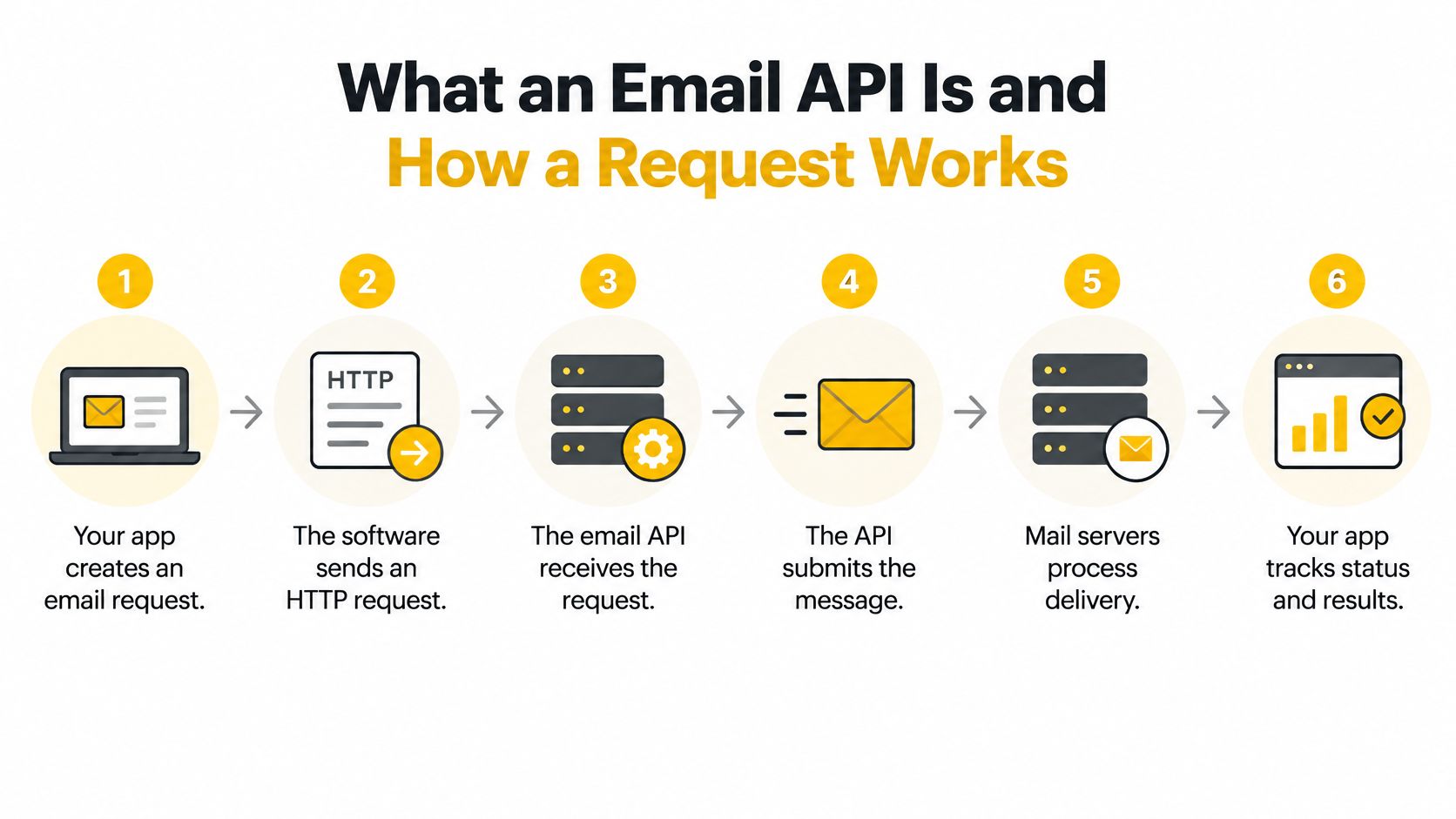
The path from your code to a mailbox provider looks like this.
- Your application calls the endpoint with the message fields and credentials.
- The service validates the fields, the key, and the sending identity.
- The message is queued for processing.
- The receiving mailbox provider, such as Gmail, Yahoo, Outlook, or iCloud, decides whether to accept it and where to place it.
The API can also expose delivery responses, bounce events, suppression data, and webhooks, so your software can react after submission. SMTP, covered later, is the mail-transfer protocol between servers. The API is the control layer your application talks to.
Open a sample request from your provider, find the recipient, sender, and template fields, and store the message id the response returns.
Why Email APIs Matter and Where Apps Use Them
The first benefit a team feels is timing. The message fires from the event that caused it, for example a checkout, a sign-up, or a published article. Nobody exports a list and pastes it into a mailbox.
That only works if sending is infrastructure. The Radicati Group estimated worldwide traffic at 361.6 billion messages a day in 2024, which averages about 4.2 million messages per second. Those figures cover consumer mail, business mail, automated mail, and spam, so they describe the ecosystem, not any one provider. At that pace, a send button in a person's inbox can't sit on the critical path of your product.
Production sending needs authentication, rate controls, queues, retries, templates, bounce handling, and a record of what happened. An API connects those controls to application events and keeps delivery work out of your core code. A checkout, a user action, a publication schedule, or a client workflow can generate the right message and hand a machine-readable result back.
You get five practical gains from that split.
- Event automation: The product event creates the message, so a reset or a receipt doesn't wait on a person.
- Separated code: Email retries and templates live with the sending service, not inside every feature branch.
- Machine-readable results: Your system can branch on acceptance, a validation error, or a later bounce.
- Repeatable sending: The same endpoint serves one message or a stream of events.
- Queues and retries: The service holds and retries work your application shouldn't block on.
Transactional email is a message triggered by one action from one user. Marketing email follows different consent and unsubscribe rules, including the CAN-SPAM Act's requirements for marketing mail. One API can carry both only when each message is labeled correctly, because mailbox providers read a password reset and a promotion as different kinds of sending behavior.
| Use case | Trigger | Example message | Sending pattern |
|---|---|---|---|
| Account security | User requests a password reset | Reset link | One message per request |
| Order confirmation | Customer completes a checkout | Receipt and order details | One message per order |
| Onboarding | User creates an account | Welcome and setup steps | Short sequence over the first days |
| Usage alerts | Account crosses a set threshold | Limit warning | One message per threshold event |
| Team invites | Admin invites a teammate | Invite link | One message per invite |
| Product notices | Publication or system event | Update or status message | One message per event, to the affected users |
List the events in your product that should send email, and mark which ones are transactional before you pick templates or keys.
Email API Versus SMTP and When Each One Fits
Use an email API when your application triggers sends and needs structured responses and events. Use SMTP when a legacy tool, a printer, or a mail client needs a relay and you don't control the code.
SMTP is the postal route between mail servers. The API is the order form your application fills in before anything leaves the building. The route still exists behind the form. You just stop speaking the route's dialect from inside the product.
An email API is an application-layer interface, typically HTTPS on port 443, that takes structured JSON instead of making you implement SMTP, IMAP, and MIME yourself. A send is an authenticated POST with recipients, subject, content, headers, attachments, and often a template id. The service returns an acceptance id or a validation error. HTTP libraries already give you connection pooling, TLS checks, retries, and timeouts. JSON is easier to validate across languages than a live mail session.
That acceptance is not inbox placement. It confirms the provider took the request. DNS, authentication, policy checks, throttling, remote-server replies, bounces, and deferrals still decide the outcome. Persist the provider message id, use idempotency keys where the API supports them, and treat transient failures differently from permanent ones. Read delivery and bounce events from webhooks, not from the synchronous HTTP response alone.
| Aspect | SMTP | Email API |
|---|---|---|
| Transport | Mail-transfer protocol between mail servers | HTTPS requests carrying JSON |
| Authentication | SMTP AUTH before the MAIL command, otherwise code 530 under RFC 6409 | Key or token sent with each request |
| Response | Reply codes for each command in the session | JSON response with an acceptance id or validation error |
| Failure handling | Bounce messages and reply codes | Webhook events for bounces, complaints, and deferrals |
| Best fit | Legacy apps, printers, and mail clients | Application-triggered sends and event-driven systems |
Sources: RFC 6409 for message submission, and the protocol notes above for the application-layer request.
Authentication doesn't disappear because you stopped speaking SMTP. Under RFC 6409, a Message Submission Agent must reject the SMTP MAIL command by default when the session hasn't authenticated, using response code 530, unless the sender was already authenticated another authorized way. Your HTTPS call still has to prove who may submit mail. The key controls who may send. SPF and DKIM, covered next, help mailbox providers check whether that sender may use the domain. A practical SMTP service setup is the right path when the sending software is a fixed client.
Decide in three checks.
- If the sending software is a fixed client you can't change, stay on SMTP.
- If you need a status and a bounce code per message, use the API.
- If both are true for different products, run both, and don't force a mail client through JSON.
SendX Infrastructure supports both on one account: a REST API, an SMTP relay, and official SDKs for JavaScript, Python, Go, Ruby, Java and PHP, so a fixed SMTP client and an event-driven app don't need separate vendors.
Deliverability Controls and Numbers to Monitor
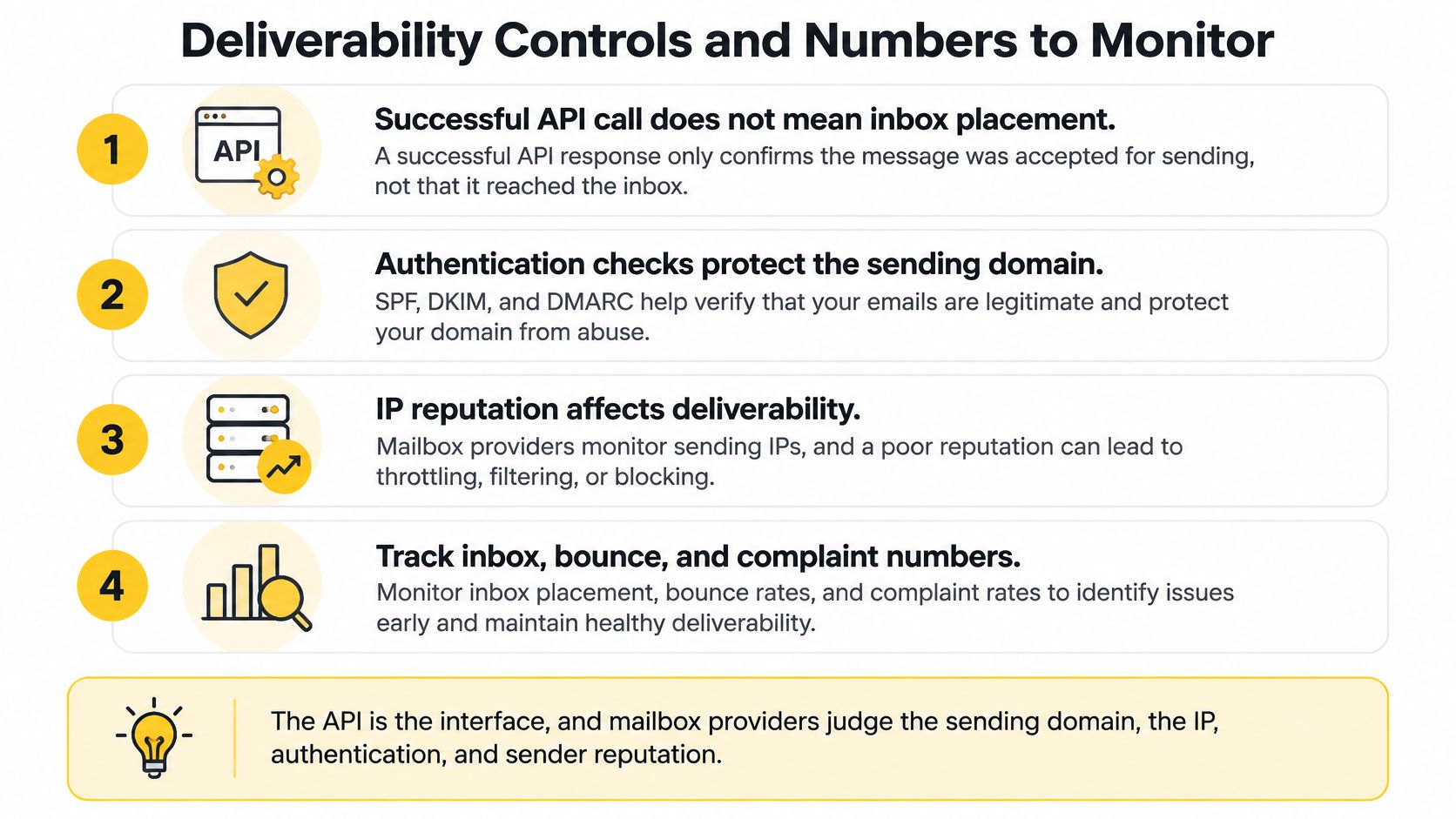
A successful API response means the request was accepted for processing. It does not tell you whether a message reached the inbox. Mailbox providers judge the sending domain, IP, authentication alignment, and complaint behavior behind each send.
For example, one brand can have healthy engagement while another draws complaints. An account-wide average can hide the difference, so review delivery signals by sending identity as well as across the account.
Since February 1, 2024, Google's sender requirements say every sender to personal Gmail accounts must set SPF or DKIM on the sending domain. Bulk senders, defined as sending more than 5,000 messages a day to Gmail, must set SPF, DKIM, and DMARC. DMARC tells receiving servers how to handle mail that fails SPF or DKIM. For DMARC to pass, SPF or DKIM must authenticate the message, and the authenticated domain must align with the visible From address. An API key cannot replace these DNS records.
Gmail also evaluates sending behavior. Gmail's bulk sender guidance says senders over 5,000 messages a day should keep their reported spam rate below 0.3%, offer one-click unsubscribe on marketing email, and process unsubscribe requests within two days. When mail lacks both SPF and DKIM authentication, Gmail may defer or reject it, or send it to spam. That points to a sending or authentication problem, not necessarily a fault in the HTTP client.
| Metric | Threshold or target | Why it matters |
|---|---|---|
| Reported spam rate | Below 0.3% | Gmail uses complaint behavior as a sending signal |
| Yahoo complaint rate | Monitor by mailbox provider | Helps identify complaint problems among Yahoo recipients |
| Unsubscribe processing | Within two days of the request | Gmail bulk-sender rule for marketing email |
| Authentication | SPF, DKIM, and DMARC for senders over 5,000 messages a day to Gmail | Lets mailbox providers verify the sending domain |
| Accepted versus inbox | API acceptance does not confirm inbox placement | Shows whether accepted mail reaches the inbox |
| Bounce and deferral rate | Watch for increases | Can reveal delivery problems before complaint rates rise |
Sources: Google's sender requirements and Gmail's bulk sender guidance.
What to monitor after the call
A mailbox provider can accept a message without placing it in the inbox. Delivery events and placement tests help distinguish those outcomes; an HTTP response alone cannot.
Review signals by sending identity and mailbox provider. A single blended rate may conceal trouble affecting one brand or one recipient network.
- Webhooks by brand: Route delivery, bounce, deferral, and complaint events to the identity that sent the message.
- Complaint rate by mailbox provider: Compare rates across recipient networks so a problem in one does not disappear in the account-wide average.
- Alerts: Set alerts for rising complaints, bounces, or deferrals so you can investigate before delivery worsens.
For more on how transactional messages are filtered, see this guide to transactional email deliverability. For wider context on email marketing data and trends, compare your own campaign results with broader patterns.
Check SPF, DKIM, and DMARC for each sending domain, then set an alert for complaint rates. In SendX Infrastructure you can drill down from a sub-account to the IP, the mailbox provider and the SMTP code behind a bounce, with Google Postmaster data and blocklist status for the IP, domain and tracking domain alongside. Webhooks can be set at the account or sub-account level, so each brand's events land in the right place in one schema.
Keeping Many Brands Isolated on One Email API
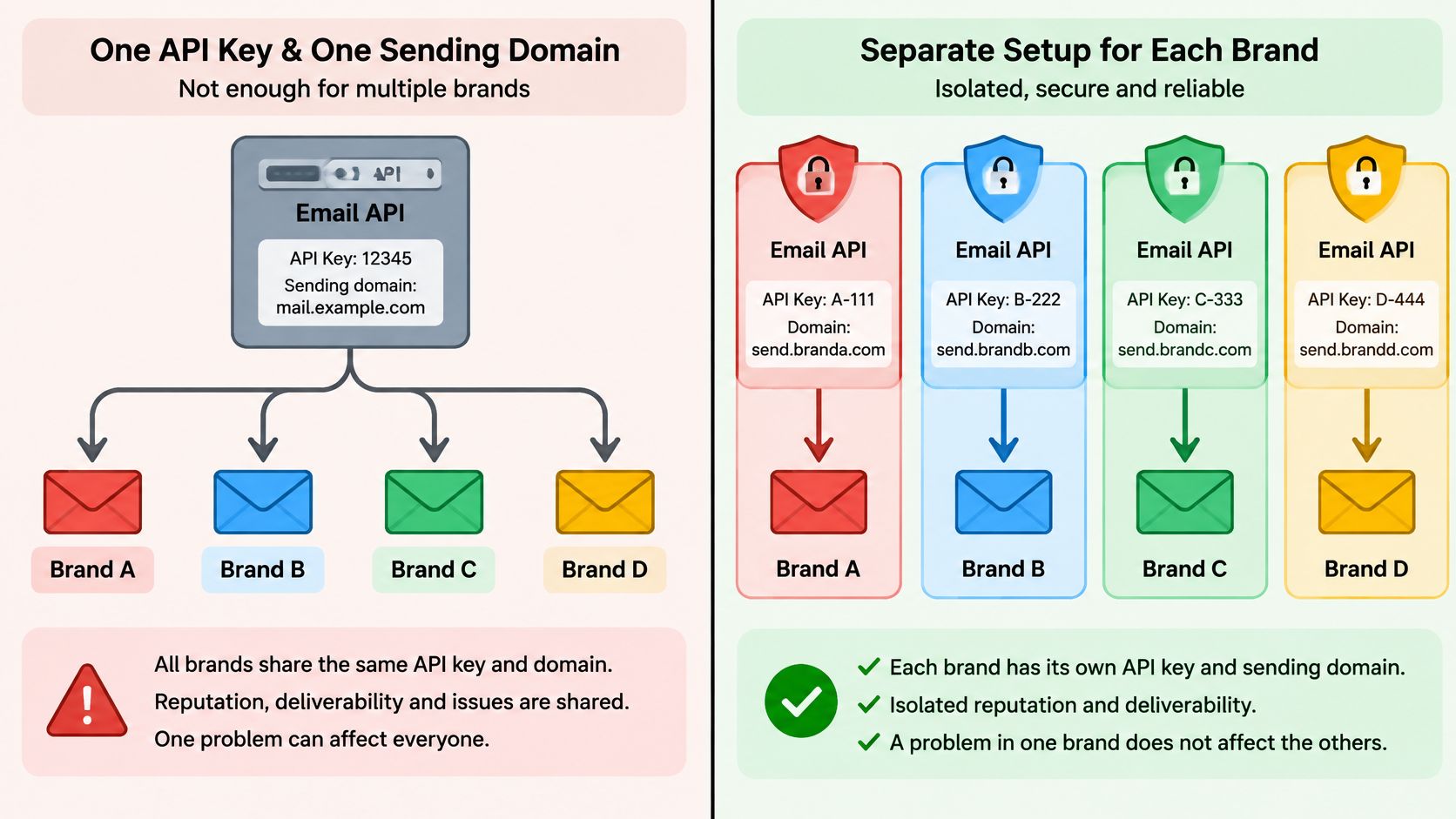
When one system sends for several brands, clients, or publications, its API architecture needs to keep each identity's access and data separate. A tenant boundary is like a lock between rooms: a mistake in one should not expose another tenant's credentials, suppression records, or events. Isolation also limits how far a reputation problem can spread.
Mailbox providers judge sending domains and IP addresses based on the mail they receive. If several identities share them, one identity's bounces or complaints can affect the others.
For each tenant, enforce the tenant ID in data queries, and make queries fail closed when that filter is missing. Test that tenant A cannot read tenant B's data. Partition credentials by tenant, rotate secrets, and log which identity sent each message.
| Isolation level | What it separates | When to use it |
|---|---|---|
| Shared pool | Identities share reputation | One brand at modest volume |
| Subaccount per brand | API credentials, domains, and suppression data | Several brands on one account |
| Dedicated IP pool | IP reputation and throttles | High volume or a higher-risk brand |
| Separate domain and pool | Domain, IP, and warmup plan | Publications or clients that need separate sending reputations |
Choose the level that matches the risk. One publication at modest volume may share a pool. Several brands benefit from separate credentials and suppression data. High-volume or higher-risk identities may need their own IP pool, while publications or clients that must protect their reputations from one another may need separate domains and IPs.
SendX Infrastructure sets this up per brand. Each sub-account has its own API key, domains and handler assignment, and sub-accounts map onto IP pools, so a bad week for one brand stays with that brand. See how SendX Infrastructure separates sending reputation.
Each tenant should have scoped authorization and events that identify the sending identity. Separate domains or IP pools can add isolation where a tenant's sending risk or volume warrants it.
For agencies and publishers, white-label sending depends on keeping each client's sending identity distinct. The white-label email marketing model should preserve that separation so one client's complaint does not affect another client's reputation.
Choosing an Email API Provider and Testing It Before You Commit
There is no single best email API. Choose by how many identities you send for and how much volume they carry. A tool that is fine for one app at low volume will hide problems once you send for clients.
Score the provider on the job, not on a feature grid in a sales deck.
- Per-message event data, with status and bounce code.
- Domain authentication for SPF, DKIM, and DMARC, not only an account key.
- Webhooks and SDKs your team will call.
- A sandbox that exercises validation and webhook handling.
- Reputation you can attribute per identity.
- Throttles you can set per mailbox provider.
- Price per thousand messages, overage, and how fast a human answers when placement drops.
Support response time matters because a complaint spike needs someone who can read the data with you. SendX Infrastructure gives a first response within three hours on a work day. When you compare providers, read each vendor's own docs for event fields, sandbox limits, and IP options, and don't trust a summary table you didn't check. A side-by-side of transactional email APIs for developers is a useful checklist for those docs, not a substitute for a test send.
Is There a Free Email API?
A free tier is for learning the request format and for basic delivery to test addresses. It is not a placement test at real volume. Shared free infrastructure tells you the JSON parsed. It doesn't tell you how Gmail will treat your domain next month. Use it to confirm fields, errors, and webhook signatures, then move to a test that uses your own domain.
What Is the Best Email API for Your Volume?
Match the setup to the identity count.
One brand at low volume should prove the sandbox, webhook handling, and a clean list before anything else. Several brands need a subaccount per brand, with its own domains and suppression. A platform sending for its users needs API keys per tenant and throttles per mailbox provider, so one tenant can't consume the account. Millions of sends a month need dedicated IP pools, throttles, and a warmup plan you can point at a single brand.
Red flags are easy to spot once you ask for the data. No per-message events. One shared pool and no per-brand results. No audit trail per tenant. Limits that exist only at the account level, so you can't slow one identity without slowing all of them.
How Do You Test an Email API Before You Commit?
| Test method | What it proves | What it misses | Cost |
|---|---|---|---|
| Developer sandbox | Request format, validation errors, and webhook handling | Inbox placement | Check the provider's terms |
| Free-tier sends to test addresses | Basic delivery to Gmail, Outlook, and Yahoo test addresses | Placement at real volume | Free up to the tier limit |
| Seed-list test | Placement across mailbox providers for your content | Real audience behavior | Low if you use addresses you control |
| One-brand pilot | Delivery and placement on your own domain at real volume | Long-term reputation changes | Paid sends at your rate |
Run the pilot in order, and change one thing at a time.
- Send to a seed list drawn from your own recipients, not from a bought list.
- Read placement for each mailbox provider, not a single blended number.
- Move one brand's traffic, and leave the rest on the current path.
- Compare results before you change templates, volume, or domains.
What Does an Email API Cost in Practice?
Confirm every price on the provider's current pricing page. The line items to read are these.
- Price per thousand messages: Compare it at your real monthly volume, not at the entry tier.
- Overage rate: A spike above the plan can cost more than the plan.
- Rate limits: A low cap forces you to queue or to split traffic.
- Log retention: Short logs make last month's bounce impossible to audit.
- Webhook charges: Some providers bill events as well as sends.
The costs that don't appear on the pricing page are the ones that slip. Time to publish SPF, DKIM, and DMARC. Warmup volume on a new domain before you send at full pace. A backup provider so one outage doesn't stop password resets. Revenue and audience trust lost when a damaged reputation pushes mail to spam. Budget for those before you compare per-thousand rates.
How SendX Infrastructure Handles Email API Sending for Many Brands
For a team sending mail under several brands, the key design question is how to keep each identity's sending and results distinct. Publishers, CRM and platform teams, and agencies may need separate domains, API credentials, sending limits, and reporting so a problem with one brand does not obscure what is happening with another.
An API request is the boundary between an application and the delivery infrastructure. The API can accept a message for processing, but that response does not establish that the message reached the inbox. Mailbox providers make that decision. Teams need to monitor results by identity and provider, then use the available delivery controls to investigate problems.
SendX Infrastructure provides API and SMTP sending, transactional email, and deliverability controls for multi-identity senders. It offers a RESTful API, webhooks, SDKs for popular programming languages, a developer sandbox, and enterprise-grade security and rate limits. Learn about SendX Infrastructure.
FAQs
How long does DNS authentication take to show up?
Publish SPF, DKIM, and DMARC before your first real send. After the record's TTL expires, check the records with a DNS lookup from outside your office network. If they have not updated yet, check again later before sending at volume.
Can I run an email API next to my current SMTP provider?
Yes. Start with one brand: authenticate its sending domain, route that brand's API traffic through the new service, then compare acceptance, bounces, and inbox placement with your current provider. Keep the other identities on their existing setup while you assess the results. SendX Infrastructure is built for exactly this: put one brand through it while your current provider stays underneath, and compare the results. If you're coming from SendGrid or Amazon SES, the compatible APIs mean changing the base URL instead of rewriting your send code.
What does a rate-limit response mean for my sends?
An HTTP 429 means your application has exceeded the API's rate limit for a key or identity. Queue the messages and retry after the wait specified in the response. Avoid retrying immediately; follow the provider's instructions and adjust your sending rate if the limit recurs.
