A/B Split Test is one of five campaign types in SendX. Write two or more subject lines, send them to a slice of your list, and the winner goes out to everyone else automatically. Included on every plan, not held back for a higher tier.

Nobody reads the email they did not open. The subject line and the preview text are the whole of that decision, and they are what a SendX split test varies.
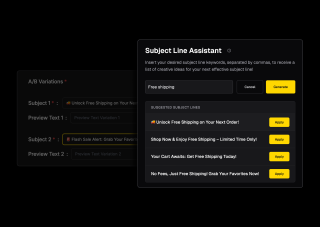
Variation A and B are the start, not the limit — add a C and keep going. Every variation carries its own subject line and its own preview text, so you are testing the full inbox preview rather than half of it. Custom fields work inside each one, and the Subject Line Assistant will generate options from a few keywords if you would rather edit than invent.
Choose what share of the list receives the test and how long to measure before calling it. When the wait is up, the winning subject line goes to everyone who has not been sent yet — no diary note, no second campaign to build. The result is laid out side by side afterwards, with the winner marked and sent, opened and clicked shown for every variation, so you can see how close the call actually was.

An A/B Split Test campaign varies the subject line on one send. A workflow has its own A/B split node, which does something different — it divides contacts down two entire paths, so one group can get a single email while the other enters a drip. Use the campaign for "which subject wins", and the workflow node for "which sequence works better".
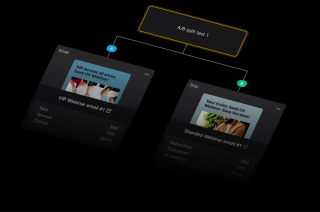
Two steps you do and one the campaign does without you.
The sender is set once for the whole test, so every variation goes out from the same From address and only the inbox preview differs. Under it, write your subject lines — a preview text and any custom fields you want on each, and a third or fourth variation if two is not enough. The Subject Line Assistant takes a few keywords and suggests lines you can apply with one click.
Once scheduled the campaign runs through its own states — testing while the sample is out, then picking and scheduling the winner — without you checking in. When it is done the variations sit side by side with the winner marked, and sent, opened and clicked for each. That comparison is the useful part, because two lines finishing a point apart is a different result from one beating the other outright.
The sender is set once for the whole test, so every variation goes out from the same From address and only the inbox preview differs. Under it, write your subject lines — a preview text and any custom fields you want on each, and a third or fourth variation if two is not enough. The Subject Line Assistant takes a few keywords and suggests lines you can apply with one click.
Once scheduled the campaign runs through its own states — testing while the sample is out, then picking and scheduling the winner — without you checking in. When it is done the variations sit side by side with the winner marked, and sent, opened and clicked for each. That comparison is the useful part, because two lines finishing a point apart is a different result from one beating the other outright.
Everything you need to know about SendX and our services. Last updated June 2026.
Email split testing, also called A/B testing, sends different versions of an email to different parts of your list to find out which performs better. In SendX it works on the subject line and preview text — a portion of your audience receives the variations, and after a wait you set, the best-performing version is sent to everyone remaining. The point is that the winner is decided by your own list rather than by a guess.
The subject line and the preview text. Each variation has its own of both, and you can add more than two. What stays the same across every variation is the email itself — the design, the content and the sender do not change between A and B. That is a deliberate limit rather than an oversight — holding the email constant is what makes the result attributable to the subject line rather than to a dozen differences at once.
More than two. A and B are there by default and you can add further variations to the same test. Bear in mind that every extra variation divides your test sample further, so on a smaller list two well-differentiated subject lines will usually give you a clearer answer than four similar ones.
You choose what percentage of the list receives the test and how long SendX should wait before deciding. When that wait elapses the campaign moves to Tested, the best-performing variation is selected, and it is scheduled to the rest of your audience as Winner Scheduled. No second campaign to build and nothing to remember to do.
Yes. A/B Split Test is one of the five campaign types in SendX, alongside broadcasts, drips, auto-triggers and RSS, and it is included rather than reserved for a higher tier. Several tools in this category put split testing behind an upgrade or leave it out of their entry plan entirely, which is worth checking when you compare.
They solve different problems. An A/B Split Test campaign varies the subject line on a single send and picks a winner for you. A workflow A/B split node divides contacts down two entire paths — one group might receive a single email while the other is enrolled into a drip — and it keeps running as part of the automation rather than resolving to one winner. Use the campaign to find the better subject line, and the workflow node to compare two sequences.
Large enough that the difference between variations is not noise. A split test needs enough recipients in the test portion for the gap in open rates to be real rather than chance, which is why the test percentage is yours to set — on a big list a small slice is plenty, and on a small list you may need to test on a much larger share. If two variations finish close together, treat that as no clear winner rather than a narrow one.
Still have questions? We're here to help.
Automatically ramp sending volume to earn a rock‑solid sender reputation—no spreadsheets required.
Write, publish, and track articles without leaving SendX—turn readers into subscribers in minutes.
Filter out security‑scanner noise and see the clicks that actually matter.
Auto‑expire unsent emails so your audience only sees timely, relevant messages.
Give every campaign its own reply‑to address and make sure answers land in the right inbox—every time.
Never let your emails fall into the void. Get real-time insights on your domain's reputation and boost your deliverability like never before.
Write two, let your list decide, and send the winner automatically. Free trial, no credit card required.