




Would a message accepted by a server necessarily reach the inbox? No. An SMTP service accepts outgoing email and sends it toward the recipient's mailbox provider using the Simple Mail Transfer Protocol. Temporary failures can lead to retries over several days, while permanent failures typically result in a bounce.
For publishers and software teams sending under multiple identities, a working connection does not show how each brand's mail performs after it leaves the server. SendX offers managed sending infrastructure for multi-identity senders. The practical question is whether a service can show what happened to each message, by sending identity and mailbox provider.
What an SMTP Service Does for Your Email
An SMTP service handles the journey between sending software and a receiving mailbox provider. Like a post office counter, it accepts a prepared message, checks the handoff and routes it toward the destination. It doesn't decide which folder the recipient ultimately sees.
For example, a publishing system prepares a subscription confirmation. The SMTP service receives that message, queues it and contacts the recipient's mailbox provider.
How does the message reach the mailbox provider?
- The sending software submits the message using the service's hostname, port and login.
- The service puts the message in a delivery queue.
- The service connects to the recipient's mailbox provider and offers the message.
- The mailbox provider accepts it or returns a response explaining why it hasn't.
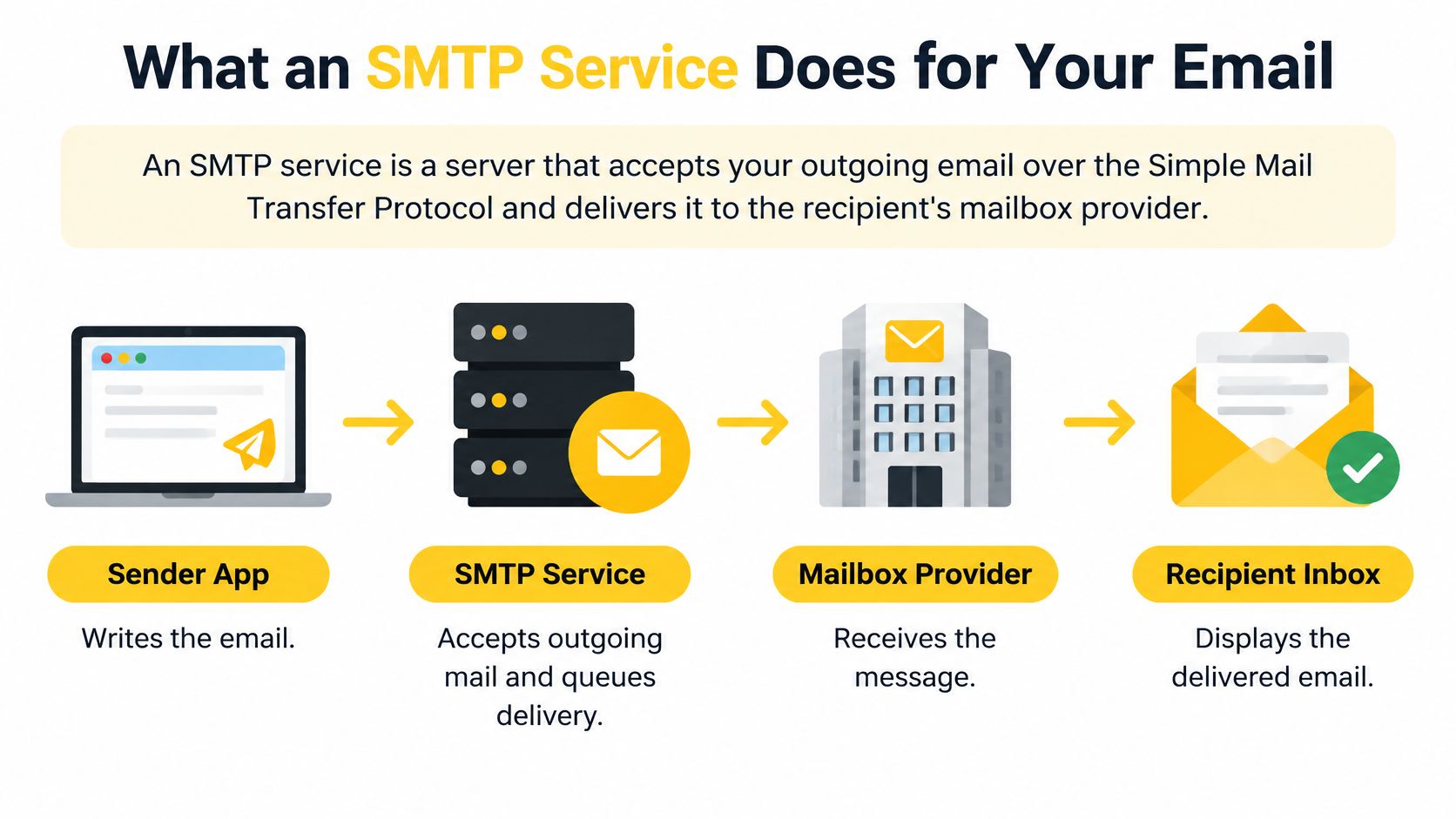
Delivered means the mailbox provider accepted the email. In the inbox means where it landed. A delivery log establishes acceptance, not inbox placement.
What happens when delivery fails temporarily?
A temporary failure should normally keep the message in the queue. A permanent failure should produce a bounce, with enough detail to identify the rejected address or policy problem.
The SMTP standard, RFC 5321, recommends a general minimum retry delay of about 30 minutes and a retry period generally lasting at least 4 to 5 days, while allowing adaptive strategies. These are protocol guidelines, not a promise that every message should remain useful for that entire period.
For example, a delayed newsletter and an expired password-reset message need different operational treatment. Sending software should track message usefulness as well as transport status.
The belief that any working SMTP server will do misses these differences. Queue retention, backoff and error classification affect whether a temporarily deferred message gets another sensible delivery attempt.
Before comparing SMTP services, record the current hostname, port, authentication method and software that uses them. That inventory identifies what can change through configuration and what needs development work.
Best SMTP Server Options Compared
The best SMTP server is the one whose operating model matches the sending team's responsibilities. A relay that accepts messages is different from infrastructure that also helps manage authentication, recipient-provider responses and separate sending identities.
SMTP service models by best fit and sending responsibility
| Service model | Best fit | Stream or IP model | Check before committing |
|---|---|---|---|
| Cloud-account relay | Engineering teams already managing cloud resources | Shared sending with optional isolation | Domain verification, regional configuration and bounce processing ownership |
| Transactional-first service | Product notifications and account messages | Message streams separated by purpose | How marketing traffic is classified and billed |
| Developer-focused relay | Software teams needing SMTP and API access | Shared pools with plan-specific dedicated options | Log retention, event export and account permissions |
| Testing service | Development and staging | Captured messages rather than ordinary recipient delivery | Whether production sending is a separate product |
| Managed sending infrastructure | Publishers, agencies and multi-identity software businesses | Brand-specific domains, IPs and pools | Reporting detail, provider-level controls and operational support |
| Self-managed server | Teams prepared to operate mail infrastructure directly | Team-controlled queues and IPs | Staffing, abuse handling, security maintenance and recovery procedures |
These categories provide a shortlist without pretending that a product name settles the decision. Published plan details still need checking against the actual sending workload.
Which SMTP server works best for a small team?
A small team inside an established business should minimize operational handoffs. A service becomes difficult to run when marketing owns the audience, engineering owns credentials and neither owns bounce processing.
The evaluation should follow a real message from submission through acceptance, rejection and suppression. A suppression is a rule that prevents further sending to an excluded address.
A test account should reveal whether the team can retrieve a message's status without opening a support ticket. It should also show whether someone without server access can identify an authentication failure.
Which SMTP server works best at volume?
At volume, the useful question changes from connection success to control over different sending conditions. A newsletter title with inconsistent engagement shouldn't dictate the delivery pace of unrelated account notifications.
The evaluation should include recipient-provider breakdowns, exportable bounce reasons, queue controls and a documented path for separating identities. Dedicated IPs are useful only when the team can maintain the sending pattern and monitoring they require.
Queue controls decide how much of this you can act on yourself. SendX Infrastructure, for example, sets throttles and warmup per mailbox provider, for 27 providers, and you hold those controls through the software or the API. You can slow one provider's queue without touching the rest.
A free tier can establish compatibility. It can't establish how a service behaves under the business's normal mix of brands, message types and recipient domains.
Pricing and Free Plan Limits Compared
SMTP pricing should be compared using the cost of operating the full sending workload, not the smallest advertised package. Free allowances and entry prices aren't directly comparable when plans include different logs, support, IP arrangements and message limits.
Costs and limits to compare before committing
| Pricing model | Paid starting point | Free-plan limitation to check | Additional cost to examine |
|---|---|---|---|
| Usage-based relay | Metered message usage | Eligibility, expiry and production restrictions | Data transfer, dedicated IPs and monitoring |
| Monthly message package | Subscription with an included allowance | Sending cap and approved recipients | Overage, additional streams and retention |
| Transactional package | Subscription or usage charge | Test-only versus production access | Event history and support access |
| Testing package | Test-inbox subscription | Captured messages rather than live delivery | Separate production sending |
| Managed infrastructure | Scope based on sending identities and service | Evaluation scope rather than assumed ongoing allowance | Isolation, operational support and reporting |
Why does price per email mislead?
A low transport rate doesn't include the engineering work required to process failed deliveries or connect authentication reports to individual brands. Those responsibilities still exist even when they don't appear on the invoice.
A useful comparison separates transport cost, infrastructure cost and team cost. Transport pays for messages, infrastructure covers items such as IPs and retention, and team cost covers investigation and ongoing operation.
For example, a publisher may find a metered relay economical until every title needs separate logs, credentials and reporting. Another business may already have that tooling and need little beyond transport.
The calculation should use normal sending volume, campaign peaks and expected growth. A single average month can hide the cost of a publication launch or seasonal campaign.
What don't free plans establish?
Free plans don't automatically establish production readiness. The important checks are whether live recipients are allowed, what happens at the sending cap and whether delivery events remain available long enough for an investigation.
A limit may stop submissions instead of generating an overage charge. That behavior matters when the same account carries time-sensitive notifications.
Before choosing a plan, total message volume across all identities and classify the operational work each price excludes. A plan is affordable only when the business can also operate it.
What to Check Before You Pick an SMTP Provider
An SMTP provider earns its place by what happens after a message is submitted. Authentication checks, queue behavior and usable response codes explain more about daily operations than an uptime banner, because a relay can accept a message and still leave a publisher without a usable delivery record.
Criteria for judging an SMTP provider
| Criterion | What to check | Why it matters | Red flag |
|---|---|---|---|
| Authentication support | DNS records for every sending domain | Each identity needs its own valid setup | Only the default domain has records |
| Retry and queue behavior | Retry spacing and temporary-error handling | Recoverable failures need controlled retries | Temporary errors become immediate permanent bounces |
| Per-provider throttling | Separate sending speeds by destination mailbox provider | Receiving systems respond differently to volume and reputation | Only one global speed control exists |
| Message classification | Marketing and transactional separation | Message types need different handling | Everything enters an undifferentiated queue |
| Logs and bounce codes | Recipient-provider and reason breakdowns | Teams need causes and totals | Reports contain only aggregate delivery rates |
| IP and pool controls | Routing by identity and message purpose | Separation limits shared exposure | Brands cannot be assigned separate routes |
| Support response | Response commitment and technical ownership | Investigation requires sending context | Support cannot inspect the relevant configuration |
Which authentication check belongs in the selection process?
The full mechanics of SPF, DKIM and DMARC belong with mailbox-provider rules. For this checklist, confirm that every sending identity has its own valid DNS records. A single SPF record for one domain can look like v=spf1 include:_spf.example.net ~all. The question is whether every domain and subdomain has one, not only the default domain.
The European Commission Joint Research Centre's 2025 assessment found approximately 87% to 98% adoption for StartTLS, SPF, DKIM and DMARC among measured domains in EU member states. Basic authentication is table stakes.
Why do logs matter more than uptime?
An operational service can still receive repeated deferrals from one mailbox provider. Logs should identify the affected identity, destination, sending IP and SMTP response code. Consider a 421 temporary failure and a 550 permanent failure. A service that records both as generic bounces hides whether a retry was appropriate.
The same distinction matters for transactional email deliverability, where an accepted submission does not establish timely recipient access.
Five questions expose whether the service gives a team enough evidence.
- Can every sending domain be validated independently?
- Can temporary failures be inspected without support?
- Can sending speed change for an affected recipient provider?
- Can a message be traced from submission to its final transport status?
- Can one identity be isolated without stopping unrelated traffic?
The decisive test is whether a team can explain a failed message using the service's own records, read per mailbox provider and per sending identity.
Mailbox Provider Rules for Complaints and Authentication
A message can pass authentication and still be marked as spam. Mailbox providers assess both who sent the message and how recipients respond, so review complaint guidance by provider and by sending identity.
Mailbox-provider requirements to monitor
| Mailbox provider | Complaint-rate guidance | Authentication requirement | Unsubscribe requirement |
|---|---|---|---|
| Gmail | Aim to stay below 0.1% and avoid reaching 0.3%, according to Google's sender requirements. | Bulk senders need SPF, DKIM, DMARC, and valid forward and reverse DNS. | Provide easy unsubscribe for marketing messages. |
| Yahoo | Keep complaint rates below 0.3%, according to Yahoo's sender FAQs. | DKIM signing with a key of at least 1024 bits. | Provide one-click marketing unsubscribe and process requests within two days. |
| Other recipient providers | Check each provider's published measurement and enforcement rules. | Validate the sending identity against published requirements. | Test marketing opt-out processing from request through suppression. |
Google's bulk-sender requirements apply to senders delivering at least 5,000 messages daily to Gmail accounts, as described in Google's bulk-sender guidelines. Google also states that senders whose spam rate exceeds 0.3% are ineligible for mitigation until the rate has remained below that level for seven consecutive days.
What does a complaint rate actually measure?
A complaint records a recipient marking a message as spam. Providers may calculate the rate using different denominators or eligible-message populations, so an internal percentage may not match the provider's reported rate.
For the mailbox provider, repeated complaints signal that recipients do not want those messages. Authentication confirms aspects of sender identity; it does not erase recipient feedback.
Investigate complaints by audience segment, publication, and sending source. A portfolio-wide average can hide a problem affecting one title. Teams comparing diagnostic options can also review software for improving email delivery.
Where does a bounce spike usually start?
Compare authentication results, recent audience imports, and the recipient domains affected before pausing unrelated traffic. A spike concentrated among newly imported addresses points to a different issue than widespread authentication rejection.
Track complaints alongside bounces. A rejected address calls for investigating delivery errors, while an accepted message marked as spam calls for examining recipient response and the audience that received it.
Sending Transactional and Marketing Email Through One Service
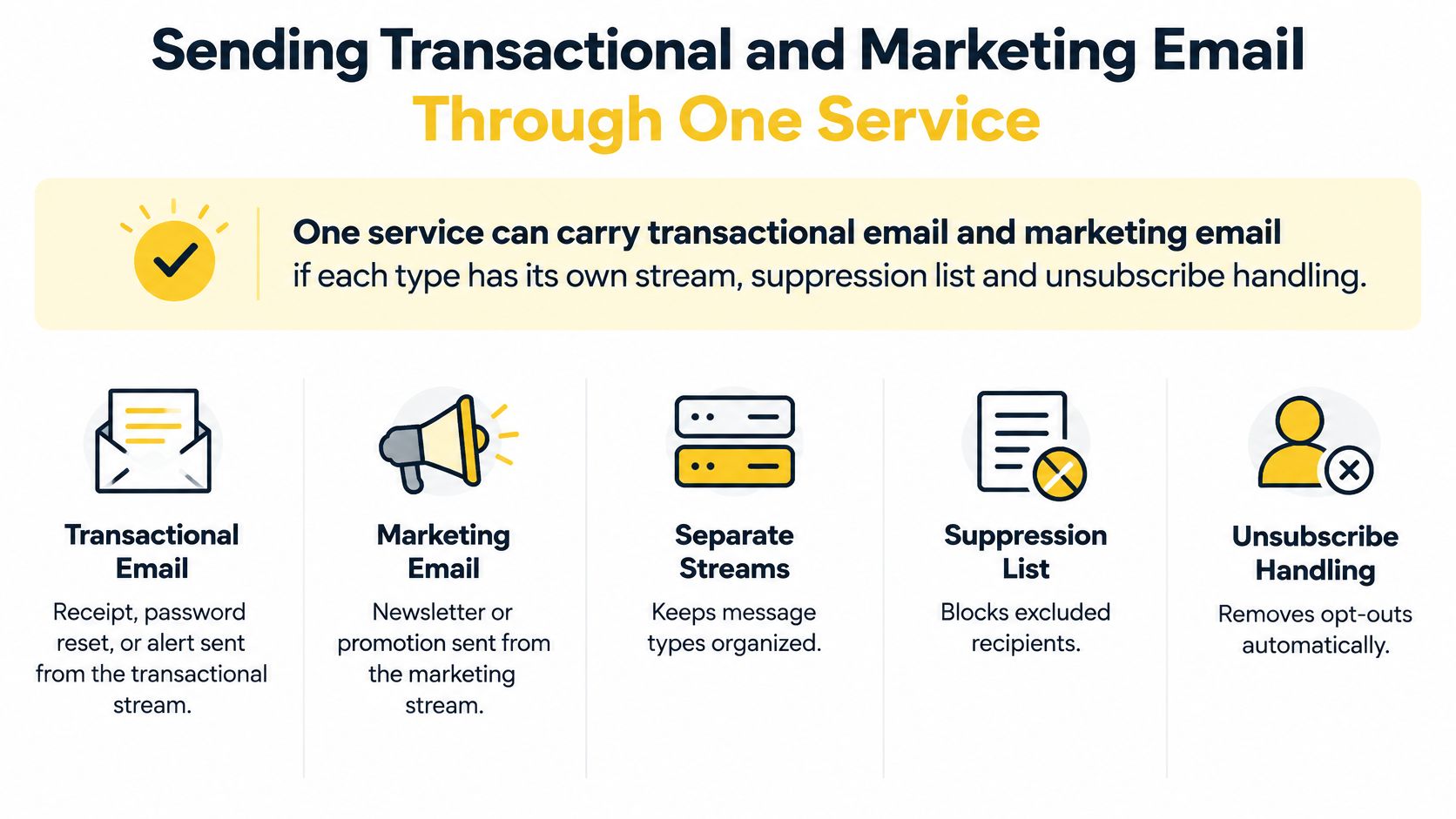
Can a password reset and a newsletter use the same sending service without sharing the same delivery rules? Yes. The software should classify them as separate message streams, each with its own route and operating rules.
For example, send a password reset through a transactional stream and a newsletter through a marketing stream. If a subscriber opts out of newsletters, that choice should not automatically block a requested account-security message.
How should transactional email sending be separated?
Set the message type when the sending software creates the email. A subject line alone is not a reliable way to classify it. The distinction between transactional and marketing email affects routing, suppression and unsubscribe handling.
How can one service handle both message types?
- Classify each message at creation. Mark it as transactional or marketing in the sending software.
- Assign the appropriate route. Keep campaign traffic on its designated stream or subdomain, separate from password-reset traffic.
- Scope suppression rules. Apply marketing opt-outs to the identities covered by that consent. Exclude invalid addresses wherever they occur.
- Test unsubscribe processing. Confirm that marketing headers and visible links reach a working endpoint and update the sending system.
Yahoo's rules require one-click unsubscribe for marketing messages, but not transactional messages. The List-Unsubscribe header carries the mechanism, and RFC 8058 describes how one-click unsubscribe works.
Newsletter drafting and email delivery are separate workflows. Teams that automate newsletter drafting in your voice still need to classify the message and check suppression rules before sending.
Email Design Features Your SMTP Service Must Pass Through
Email design belongs in SMTP evaluation because the delivery service carries the message's content, headers and links. It doesn't replace template testing, and its tracking or routing changes must not break the sender's identity.
Like a courier carrying a signed document, the service must preserve the parts that make the message understandable and attributable.
What must survive the handoff?
The From and Reply-To fields must retain the intended brand identity and reply destination. Otherwise, recipient replies can reach the wrong publication or an unattended address.
HTML and plain-text versions should travel together. A reader using the text version still needs a usable message, not a blank alternative part.
Message size must fit both the sending service and receiving system. A protocol minimum capability isn't a safe maximum for attachments or image-heavy templates.
Tracking links should use a domain controlled by the sender, and hosted images should remain under operational control. This makes broken links, certificate issues and brand attribution easier to manage.
Template variables must resolve before submission. A service can successfully deliver a message that still contains an unfinished personalization field.
Marketing email also needs a visible unsubscribe mechanism and the appropriate header handling. These email design best practices are functional requirements, not just visual polish.
What does the CAN-SPAM Act require?
The CAN-SPAM Act requires accurate sender and routing information and prohibits deceptive headers and subject lines. The FTC's compliance guide requires opt-out mechanisms to remain functional for at least 30 days after sending, and requests must be honored within 10 business days.
The company initiating the marketing email remains responsible when another organization transmits it. Outsourcing delivery doesn't outsource that duty.
How should a finished message be tested?
- Send the production template to a controlled seed account.
- Inspect the message headers and confirm the intended sender identity.
- Read the plain-text version and check resolved variables.
- Test the unsubscribe process through to the resulting suppression.
A seed account is a mailbox used to inspect received messages. It provides a concrete check of what survived delivery.
Decide Whether Your Brands Need Managed Sending Infrastructure
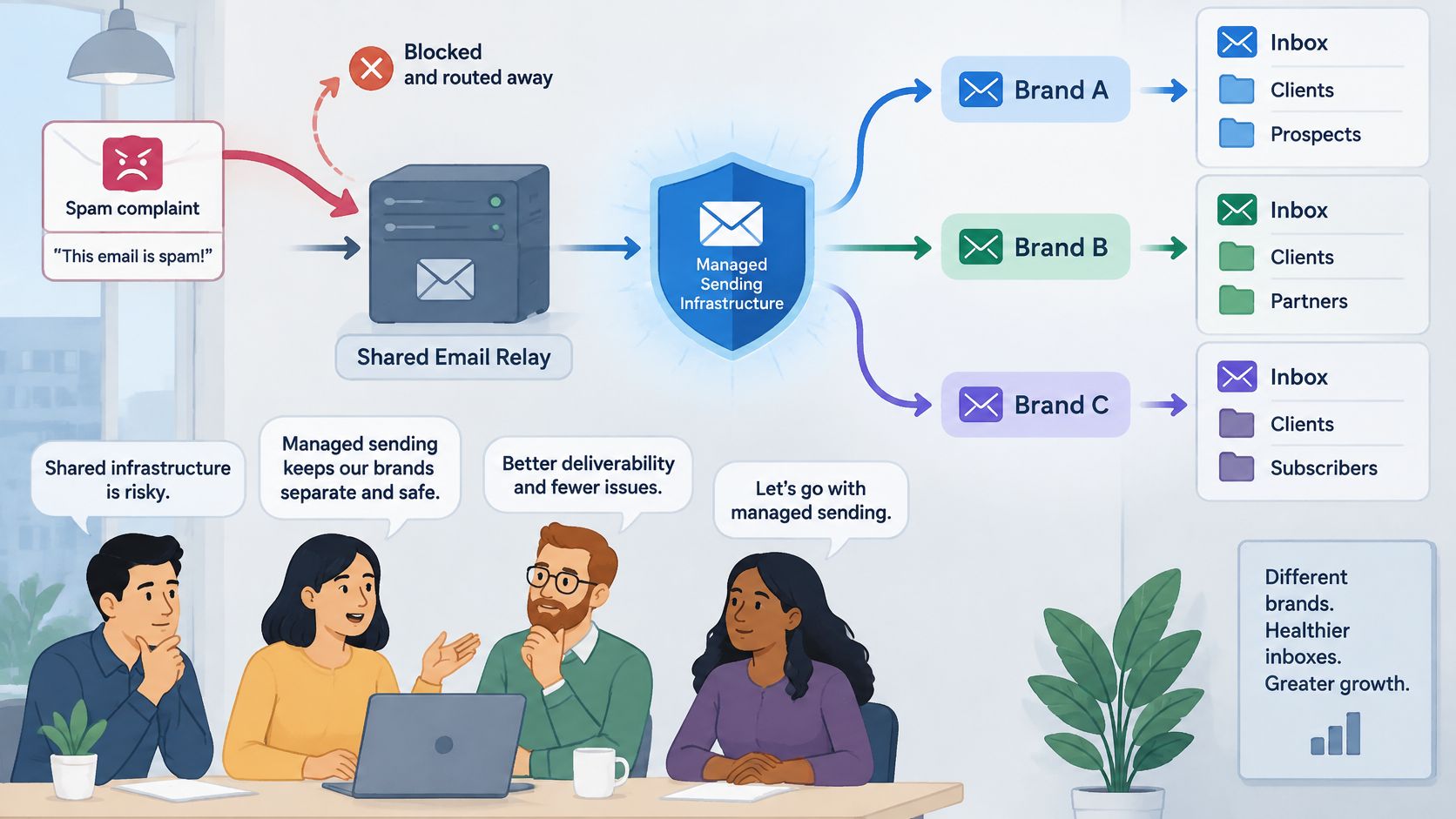
A shared relay may be adequate until one brand's delivery problems become hard to separate from another's. Publishers with several titles and agencies sending for multiple clients need to know which identity sent each message, which route it took, and what changed when delivery shifted.
A publisher may need title-level controls even when its total volume is manageable. An agency may need separate records so it can explain results to each client.
When does one shared relay stop working?
A shared route becomes difficult to operate when a troubled identity cannot be contained without disrupting unrelated mail. Combined reporting, different warmup needs, and manual changes repeated across brands are signs that the setup may not fit the team's responsibilities.
Separate IPs are not automatically better. Each route needs an appropriate sending pattern, monitoring, and maintenance. The practical test is whether the team can identify which sending identity caused a change, which route it used, and what adjustment followed.
This matters to businesses offering white-label email marketing, where one organization operates delivery while another brand appears to recipients.
What should you check in a managed service?
Evaluate whether the service can keep each brand, client, or publication operationally distinct. Check for separate domains, IP pools, warmup plans, and provider-specific throttles. These controls let a team adjust sending for one identity without automatically changing the others.
Reporting should also connect outcomes to causes. Useful records break results down by identity, mailbox provider, and IP, and include bounce reasons, blocklist status, and relevant reputation signals. That makes it easier to distinguish a provider-specific issue from a problem affecting the sender more broadly.
Finally, check how a new route can be introduced. A service that lets a team test one brand while retaining its existing route can limit the risk of a full migration. SendX Infrastructure is built for these checks. It serves multi-identity senders, meaning several brands, clients or publications on one account, and each identity can get its own domain, IPs, pool, warmup plan and throttles. Mail goes in through an SMTP relay or the Email API. Reporting drills down from sub-account to IP to mailbox provider to SMTP code, so you can see which identity a bounce belongs to. The relay is a drop-in for apps that already use SMTP, so you can point one brand at SendX with your current provider still running underneath, and switch back if the numbers don't hold.
Review white-label email marketing considerations.
FAQs
Does an SMTP login prove ownership of the From domain?
No. The login authorizes software to submit messages to the service. Domain verification and message authentication establish separate permissions and identity checks.
A valid password can therefore coexist with an incorrectly configured sending domain. Both need testing before production sending begins.
Some services close that gap at the credential. SendX Infrastructure offers SMTP credential domain scoping, so a credential can only send from the domains you've verified, and a message from any other domain is rejected with a 5xx error. Whichever service you choose, ask whether it does the same, because it limits what a leaked or misconfigured credential can send as.
Can an SMTP service receive replies from recipients?
Not necessarily. Outgoing transport and incoming mailbox hosting are separate functions.
The Reply-To address should point to a monitored mailbox or an intentionally configured inbound-processing system. A sending credential doesn't automatically create that destination.
Should a timed-out submission be sent again immediately?
Not without checking whether the service already accepted it. A connection can fail after acceptance but before the sending software receives confirmation.
The software should retain a message identifier and inspect available logs before resubmitting. Blind retries can produce duplicate messages.
Can SMTP and an HTTP API be used together?
Yes. A business can retain SMTP for software with conventional mail settings while using an API for software under active development.
The important requirement is consistent identity, routing and suppression policy across both submission methods. Choosing a different submission method shouldn't create a separate set of audience permissions.
SendX Infrastructure offers both an SMTP relay and an Email API, so software that only has mail settings can stay on SMTP while newer software uses the API. Test one message through each path and confirm both appear under the same sending identity in your logs.
Evaluate an SMTP service by its handling of identities, receiving-provider responses and delivery failures, not merely successful submissions.
