Give each location its own team with its own contacts, then share the templates, tags, custom fields and segments they all work from. Update the template centrally and every location has the new version. The Franchise-Wide Resource Sharing add-on is free.
The hard part of multi-location email is not sending it. It is keeping fifty locations on-brand without becoming the person who approves every email.
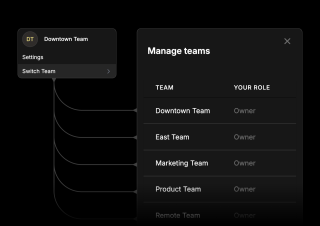
Each location is a team with its own contacts, lists and campaigns, kept separate from the others — one location cannot email another location list by accident. Head office moves between them from the team switcher rather than juggling logins, and each team carries your role, so the same person can own one location and only view another.
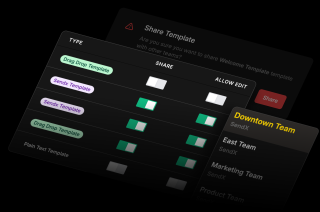
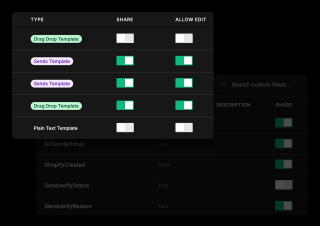
Sharing and editing are two different switches. Turn on Share and every team can use the template. Leave Allow Edit off and they can send it but not alter it, which is how a brand stays a brand across fifty locations. Turn Allow Edit on for the teams you trust to adapt it. Both are set per item, not once for everything.
Tags, custom fields and segments share the same way. That matters more than it sounds — if every location defines its own idea of a lapsed customer, head office cannot compare anything. Share the segment definition and the same rule applies everywhere, so a report across locations means something. Landing email templates share too.
The add-on is free and sits under Account and services. What takes thought is deciding what locations may change.
With the add-on on, every template, tag, custom field and segment gets a Share toggle and templates get an Allow Edit toggle beside it. Work down the list — the brand templates shared but not editable, the seasonal ones editable so a location can put its own offer in, the internal test templates shared with nobody. Custom fields have their own list with the same control.
Each location works in its own team with its own contact list, building campaigns from the shared pool rather than rebuilding the brand from scratch. Head office switches between teams to check on any of them. When a shared template changes centrally, the locations have the new version — nobody sends last quarter artwork because they saved a copy.
With the add-on on, every template, tag, custom field and segment gets a Share toggle and templates get an Allow Edit toggle beside it. Work down the list — the brand templates shared but not editable, the seasonal ones editable so a location can put its own offer in, the internal test templates shared with nobody. Custom fields have their own list with the same control.
Each location works in its own team with its own contact list, building campaigns from the shared pool rather than rebuilding the brand from scratch. Head office switches between teams to check on any of them. When a shared template changes centrally, the locations have the new version — nobody sends last quarter artwork because they saved a copy.
Everything you need to know about SendX and our services. Last updated June 2026.
Yes. Each location is set up as its own team inside one SendX account, and head office moves between them from the team switcher without separate logins. Every team keeps its own contacts and campaigns, while the templates, tags, custom fields and segments they work from are shared centrally. Head office builds the brand assets once and each location sends its own email using them.
Nothing. It is a free add-on, found under Account and services in the add-ons list, and you switch it on yourself. What it adds is the ability to share resources between the teams on your account — templates, tags, custom fields and segments — rather than each team keeping its own separate copies.
Yes, and this is the setting that matters most for brand control. Share and Allow Edit are separate toggles on each template. Share it with Allow Edit off and locations can send that template but cannot change it. Turn Allow Edit on only for the templates a location should be able to adapt — a seasonal promotion where the offer differs by region, for instance.
Yes. Teams hold their own contacts, lists and campaigns, and that data is kept separate between them. A location works with the people who are actually its customers, and there is no path for one location to accidentally email another list. The sharing works the other way round — it applies to the assets you build campaigns from, not to the people you send to.
That depends on the role you give them. There are five — Owner, Admin, Non-Billing Admin, Contributor and Viewer — and roles are held per team, so the same person can own one location, contribute to a second and only view a third. Non-Billing Admin is the useful one for franchise setups, since a location manager can run everything about their own email without seeing or changing what the account is paying.
Because otherwise every location invents its own definitions and nothing can be compared. If one location calls a field Joined and another calls it SignupDate, and each writes its own version of a lapsed-customer segment, a report across locations is meaningless. Sharing the field and the segment definition means the same rule applies everywhere, which is what makes head-office reporting worth reading.
The locations have the updated version — it is the same template being shared, not a copy each team took at some point in the past. That is the practical difference from emailing a design around and hoping everyone uses the latest one. Change the footer, the logo or the legal line centrally and the next send from every location carries it.
Still have questions? We're here to help.
A/B Split Test is one of five campaign types in SendX. Write two or more subject lines, send them to a slice of your list, and the winner goes out to everyone else automatically. Included on every plan, not held back for a higher tier.
Automatically ramp sending volume to earn a rock‑solid sender reputation—no spreadsheets required.
Write, publish, and track articles without leaving SendX—turn readers into subscribers in minutes.
Filter out security‑scanner noise and see the clicks that actually matter.
Auto‑expire unsent emails so your audience only sees timely, relevant messages.
Give every campaign its own reply‑to address and make sure answers land in the right inbox—every time.
Set up a team per location, share your templates, and keep control of what can be changed. Free trial, no credit card required.