

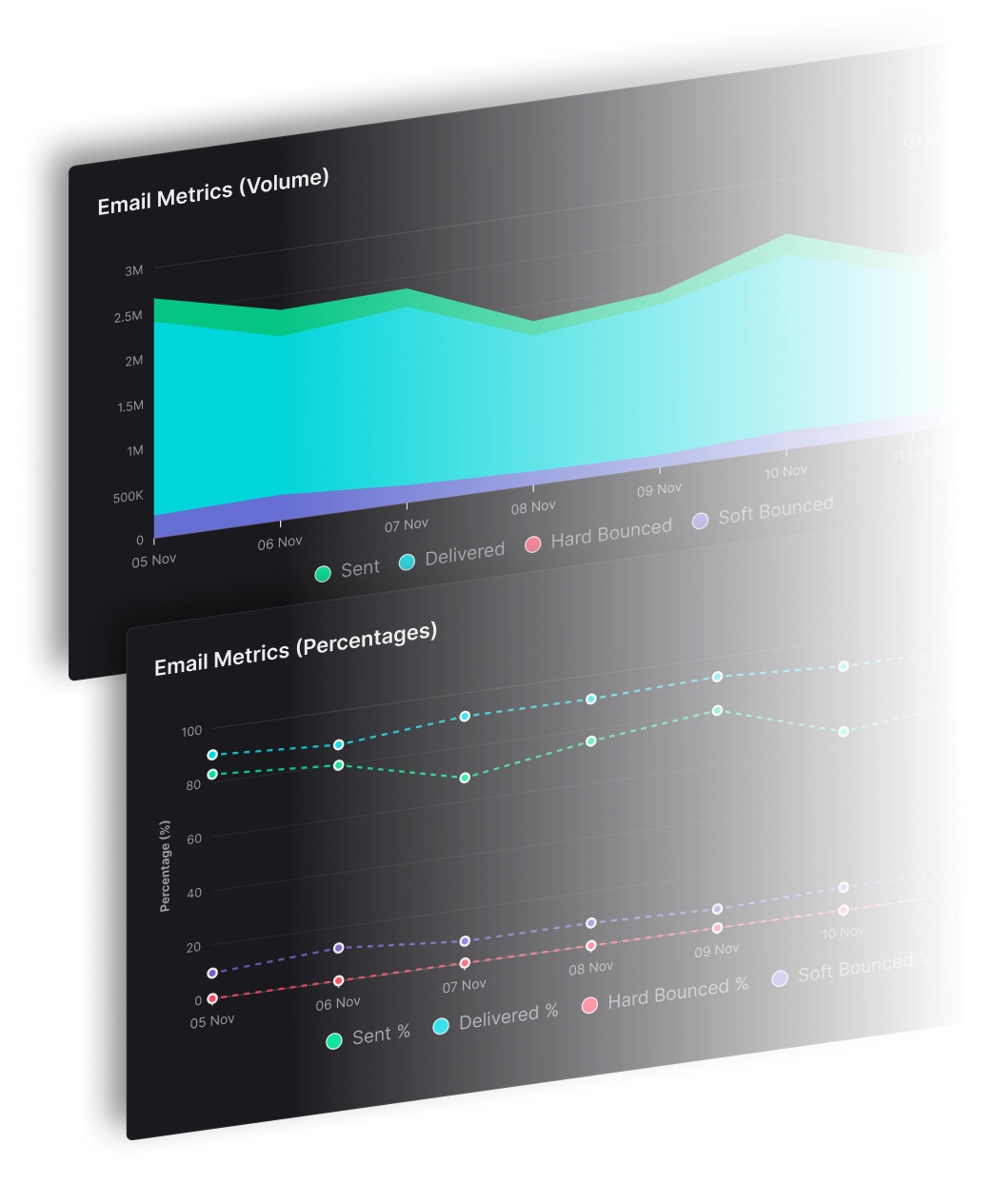


Authentication alone won't keep receipts and password resets out of spam. Transactional email deliverability requires measuring inbox placement separately from server acceptance, then identifying which brand, message class, and mailbox provider changed. A successful sending response doesn't prove that a recipient can find the message.
For publishers, agencies, and software businesses sending for many identities, a blended report can hide a failing receipt stream behind healthy newsletter traffic. SendX Infrastructure addresses that operational problem through managed sending infrastructure for multi-identity senders. The practical work starts with separating acceptance from placement, understanding provider signals, applying the right rules, and repairing only the affected stream.
Does Accepted Mail Mean the Inbox
A mailbox provider can accept a password reset and still place it in spam. “Delivered” in a sending report usually means the provider accepted the message, not that the recipient can find it in the inbox.
That gap matters for receipts and account notices: a message can clear the sending system's transport checks yet fail to reach the folder where the recipient expects it.
What Does a Provider-Level Report Reveal?
The 2024 benchmark described by DMARC Report shows why a company-wide delivery percentage can obscure differences between mailbox providers. Its reported inbox-placement results vary by provider.
Inbox placement by mailbox provider, 2024 benchmark
| Mailbox provider | Inbox placement | Missing or unobserved |
|---|---|---|
| Gmail | 87.2% | 6.0% |
| Microsoft | 75.6% | 9.8% |
| Yahoo and AOL | 86.0% | 9.2% |
| Apple | 76.3% | 9.4% |
| All providers | 83.5% | 16.5% |
Sources: DMARC Report's 2024 inbox-placement benchmark.
The table separates observed inbox placement from mail that was missing or unobserved. The remaining share isn't shown in the provider rows. For all providers, the remainder combines messages that reached spam with messages that weren't observed, so the categories aren't directly comparable.
These historical results cover email generally, not transactional traffic alone, and don't predict placement for an individual sender.
Why Does a Blended Rate Hide Failures?
A publisher might see newsletters reaching Gmail while account notices encounter filtering at Outlook. The provider can accept both streams, keeping the accepted rate healthy even as one type of message becomes harder to find.
Track results by brand, message class, mailbox provider, domain, and sending IP. An IP is the network address used by the sending server. Keeping these fields with each message event helps you locate the affected stream rather than treating every identity as broken.
A focused inbox deliverability review combines placement observations with transport results. Controlled test mailboxes can show whether messages reach the inbox or spam, while complaints, bounces, and account-support reports provide further context.
Add brand, message class, mailbox provider, domain, and sending IP to your event log. Those fields let you separate an inbox-placement problem from a message that was never accepted.
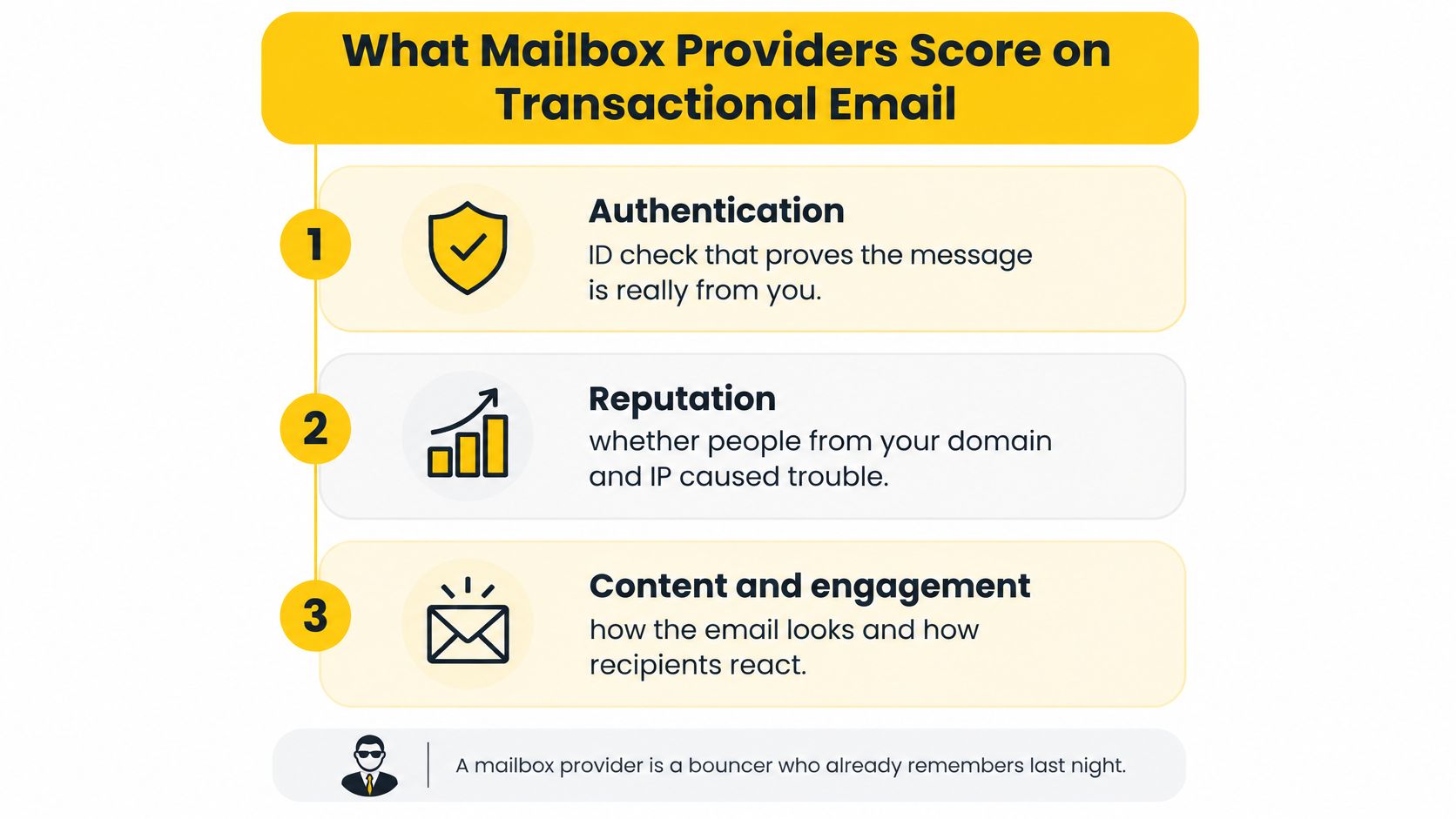
What Mailbox Providers Score on Transactional Email
Security scanners can fetch open pixels before a person sees a message, so an open event alone is a weak placement signal. Mailbox providers assess transactional mail through sending identity, reputation history, recipient quality, and reactions such as complaints.
How Does Sending History Affect a Reset?
Domain and IP reputation reflects the sending history associated with those identities. A new reset domain has little observed history, even if the same business has sent newsletters for years.
If a team moves established account-notice volume onto a fresh domain all at once, providers see a sudden change in traffic from an identity with limited history. A controlled warmup, monitored separately by provider, gives that identity time to establish a sending pattern. The company name in the From field does not replace that history. For more on email sender reputation, consider how providers evaluate the domain and IP behind each message.
What Do Bad Addresses and Complaints Signal?
An unknown user response means the receiving system says the address does not exist. A hard bounce is a permanent delivery failure, and unknown-user responses are worth tracking separately because they point to address-quality issues.
A signup form that saves mistyped addresses can trigger welcome messages to nonexistent accounts. Retrying those addresses will not correct the form or make the recipients valid.
Complaints signal a different problem. A receipt sent to the wrong person, or an account message dominated by promotion, can prompt a spam report even when the message authenticates successfully. For a related view of recipient signals, see deliverability scoring for newsletter senders.
Does a High Open Rate Prove Placement?
Open rates alone cannot confirm inbox placement. Privacy features and security scanners may fetch message content automatically, creating open events without a person reading the receipt.
Completed reset actions and legitimate receipt-link use add useful context, but neither reveals every recipient's folder. Compare them with controlled placement tests, complaints, and unknown-user responses.
Track complaint rate by brand and mailbox provider over a rolling window. A rising rate in one stream can reveal a problem that a healthy blended total would hide.
Which Rules Still Bind Password Resets and Receipts
Receipts and password resets still need authentication, secure transport, and sender-identity checks, even when their content is operational.
Google classifies senders approaching or exceeding 5,000 daily messages to personal Gmail accounts as bulk senders. Its requirements took effect in February 2024. Google's sender requirements say to keep the user-reported spam rate below 0.1% and avoid reaching 0.3%.
That count concerns messages to personal Gmail recipients, not the total size of a business's contact database. If you send for several brands, track your volume to Gmail separately from your overall campaign totals.
Which Identity Controls Need Checking?
SPF identifies authorized sending infrastructure. DKIM adds a verifiable signature to the message. DMARC connects those authentication results to the visible From domain and publishes handling and reporting instructions for messages that fail applicable alignment checks. Alignment means the authenticated domain matches the visible sender domain under the relevant rules.
Your sending software transmits the message, while your team publishes and checks the domain records. Verify the setup on actual messages. This guide to transactional email authentication explains the controls and how they fit together.
Where Does Unsubscribe Differ?
Yahoo's sender FAQ distinguishes marketing email from order confirmations and password resets. One-click unsubscribe applies to marketing messages, not those purely transactional examples.
Where one-click unsubscribe applies, the List-Unsubscribe header provides a machine-readable control. The RFC 8058 mechanism is separate from an unsubscribe link in the message body.
Which controls apply to receipts and password resets
| Control | Applies to receipts and resets? | Source |
|---|---|---|
| SPF and DKIM | Yes, for Gmail bulk senders | Google sender requirements |
| DMARC policy | Recommended even at none; bulk senders should publish it | Google sender requirements |
| Valid forward and reverse DNS and TLS | Yes | Google sender requirements |
| User-reported spam rate under 0.1%, never 0.3% | Yes; segment monitoring by brand and provider | Google sender requirements |
| One-click unsubscribe | No, for order confirmations and password resets | Yahoo sender FAQ |
| List-Unsubscribe header with RFC 8058 | Only where one-click applies, such as marketing email | Yahoo sender FAQ |
Forward and reverse DNS connect sending names with network addresses. TLS encrypts the connection used to transmit messages. These controls support identifiable, secure sending, but they don't determine whether a message reaches the inbox.
If a receipt includes a promotional block, review its primary purpose. A change in content can affect how the message should be classified.
When Shared IPs Pull Transactional Mail Into Spam
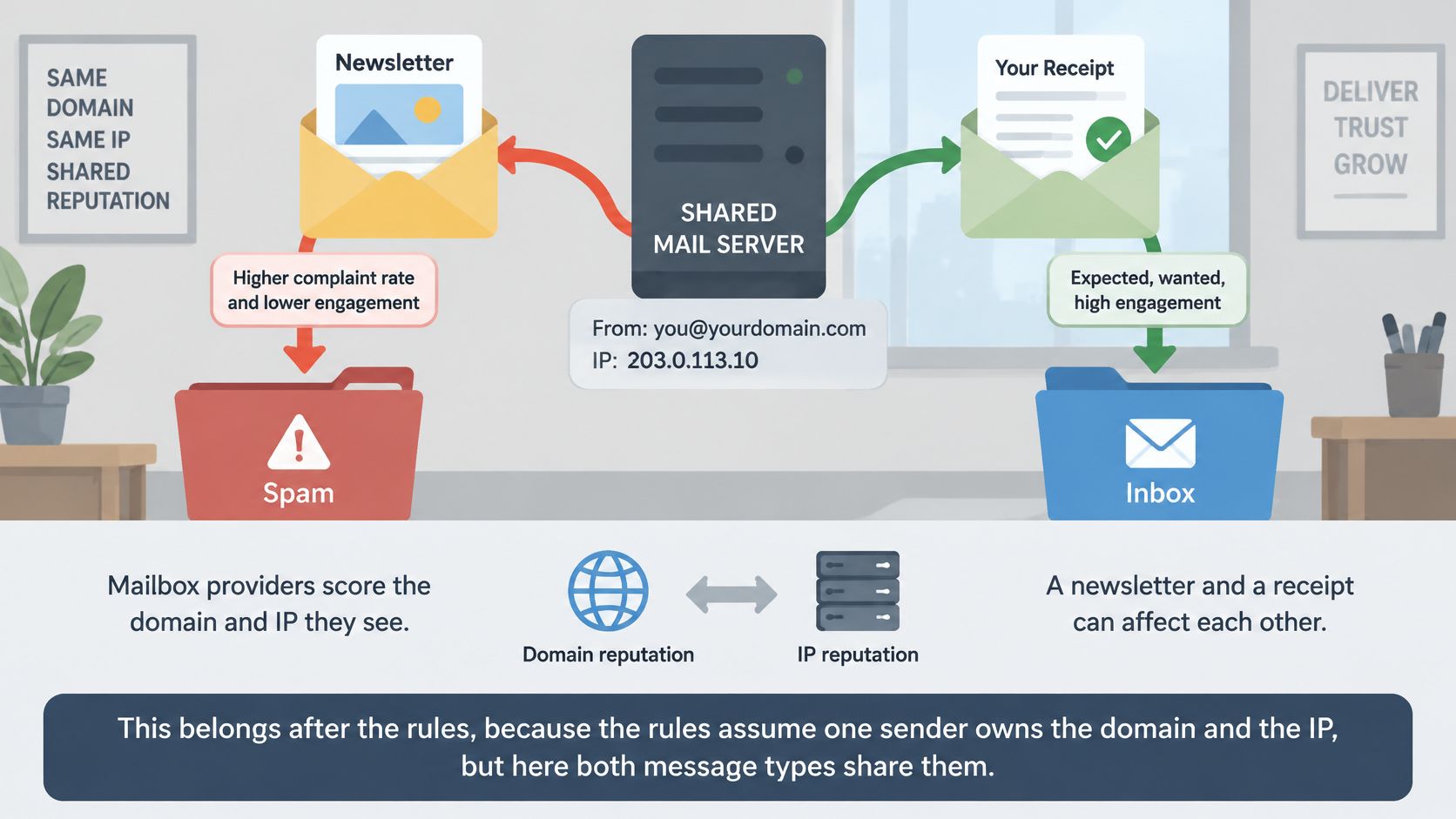
Separate reputation by identity and message class before a problem in one stream affects another. A dedicated IP alone won't protect transactional mail if promotions from other identities still use that IP.
Mailbox providers assess the sending domain and IP, not your internal team structure. A publisher sending several titles through one pool could see complaints on a promotion coincide with deferrals on receipts from another title. That pattern calls for investigation; it doesn't prove the receipt template is defective.
The diagram shows how shared infrastructure can connect otherwise different messages.
What Should a Multi-Identity Sender Separate?
Pooling volume can help sustain a sending stream. Separation limits how far a reputation issue can spread, while adding setup and monitoring work.
Separation levels for multi-identity sending
| Separation level | What it isolates | What it costs |
|---|---|---|
| Brand or tenant | Reputation and complaints tied to one identity | Its own domain, IPs, pool, warmup, and throttles |
| Message class | Receipts and resets apart from promotions | An additional stream to warm and monitor |
| Domain or subdomain | Authentication identity and domain-reputation measurement | DNS records and DMARC policy planning |
| IP or pool | IP reputation and shared sending constraints | Warmup and throttles for each pool |
| Mailbox provider | Responses to filtering or throttling at a provider | Provider-level tracking in each report |
A pool groups sending IPs assigned to traffic. A throttle controls sending speed. Neither changes a message's purpose, but both affect how the sender presents traffic to receiving systems.
Should Transactional Mail Use Its Own Subdomain?
Yes, for most senders. Send receipts and password resets from a dedicated subdomain such as notify.example.com, and keep newsletters and promotions on a different one such as news.example.com. Mailbox providers then judge each type of message on its own sending history, so a complaint spike on a promotion is less likely to follow your resets into spam.
Think of it as two shopfronts on the same street. Customers can tell both are yours, but trouble at one doesn't automatically close the other. Keep both under the domain you already own. A password reset from an unfamiliar domain looks like phishing to the reader, and it breaks the brand match that providers and recipients use to trust the message.
Setting it up takes 5 steps:
- Create the subdomain under your main domain, for example notify.example.com, and use it in the From address of transactional mail only.
- Publish SPF and DKIM records for that subdomain, and confirm at least one of them aligns with the From domain. A subdomain inherits your parent domain's DMARC policy unless you publish its own DMARC record or an
sp=tag, so check which policy applies. - Put the subdomain on its own IP or pool if your provider offers it. A subdomain alone doesn't separate IP reputation, so a shared pool still carries shared risk.
- Warm it up in steps. Start with a small share of your most engaged recipients, raise volume gradually, and watch bounces and complaints by mailbox provider before moving the rest.
- Report on it separately. Track the transactional subdomain's complaints, bounces and placement apart from the marketing subdomain, so a drop in one doesn't hide in a blended average.
A separate subdomain isolates reputation measurement and authentication. It doesn't isolate everything, which is why the IP and warmup steps matter just as much.
How Can Separation Be Tested?
Compare the isolated stream with unaffected streams using acceptance, deferrals, bounces, complaints, and authentication results. Keep results broken down by mailbox provider, and compare the same message class rather than a receipt stream against an entire newsletter portfolio.
A dedicated IP for email is one part of the decision, not proof that isolation worked. Changing only the display name while retaining the same domain and IP doesn't create an independent sending identity.
The accompanying video provides additional context for the infrastructure decision.

Success means the affected identity improves without unrelated streams deteriorating, with provider-level responses supporting the change. A blended average can hide a failing brand, message class, or mailbox provider.
How You Monitor and Repair a Placement Drop
Diagnose the affected stream before changing shared infrastructure. When a receipt or reset is late, the first job is to determine whether the provider delayed acceptance, rejected the address, or accepted mail that then reached spam.
An incident record should retain the message identifier, event, brand, sending domain, IP, mailbox provider, timestamp, and response text. Without that context, separate problems can look like the same delivery incident.
Which Checks Should the Team Run?
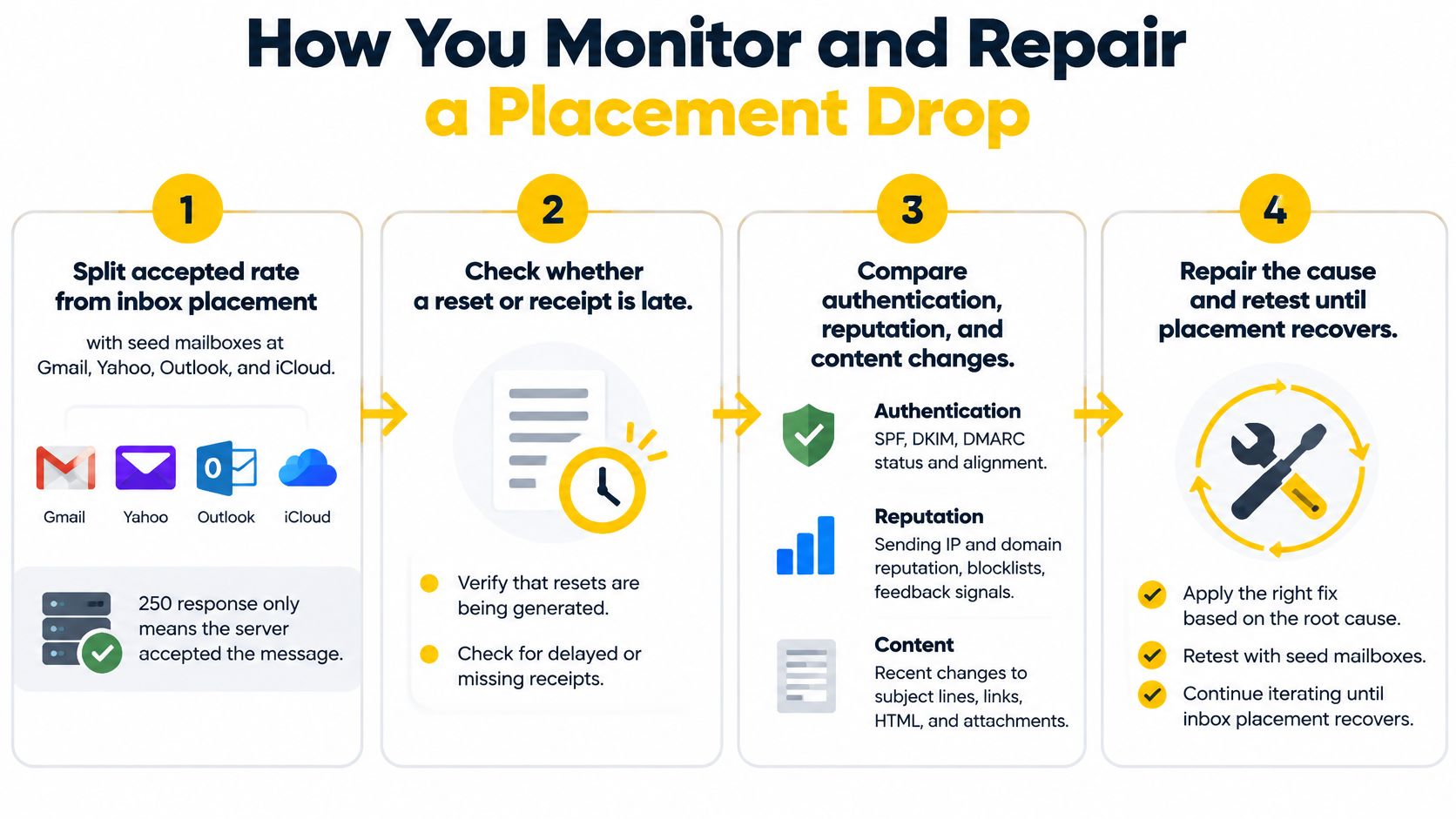
Separate acceptance from placement. Compare sending events with controlled seed mailboxes at Gmail, Yahoo, Outlook, and iCloud. A seed mailbox is a test inbox under the team's observation; its folder result supplements, rather than represents, the entire audience.
Inspect complaints at the affected identity. Read provider reporting alongside brand, domain, and IP data where available. A complaint increase signals that recipients aren't treating the traffic as expected, so a blended company percentage isn't sufficient.
Read temporary and permanent failures separately. Temporary deferrals indicate that delivery may be retried; permanent bounces require handling according to the actual response. Count unknown users separately so invalid addresses don't disappear inside a general failure total.
Inspect authentication on actual messages. Check the visible From domain against SPF, DKIM, and DMARC results. An authentication failure points toward identity configuration; a pass requires investigating other explanations rather than repeatedly editing DNS.
Reduce only the affected traffic. Slow or pause the brand and mailbox-provider combination showing the change, while observing its queue and response text. The provider may be signaling a rate or reputation concern that doesn't apply to other destinations.
Repair the trigger before resuming. Suppress invalid addresses, inspect the form or import that introduced them, and remove inappropriate promotional content from operational templates. Resume under observation and track acceptance, deferrals, bounces, and complaints against the same stream.
The workflow keeps evidence collection separate from the repair decision.
Which Symptom Deserves Action First?
The table provides starting hypotheses, not diagnoses. Response text, timing, and the affected identity must support the chosen action.
Placement symptoms and the first move
| What is observed | Likely cause | First move |
|---|---|---|
| Outlook defers, Gmail accepts | Provider-specific throttle or reputation issue | Slow Outlook traffic and inspect response text |
| Unknown-user bounces spike on one event | Bad addresses entering that trigger | Suppress them and inspect the form or import |
| Spam complaints reach the provider's enforcement boundary | Wrong recipients or promotional content | Pause the affected template and investigate |
| Authentication passes, seeds reach spam | Reputation or content issue rather than a missing record | Review placement tests and the template before changing DNS |
| One brand drops while others hold | Identity-specific behavior or infrastructure exposure | Compare its domain, IP, pool, and provider results |
A placement test isn't a guarantee that all recipients receive the same result. It provides a controlled observation that becomes useful when combined with event logs and provider reporting.
For teams assembling that workflow, the guide to testing and improving email deliverability offers a starting point for selecting diagnostic methods.
The mistake is changing multiple unrelated controls at once. If the team alters routing, content, domain records, and volume together, it loses the ability to explain which change improved or worsened delivery.
How SendX Infrastructure Separates Transactional Streams
For teams sending under several brands, clients, or publications, the operational question is how to test a new delivery path without moving every stream at once. A controlled test keeps the current provider running while one brand's traffic is evaluated.
What Happens When a Receipt Stream Changes?
SendX Infrastructure records each send by brand, mailbox provider, and IP, including the reason for a bounce. That level of detail helps you examine a provider's response for a specific stream instead of relying on an aggregate accepted rate.
Delivery analytics include delivery rates, bounces, spam complaints, and inbox placement by mailbox provider, with benchmark comparisons. Inbox testing provides another view of placement. Domain and IP monitoring adds real-time checks and blacklisting alerts. Accepted mail still doesn't show whether a message reached the inbox.
How Can a Team Test Without Replacing Every Stream?
Keep the existing provider running underneath while you route one brand through the new path. Compare the same message class and mailbox-provider destinations, then use the resulting logs and placement observations to decide whether to continue or switch back.
For a test to be interpretable, define its scope first: the brand, domain, IP, and message class being evaluated. SendX Infrastructure supports separate domains, IPs, pools, warmup plans, and throttles for each identity. Warmup and throttling can be configured by mailbox provider across 27 providers. Dedicated domains and IPs are available starting at 25,000 contacts.
A work-day support request receives a first response within 3 hours. The team can use that support alongside the per-stream records to review what changed during the test.
See how a transactional stream would run.
FAQs
Does a Receipt With a Discount Still Count as Transactional?
Not automatically. Under the CAN-SPAM Act, the FTC compliance guide makes the message's primary purpose decisive, rather than the endpoint that triggered it.
Transactional or relationship content can confirm an agreed transaction, provide warranty or security information, or communicate account changes. Messages containing only that content are exempt from most CAN-SPAM provisions, but routing information still can't be false or misleading; adding a discount requires examining the resulting message.
Should Password Resets Live on Their Own Subdomain?
A separate subdomain is useful when resets need an identifiable authentication boundary, independent reporting, or different sending controls. It isn't a guarantee of complete reputation isolation from the parent domain.
Configure authentication for the actual sending arrangement and examine reset traffic separately. A different subdomain paired with an unchanged shared pool leaves IP-level exposure in place.
What If Seeds Show the Inbox at Gmail and Spam at Outlook?
Treat that result as a provider-specific placement observation, not proof of a universal sending failure. Compare the Outlook seed result with response logs, complaints, and recent content or routing changes before choosing a repair.
Reduce Outlook traffic when deferral or rate evidence supports it. Gmail traffic can continue if its own operational signals remain healthy.
Build a transactional sending setup that keeps brands measurable and gives each affected stream its own controls. Visit SendX to discuss managed sending infrastructure for receipts, password resets, and account notices across multiple identities.
Produced via the Outrank tool
