



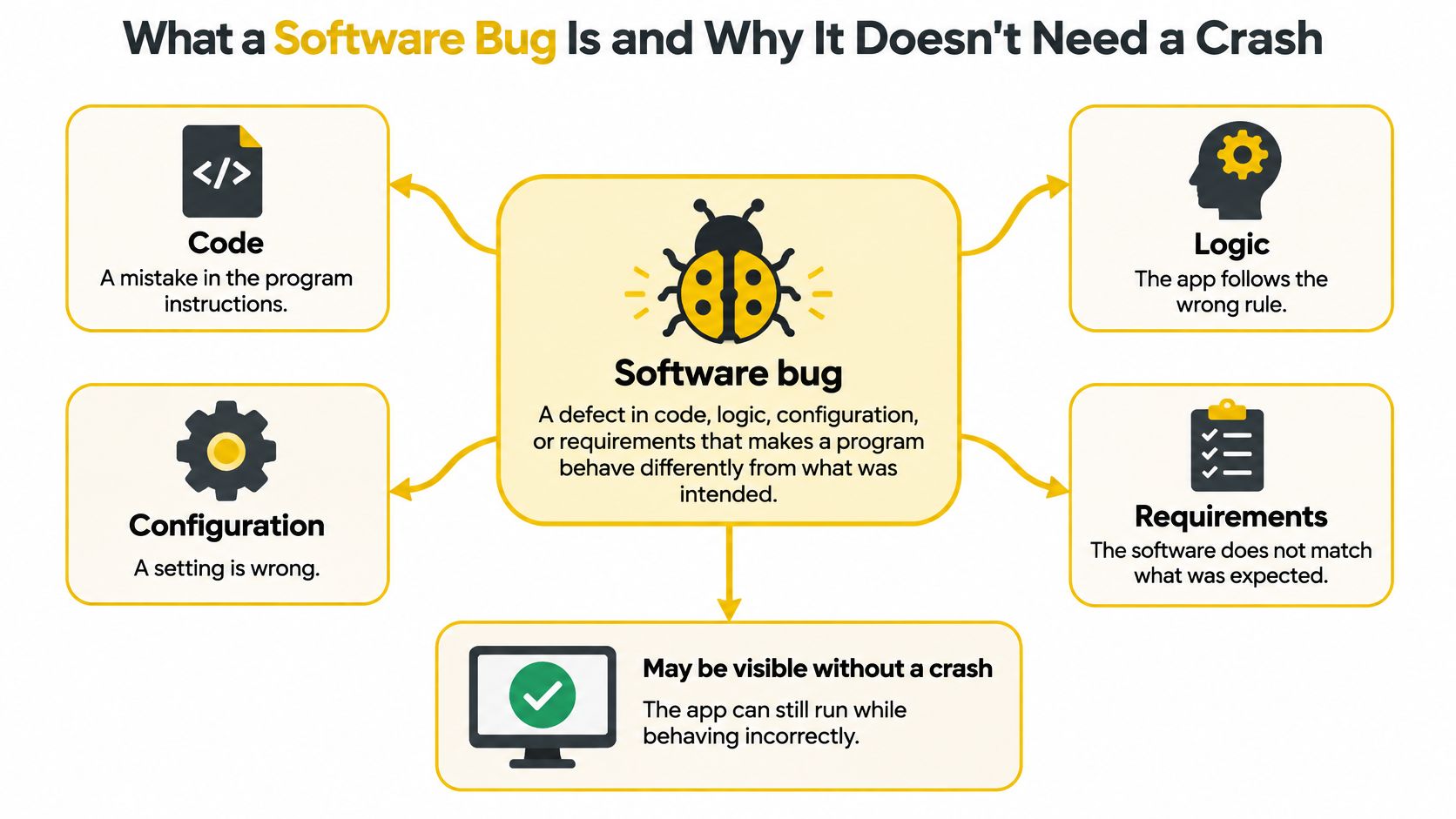
A software bug is a defect in code, logic, configuration, or requirements that makes a program behave differently from what was intended. The defect is the flaw itself. The failure is the wrong behavior someone can observe, and it doesn't have to be a crash.
Getting that right for one brand is easy. When several brands or clients share one sending setup, a bug in a template or a throttle setting reaches every brand at once. SendX Infrastructure takes that apart, with each brand on its own domain and IPs.
Does a bug still count when nothing crashes and every test passes?
What a Software Bug Is and Why It Doesn't Need a Crash
A recipe card that says one egg instead of 3 is the defect. The flat cake that comes out of the oven is the failure. Software works the same way, and the flat cake is what your team sees.
The defect and the failure aren't the same thing
A login form that skips the password check holds the defect. A stranger signing in to someone else's account is the failure. You fix the defect, but you detect the failure, which is why a report should describe behavior before it guesses at a cause.
Wrong output is the common case, not the exception
Crashes get reported. Wrong numbers often don't, because the program keeps answering requests while it produces them. NASA's review of 55 significant aerospace software incidents from 1962 through 2023 found erroneous output made up 85% of the incidents and fail-silent behavior, where the system produces no output at all, made up 15%, while rebooting cleared only 2% of erroneous situations against 38% of fail-silent ones.
A restart brings a service back up. It doesn't repair a wrong rule, a bad setting, or invalid data the program rebuilds on startup. The service looks healthy right up to the next wrong answer.
A program can stay up, answer every request, and still return the wrong number.
A virus is written to cause harm. A bug is an unintended mistake that can still open a path for one. The test you can apply today is simple. Compare what the program did with what it was specified to do, and you have a bug whether or not anything crashed.
Where Does the Word Bug Come From?
On September 9, 1947, engineers testing Harvard's Mark II computer traced a fault to a moth trapped between the contacts of Relay 70, Panel F. They taped the insect into the machine's logbook and wrote "first actual case of bug being found." The Computer History Museum's record of that day preserves the date, the machine, the relay location, and the log entry, which is why the story holds up better than most computing folklore.

The moth caused a hardware fault. The Mark II was an electromechanical machine, not a software-only system, so the word had to widen as computing moved into program logic, configuration, and data. Debugging came to mean the work of finding and removing the defect behind wrong behavior, whatever layer it sits in.
The term lasted partly because it names a cause without naming a culprit. A report that says "the export drops the last row" starts an investigation. A report that says "someone broke the export" starts an argument.
That gives you a habit worth keeping. In a bug report, describe the failure first, with the input and the version, and name the defect only once the cause is confirmed.
Types of Software Bugs With Real Examples
A discount applies twice, yet checkout completes normally. That wrong result is a logic error, even though nothing crashes. Sort bugs by the wrong behavior they produce, then match your symptom to a row below before opening a debugger.
| Bug type | What goes wrong | Example |
|---|---|---|
| Logic error | Code runs but computes the wrong result | A discount rule applies twice to the same order |
| Off-by-one error | A loop or index is one step off | A CSV export drops its last row |
| Integration mismatch | Two components disagree about the same data | One service sends units in feet while another expects meters |
| Race condition | Two processes touch shared data in the wrong order | Two checkouts reserve the same last item in stock |
| Configuration error | Correct code runs with wrong settings | A production server still points at a test database |
| Requirements defect | Code matches the spec, but the spec is wrong | A revenue report counts refunds as sales |
| Security vulnerability | A flaw lets an attacker perform an unauthorized action | User input reaches a page without being escaped, so it runs as script |
| Display or interface bug | Output looks wrong or a control becomes inaccessible | A save button is hidden on small screens |
The bug that lived between two components
The NASA Mars Climate Orbiter investigation concluded that the spacecraft was lost because a ground-software file, the "Small Forces" file used in trajectory models, supplied English units while the navigation process expected metric units. The software could process the values without recognizing that their meaning was wrong.
That is an integration mismatch: components exchange data but disagree about its meaning.
The same pattern can occur between an API and a database, or between a queue and a worker. Units are one part of that shared contract. Data types, field meanings, time zones, rounding rules, and error semantics also determine how the receiving component interprets a value. A valid-looking value can still produce the wrong result.
When a bug becomes a security vulnerability
User-supplied text that runs as script on a page gives a concrete security example. A bug is a security vulnerability when an attacker can exploit it to perform an unauthorized action. Untrusted input reaching a database query or a page deserves scrutiny because its handling can affect what an attacker can do.
To narrow the type, check whether the wrong result repeats with the same input. That can point toward logic or configuration. A failure that depends on timing or shared data state can point toward a race condition.
In sending systems, a rejection alone doesn't establish a software defect. Understanding what it means when an email bounces helps distinguish a sending failure from an address or list problem before you classify it as a bug.
What Causes Software Bugs Most Often
Look at code and logic first. That's where most defects start, ahead of data, hardware, or operator error, and it's where your review time pays back fastest.
| Origin | Share of incidents | Example |
|---|---|---|
| Code or logic | 58% | A comparison uses > where >= was meant |
| Configurable data | 16% | A tax table holds one wrong rate |
| Unexpected sensor input | 15% | A reading arrives outside the range the code expected |
| Command or operator input | 11% | An operator runs the wrong command on a live server |
Sources: NASA's historical aerospace software errors study, covering 55 significant aerospace software incidents from 1962 through 2023.
That sample is aerospace software, not all software, so treat the split as a guide for where to look rather than a universal rate. The pattern still transfers. Testing only the normal path leaves out every input that falls outside the assumptions the code was written against.
The four root causes you'll meet this month
- Misread requirements: Someone builds exactly what the document said, and the document was wrong about refunds.
- Assumed input ranges: The code handles the values the designer pictured, and a real record arrives outside that range.
- Configuration drift: Test and production hold different settings, so a tax table with one wrong rate produces bad totals while the code is perfect.
- Untested side effects: A change in one module breaks a caller nobody re-tested, which is how authentication stops matching what a mailbox provider expects, and why email authentication fails is usually a configuration story rather than a code story.
Validate inputs at every boundary, including the ones you own on both sides. Then check configuration in the same pipeline that deploys the code, so a setting can't change without a test noticing.
How Severity and Priority Decide What Gets Fixed First
Severity measures how much the bug harms the system or the person using it. Priority measures how soon the team should fix it, which depends on business timing. A low-severity typo on a launch page can be top priority the day before launch, and a critical defect in a feature nobody uses can wait a sprint.
| Severity | What it means | Example |
|---|---|---|
| Critical | The system is down or data is lost or corrupted | Payments charge a customer twice |
| High | A core function is broken with no workaround | Password reset emails never arrive |
| Medium | A feature is wrong, but a workaround exists | An export drops one column, and copy-paste fixes it |
| Low | Cosmetic, with no effect on results | A button label has a typo |
Late discovery is what makes a bug expensive
Fix defects while they're still cheap to reach. A NIST study of software testing economics estimated that inadequate software testing costs the U.S. economy $59.5 billion annually, and reported that more than half of software bugs weren't found until downstream in development, past the stage where they were easiest to correct.
The cost isn't the typo. It's investigation, rework, retesting, deployment, support, and the consequences of wrong behavior running in production while nobody knows about it.
Rank silent wrong output above a loud crash. A crash pages someone within minutes, while a wrong total can sit in a report for a quarter.
Apply one rule this week. Sort the queue by severity first, then move anything with a launch date or a contract deadline up the priority list, and write down why you moved it.
How Teams Find, Report and Fix a Bug
A bug closes only after a verified fix, not after someone merges a patch. Everything below serves that one rule.
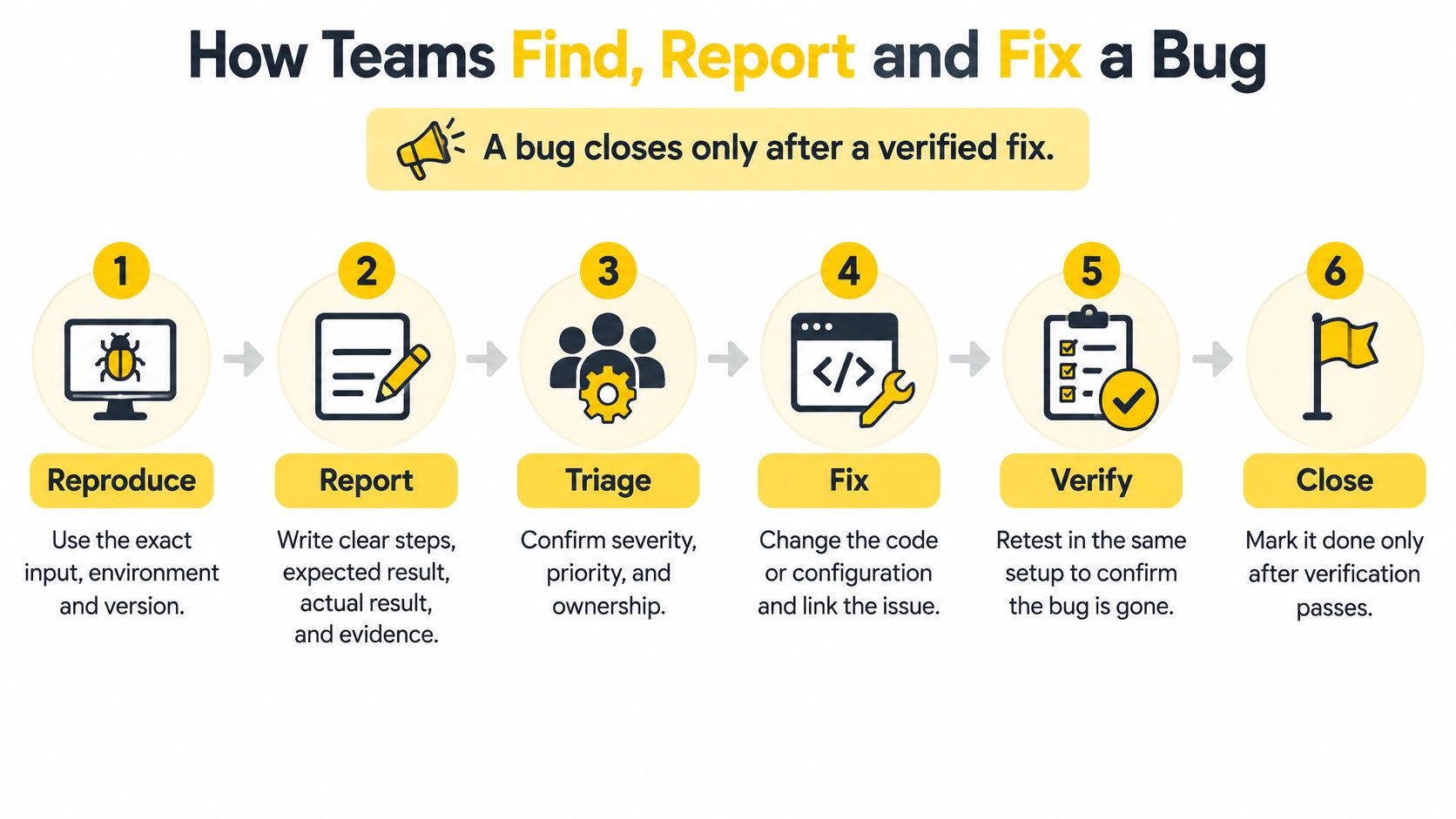
The 7 steps from report to closed
- Reproduce it. Use the exact input, environment, and version. A report nobody can reproduce stalls in the queue and eventually gets closed as unreproducible.
- Write expected and actual behavior, one sentence each. This is the whole report, and it's what makes the defect arguable rather than a matter of taste.
- Set severity and priority, and record the stage where the bug was found. Detection stage tells you later whether review, testing, or production caught it.
- Find the cause. Narrow the input until the failure disappears, read the logs around that request, then step through the code with a debugger. For network-facing failures, the response code narrows the search fast, and a reference on SMTP errors tells you which side rejected the request.
- Fix the cause, not the symptom. Catching the exception and returning an empty list hides the defect and moves the failure somewhere harder to see.
- Add a regression test that fails before the fix and passes after. Without that test, the same bug can return in the next refactor with nothing to catch it.
- Verify in the environment where it appeared, then close. A fix confirmed only on a laptop isn't confirmed.
The life cycle states in your tracker
A ticket moves through new, assigned, fixed, verified, and closed, and it goes to reopened when the regression test fails or the failure returns. Keep "fixed" and "verified" separate, because merging them is how teams start counting patches as outcomes. If your team needs a plain-language version to share outside engineering, this bug workflow guide for non-technical founders walks through the same life cycle without the tooling detail.
Prevention after the fix
For high-severity bugs, run a root-cause review that asks why review and testing missed the defect, not just what the defect was. Track the escaped-defect rate and the recurrence rate alongside time to fix. A fast average fix time can hide a bug that keeps coming back every release.
Why Passing Tests Don't Prove a Bug Is Gone
A green test run proves the scenarios someone thought to encode. It says nothing about the behavior space nobody wrote down, which is where most escaped defects live.
A 2026 empirical study of technical debt found that test modifications didn't reduce localized bug-induction rates over 30-, 90-, or 180-day periods, and that debt-heavy code was tested no more, and sometimes less, than other code. Adding tests isn't the same as testing the right behavior under realistic conditions.
| Test type | Catches | Misses |
|---|---|---|
| Unit test | Logic errors inside one function | Mismatches between components |
| Integration test | Interface and unit mismatches at the boundary | Problems that appear only under real production load |
| End-to-end test | Broken full user flows | Edge cases, because these tests are slow and few |
| Property-based test | Failures across many generated inputs | Wrong business rules, since the test checks properties, not intent |
| Mutation test | Gaps where tests wouldn't notice a changed line | Missing requirements that nobody wrote down |
| Production monitoring | Wrong results on real inputs at runtime | Damage that happens before anyone sees the alert |
Two habits close most of the gap. After you fix a bug, write a test for that exact input, so it can't return unnoticed. Then test the boundary where two components meet, because that's where unit tests stop and where a payload contract can drift, which is worth checking against your email API request and response shapes rather than each function alone.
Practical rule: Pick the test type that matches the bug class you're most worried about on the next release, and cover the interface, not only the function.
Separate Each Brand's Sending So One Bug Stays Contained
Subaccounts work like separate sending rooms inside one building. Each identity keeps its own API key, domains, and IP pool, so a broken template or list import in one brand stays inside that brand's pool instead of reaching the whole portfolio.
SendX Infrastructure is managed sending infrastructure for multi-identity senders. That includes publishers running several titles, technical leads at platforms that send for their users, and agencies answering to many clients. The practical choice is simple. Each identity either gets its own blast radius, or every identity shares one.
- Subaccounts per brand: Each brand gets its own API key, domains, and IP pool, so a bug in one brand's template touches that brand's pool and nothing else.
- Throttles and warmup per mailbox provider, for 27 providers: A volume spike from one brand is paced against Gmail, Yahoo, and Outlook separately instead of pushing every brand's traffic into the same limit. Smart throttling reduces soft bounces.
- Results per brand, per mailbox provider, and per IP, down to the bounce code: You see which brand and which mailbox provider the bug hit, with minute-level zoom, instead of guessing from an account-wide average.
- Alerts and automatic suppression: Alerts fire on delivery, bounce and deferral rates, sender score, and blocklistings. Bounces are classified and bad addresses are suppressed automatically. A Bot Open/Click Tracker addon filters out security-scanner noise.
Separation also makes switching safer. Route one brand through SendX while your current provider keeps running underneath, then switch back if the results don't hold. Agencies that need each client kept apart can review how white-label email marketing maps to that structure.
The result is a smaller failure radius. A bug stays inside one brand's pool, and per-brand results show which fix to make next. Start with one brand on SendX Infrastructure.
FAQs
What Is the Difference Between a Bug and a Feature?
A feature is behavior someone specified and accepts. A bug is behavior the specification or the user's expectation doesn't allow. That's why a requirements defect counts as a bug even when the code does exactly what the document said, because the document is part of what can be wrong.
Can You Remove Every Software Bug From a Program?
No, and chasing that target wastes review time. Aim at the defects that escape into production, rank fixes by severity, and keep the regression test that proves each fix holds. A smaller number of escaped defects is a goal you can measure.
What Do You Do When a Bug Reaches Production?
Contain it first by rolling back the release or switching the feature off, so it stops producing new damage while you work. Then fix the cause rather than the symptom, and repair the data the bug already wrote, since a corrected program won't correct yesterday's records. Add the regression test and run the root-cause review before you call the incident finished.
SendX runs sending infrastructure for teams that send under several brands, with each one on its own domain, IPs, and pool, so a single defect can't reach the whole portfolio. If your team is chasing wrong behavior across shared sending, see what per-brand results and controls look like at SendX.
