

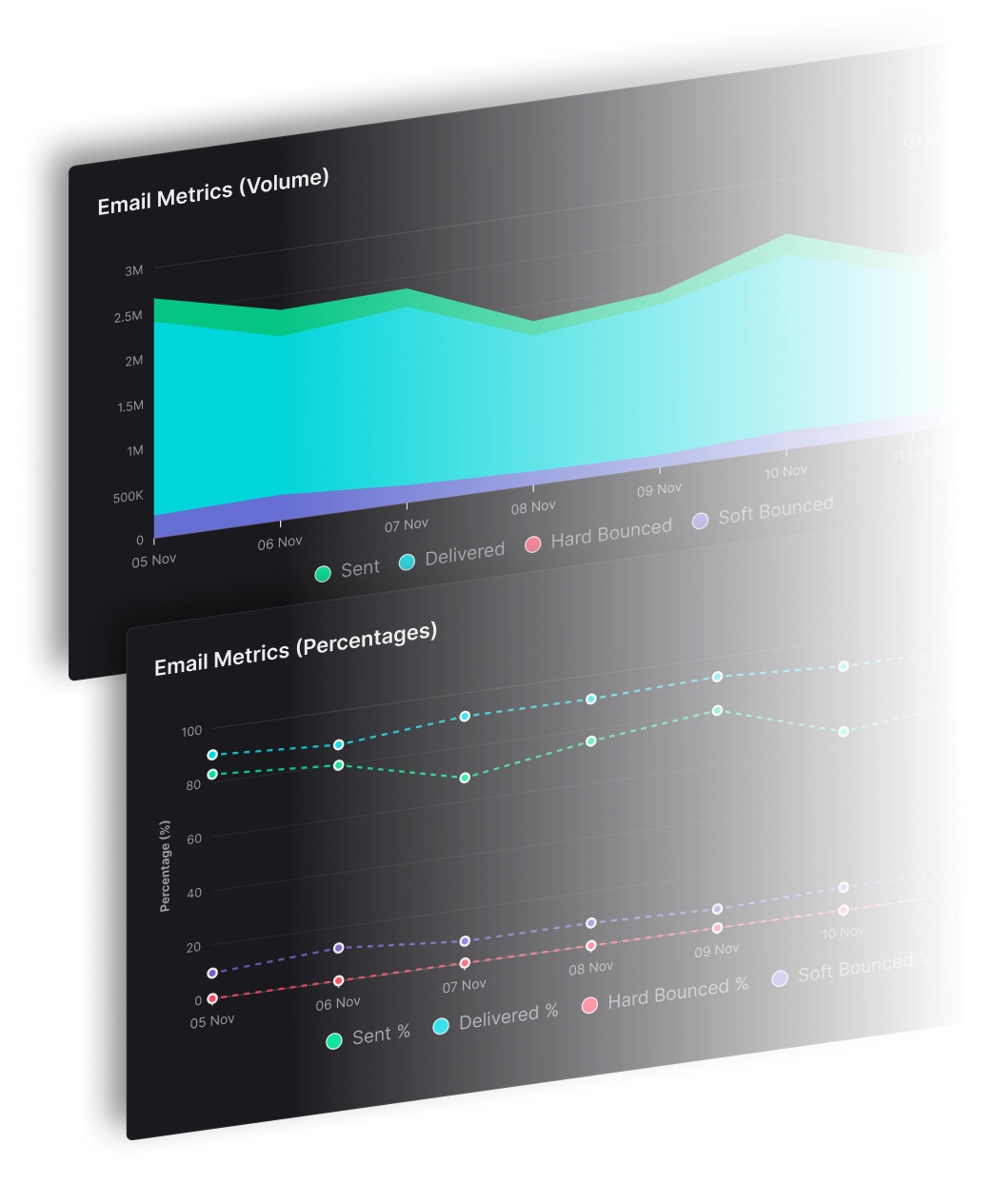


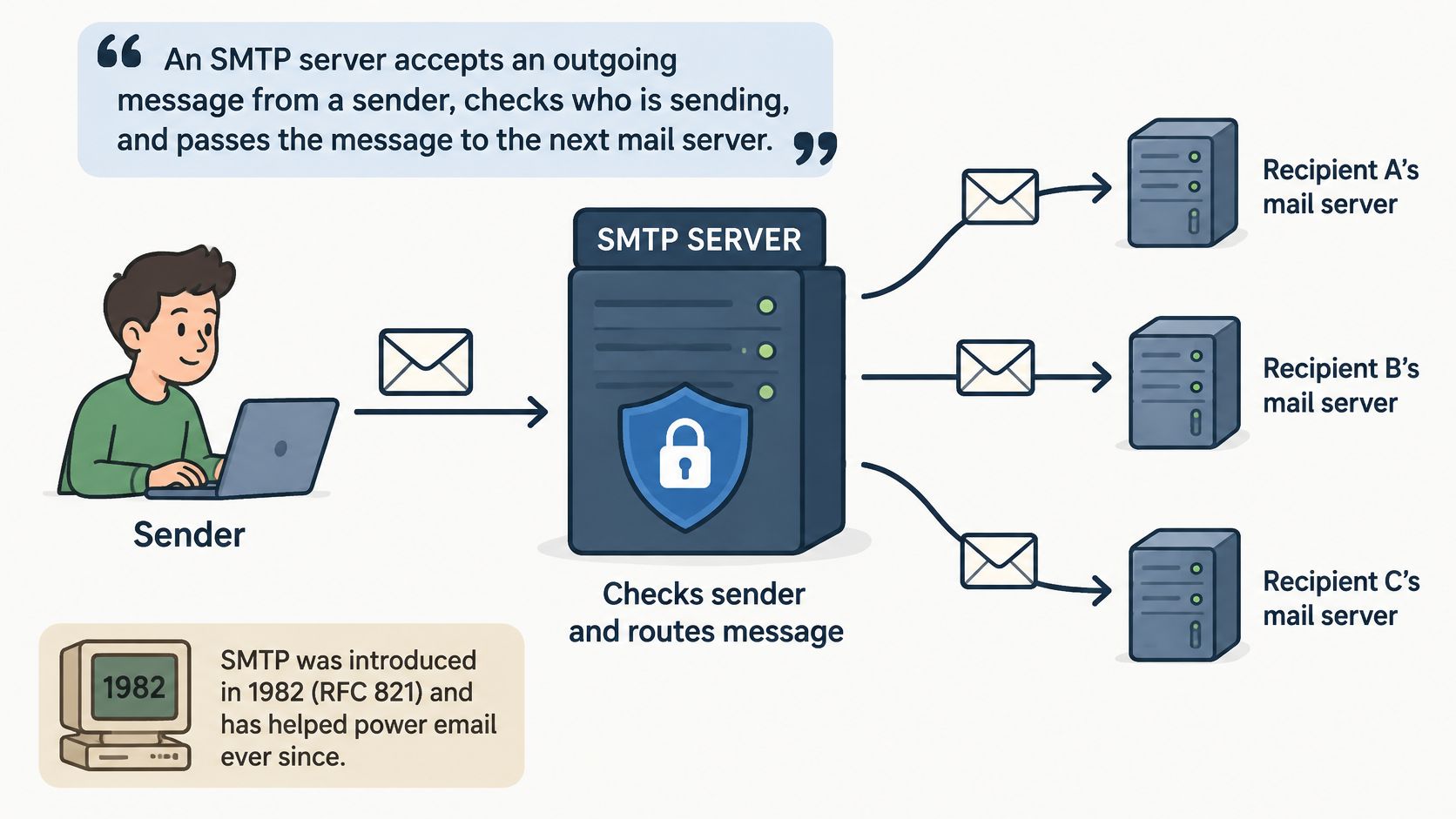
An SMTP server is the mail server that accepts outgoing email from an application and passes it toward the recipient's mail server, typically on port 587, 465 or 25. It checks the sending request, moves the message through the delivery process, and reports whether the next server accepted or refused it.
For publishers, agencies and software businesses sending across many brands, a copied SMTP login makes failures difficult to isolate. SendX Infrastructure addresses that problem with managed sending infrastructure for separate sending identities. But if a server reports success, why can the message still miss the inbox?
What Is an SMTP Server and Where Did It Come From?
Like a post office clerk accepting a letter and routing it to another sorting office, an SMTP server accepts a message and passes it toward its destination. SMTP stands for Simple Mail Transfer Protocol, the rules that mail systems use to transfer outgoing email.
A mail server is the broader system that can send, receive or store email. An SMTP server performs the transfer work. It's software, so it doesn't necessarily require a dedicated physical machine.
How does SMTP differ from IMAP and POP3?
Sending and reading use different protocols. SMTP moves outgoing messages, while IMAP, Internet Message Access Protocol, and POP3, Post Office Protocol, let email software retrieve messages from a mailbox.
| Protocol | Main job | Concrete example |
|---|---|---|
| SMTP | Submit and transfer outgoing email | Send a subscription confirmation |
| IMAP | Access and synchronize a stored mailbox | Keep read status consistent across devices |
| POP3 | Download messages from a mailbox | Retrieve messages into local email software |
SMTP also has distinct operating roles. Submission accepts messages from authorized software, normally after login. Relay transfers those messages onward between mail systems.
Is SMTP still used today?
Yes. SMTP remains the foundation of Internet email transfer. An application might submit through an application programming interface, or API, but the delivery infrastructure can still use SMTP to communicate with the recipient's mail system.
The wrong assumption is that the outgoing SMTP server chooses the inbox. The receiving mailbox provider makes that placement decision. A functioning sending server establishes transport, not permission to bypass filtering.
Why does SMTP's history matter for troubleshooting?
SMTP's history explains why modern logs still contain short commands and numeric replies. These are historical standards, not recently published sender policies.
SMTP milestones from the first specification to today
| Year | Specification | What it changed |
|---|---|---|
| August 1982 | RFC 821 | Foundational transfer model published by Jon Postel |
| January 1986 | RFC 974 | MX record routing added, so senders find the receiving server through DNS |
| February 1993 | RFC 1425 | Negotiated optional services added, the base for later extensions |
| April 2001 | RFC 2821 | Protocol consolidated and updated |
| October 2008 | RFC 5321 | Current base specification for Internet email transport |
Sources: The IETF historical review of SMTP specifications documents these publication dates and identifies MX routing and negotiated optional services as the major architectural changes.
Authentication, encryption and reputation controls developed around that command-and-response model. That's why a modern delivery investigation still starts with what the sender requested and how the receiver replied.
How an Email Moves From Your App to the Inbox
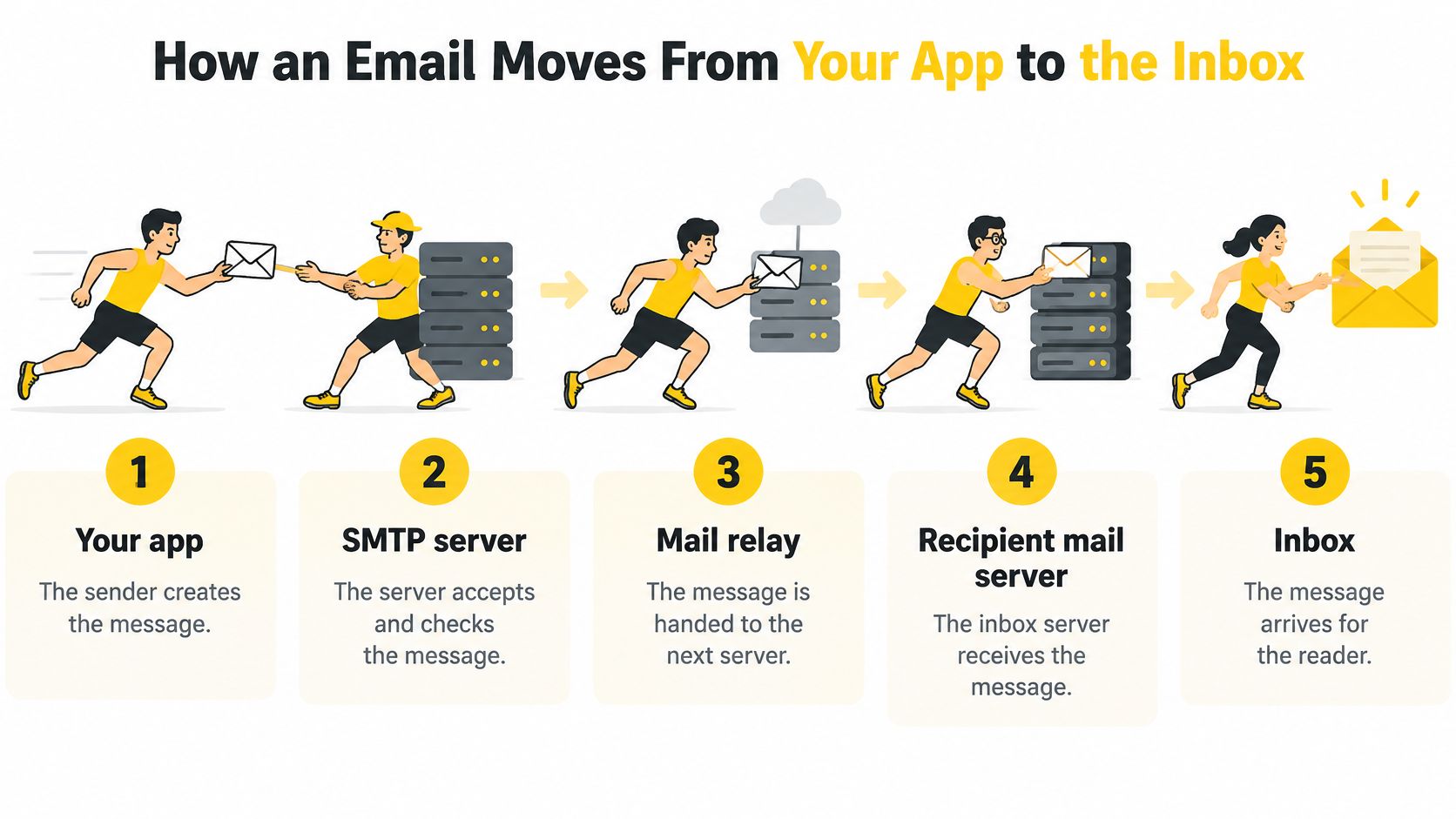
Email transfer resembles a relay race. The message is the baton, and each server takes responsibility for passing it to the next runner.
The following sequence describes authenticated submission followed by delivery to the receiving system. The application's connection and the sending server's onward connection are separate conversations.
What happens during the SMTP conversation?
- Connect and introduce the software. The application connects to the submission server, commonly on port 587, and sends
EHLOto discover its capabilities. - Encrypt and authenticate. The application negotiates
STARTTLS, repeatsEHLOover the protected connection, then usesAUTHwith the configured credentials. - Declare the return address.
MAIL FROMsupplies the envelope sender, which handles delivery failures and can differ from the visible From address. - Name each recipient.
RCPT TOsupplies a destination address, with a separate command for each recipient. - Transfer the message.
DATAintroduces the headers and body, ending with a line containing a single period. - Find the receiving system. The sending server checks the recipient domain's Mail Exchange, or MX, records in the Domain Name System, or DNS.
- Hand off responsibility. The sending server connects to the recipient's mail server and transfers the message through another SMTP conversation.
The software responsible for moving and queueing these messages is a mail transfer agent, often shortened to MTA. If the destination temporarily refuses delivery, the MTA retains the message for an appropriate retry.
Where does successful delivery end?
A 250 reply after the completed message transfer means that server accepted responsibility for the message. A successful reply to an earlier command, such as the recipient command, doesn't establish that the complete message was accepted.
Delivered means the mailbox provider accepted the email. In the inbox means where it landed. A submission server's acceptance is earlier still, because it may only mean the message entered the outgoing queue.
That distinction matters when campaign reporting looks healthy but recipients can't find the newsletter. Transport logs establish the handoff; mailbox-provider signals and placement testing help establish what happened afterward.
Which SMTP Port to Use and Why
Use port 587 with STARTTLS for most application submission setups, unless the sending service specifies another supported combination. A port is a numbered endpoint on the server, and each port can run a different service under a different security mode, so the number you configure determines the kind of conversation the server expects.
A port number alone doesn't enable encryption. The software must use the encryption mode expected by the server listening there.
How do the SMTP ports compare?
SMTP ports and when to use each
| Port | Encryption | Typical use | Pick it when |
|---|---|---|---|
| 25 | STARTTLS or none | Server-to-server delivery between mail servers | The sending system is an MTA, not an application submitting mail |
| 465 | TLS from the first byte | Submission over implicit TLS, sometimes labeled SSL | The service lists this port for sending |
| 587 | STARTTLS | Message submission from applications and clients | The application needs the usual submission setting |
| 2525 | STARTTLS when supported | Alternate submission port some services offer | The network blocks the usual submission port and the service supports this alternative |
Sources: The IANA service-name and port-number registry identifies SMTP's standard TCP assignment. Alternative submission support must match the sending service's documented settings.
Transport Layer Security, or TLS, encrypts the connection. With implicit TLS, encryption starts immediately. With STARTTLS, the connection begins with an SMTP greeting and upgrades before credentials or message content are submitted. That ordering explains a common stall: a client expecting implicit TLS waits for an encrypted handshake while the server waits for a greeting, and neither side proceeds.
Why does an application time out on the relay port?
A common configuration mistake is treating the server-to-server port as the default application submission endpoint. A hosting network can block that outbound connection even when the SMTP service itself is operating normally, so the failure looks the same whether the service is up or down.
The diagnostic order matters. Check the documented submission host and port, confirm outbound network access, then inspect the encryption setting.
Changing the password won't fix a connection that never reaches the server. Disabling certificate checks won't repair a mismatch between implicit TLS and STARTTLS. Correct the connection settings rather than weakening the protection.
Port selection settles only the first gate: whether your application reaches the server and the message is accepted. A successful submission confirms the handoff. Mailbox providers apply their own authentication and complaint checks after acceptance, and those checks decide where the message lands.
How SMTP Login and Encryption Protect Your Server
Login credentials do two jobs: they name the account responsible for a submission, and they control who may use the server at all. Both jobs fail if the password crosses the wire unencrypted or if the server accepts mail from anyone who connects.
SMTP AUTH associates a submission with an authorized account or application. A Message Submission Agent, or MSA, accepts those submissions and applies policy before forwarding them to relay infrastructure.
The RFC 6409 message-submission specification establishes authentication and submission-policy requirements. A production configuration should protect authentication with TLS and refuse unauthorized submission.
What should login and relay restrictions prevent?
An open relay accepts unauthorized mail for onward delivery. A spam operation that finds one can route its entire run through the victim's IP addresses, and the abuse is recorded under the operator's reputation. Blocklistings follow, and the operator's legitimate mail pays for them until the listings are removed.
Receiving servers still have to accept legitimate incoming mail from outside senders who hold no account. The controls therefore split by direction: inbound delivery stays open to the public, while submission and onward relay demand an authenticated identity.
For a multi-brand sender, credentials should identify an accountable application or tenant and permit only approved sending domains. That makes it possible to revoke a compromised credential without disabling unrelated senders.
Two different checks are at work here, and mixing them up causes real delivery problems. SMTP AUTH answers "which account submitted this?" Domain authentication answers "may this infrastructure send for this domain?" A submission can pass the login check and receive a 250 acceptance reply, then still miss the inbox, because the mailbox provider runs its own authentication and complaint checks after acceptance.
How do SPF, DKIM and DMARC protect the domain?
These three controls work like an approved courier list, a tamper-evident seal and posted handling instructions.
- SPF, Sender Policy Framework, identifies servers authorized to send for an envelope domain.
- DKIM, DomainKeys Identified Mail, adds a cryptographic signature that a receiving system can verify.
- DMARC, Domain-based Message Authentication, Reporting, and Conformance, evaluates alignment with the visible From domain and publishes handling and reporting policy.
Google's sender guidelines require senders to personal Gmail accounts to use SPF or DKIM, TLS, and valid forward and reverse DNS. The guidance also explains the domain relationships used for alignment.
Changing only the visible From address doesn't establish those relationships. A publisher sending under another title's name must configure the title's actual authentication, not merely edit a campaign field. The records that create the relationships live in DNS, and the SPF, DKIM and DMARC setup guide covers publishing them.
TLS protects the connection. Domain authentication establishes which sender identity the receiver can validate once it has accepted the message.
How to Set Up an SMTP Connection, Step by Step
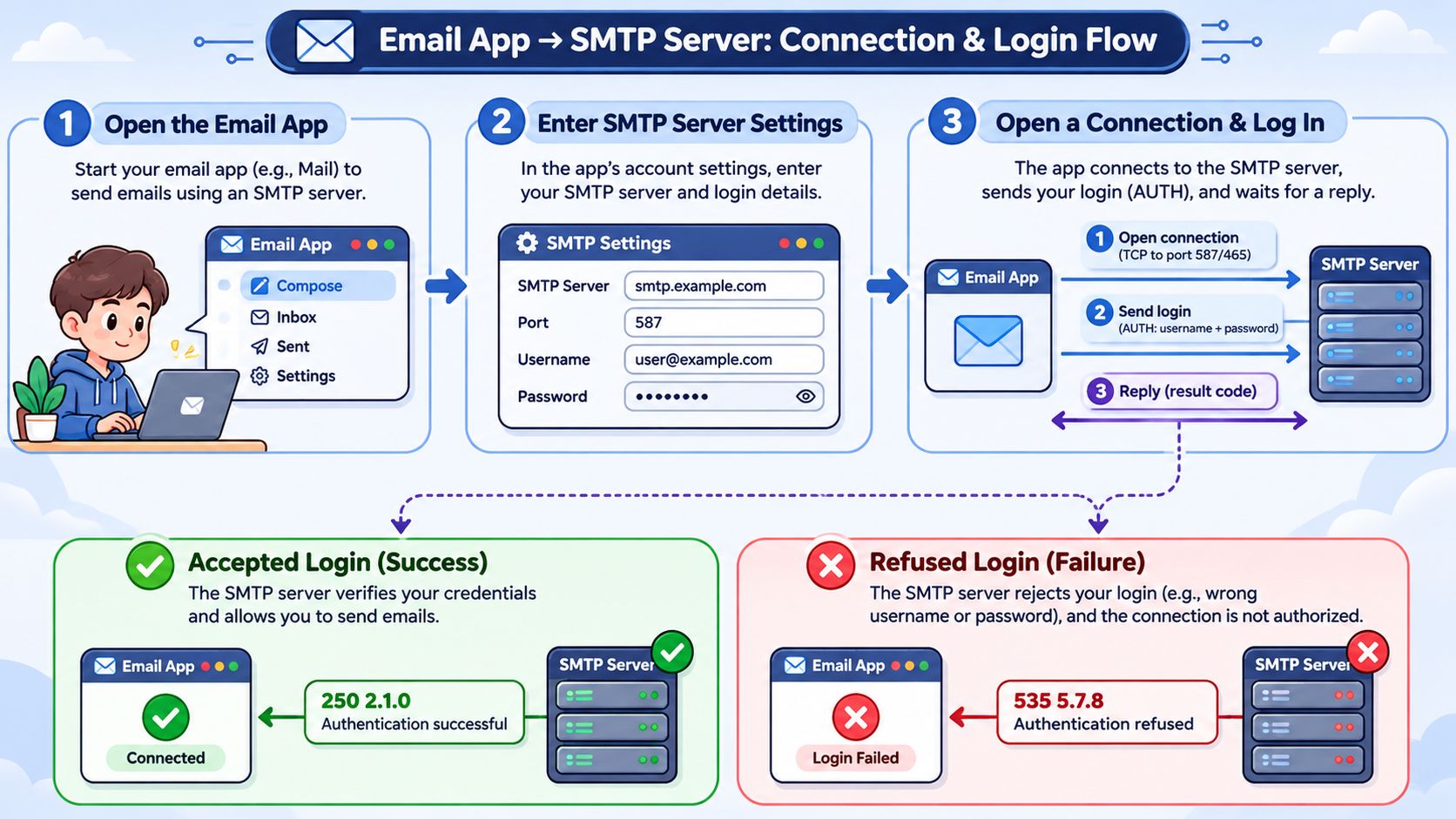
The sending software opens the connection and submits the message. The operator supplies the host, encryption mode, credentials and authorized sender address; the server then accepts the request or returns a diagnostic reply.
The reliable approach is to test each layer in order. A failed connection, failed login and failed domain check require different fixes.
1. How does an operator find the SMTP server?
Check the sending service's help page or the account's outgoing-server settings. Record the SMTP hostname, supported port, encryption mode and required username format.
Don't infer the hostname from the website address or the recipient domain's MX records. The submission endpoint can be different from the infrastructure accepting incoming mail.
For Gmail account submission, the SMTP host is smtp.gmail.com. That's an account submission endpoint, not a substitute for a managed delivery engine serving a portfolio of publications.
2. Which encryption setting should the software use?
Choose port 587 with STARTTLS or port 465 with implicit TLS, according to the service's settings. Some software labels implicit TLS as SSL, although the connection should use modern TLS.
The software negotiates the protected connection. The operator must select the matching mode and leave certificate validation enabled.
3. Which credentials belong in the SMTP settings?
Enter the service-issued SMTP username and secret. The username isn't always the visible From address, and a website password isn't necessarily an SMTP password.
For an eligible Gmail account using two-step verification, an app password may be needed instead of the ordinary account password. Organizational policy can restrict app passwords, so the account's approved authentication method governs.
Store secrets in the sending software's protected configuration. If a secret appears in a shared document or diagnostic log, replace it rather than assuming it remains private.
4. How should the From address be configured?
Use a From address on a domain authorized for that sending connection. Publish and verify the required SPF and DKIM records, then check that authentication aligns with the visible sender.
In SendX, domain-scoped SMTP credentials restrict a credential to verified domains, so a brand's credential can send only for its approved domain. The server enforces that boundary instead of relying on repeated manual checks.
5. What should the test message prove?
Send to an address controlled by the team and inspect the received message headers. Check the authentication results for SPF, DKIM and DMARC, and compare the visible sender with the authenticated domains.
Confirm the message identifier and delivery event in the sending records. A test should prove both authorized submission and correct message identity, not just that the send button works.
Avoid testing application submission through the server-to-server port. If the existing software supports SMTP, changing to an email API isn't necessary just to repair an incorrect host or encryption setting.
What SMTP Error Codes Mean and How to Fix Them
An SMTP failure needs a diagnosis before a retry. The first digit determines the response class, while the remaining status information and response text explain what needs attention.
The RFC 5321 SMTP specification defines the response classes: positive completion lets the transaction proceed or finish, temporary failure calls for delayed retry, and permanent failure requires correction before another attempt.
Which reply codes require action?
SMTP reply codes, what they mean and what to do
| Reply code | Class | What it means | What to do |
|---|---|---|---|
| 250 | Positive | Successful completion, as covered in the delivery sequence | Record the completed step; do not retry an accepted message |
| 421 | Temporary | Service is closing or unavailable | Retry later with backoff |
| 450 | Temporary | Mailbox unavailable or temporary deferral | Retry on the queue schedule |
| 535 | Permanent | Authentication failed | Fix the login before sending again |
| 550 5.1.1 | Permanent | Recipient address does not exist | Suppress the invalid address |
| 550 5.7.x | Permanent | Policy rejection | Inspect the response text, authentication and sender rules |
Match the fix to the failure. A policy rejection needs investigation of the sending configuration; suppressing a valid recipient because the domain failed authentication leaves the underlying problem unresolved.
For temporary failures, keep the message queued rather than reconnecting immediately. The SMTP retry and enforcement guidance describes delayed retries. Use destination-aware backoff so a restriction at one mailbox provider does not pause unrelated routes. Follow the receiver's response text when diagnosing a quota or policy restriction instead of applying an arbitrary pause to every deferral.
Acceptance is still only the first gate. If accepted messages miss the inbox, repeated SMTP submissions will not resolve the mailbox provider's authentication or complaint checks.
What can EHLO reveal about message failures?
The server's EHLO response advertises its capabilities. Check it before assuming the server supports your message size or authentication method.
- SIZE advertises the maximum message size the server accepts.
- STARTTLS advertises support for upgrading the connection to TLS.
- AUTH lists authentication mechanisms available in the current connection state.
- PIPELINING permits supported commands to be sent without waiting for each individual reply.
Compare the advertised size limit with the encoded message, not just the attachment's original file size. Rich text and attachments use Multipurpose Internet Mail Extensions, or MIME, and attachment encoding increases the transfer size.
Keep the full response text, destination provider and message identifier together. These details help distinguish a temporary restriction from an email bounce that requires suppression or correction, so the next action addresses the actual failure.
Which Free SMTP Services Work, and Where They Stop
A free SMTP option usually means sending through an existing mailbox account's outgoing host without a separate relay charge. Consider a newsletter sent through a personal Gmail account: the first messages go out normally, then the account hits its daily cap mid-campaign and the rest of the queue stalls, with no retry schedule and no explanation beyond a rejection.
Account-based services impose sending limits, authentication conditions and abuse controls. A successful test doesn't establish that the account is permitted or suitable for sustained marketing email. A 250 reply also means only that the account's server accepted the message. The recipient's mailbox provider still runs its own authentication and complaint checks afterward, and those checks decide inbox or spam.
Which account-based sending options are useful?
- An existing Gmail account. Use its documented submission host and supported encryption settings. Look up the account's daily sending cap in its official documentation and keep campaigns under it, because exceeding the cap suspends sending rather than queueing the overflow.
- Another existing mailbox account. Take the outgoing host and port from that account's official settings, rather than guessing. Check whether automated submission is supported and whether the account requires an app-specific password rather than the normal login.
- SMTP included with business hosting. Confirm whether outbound relay is included, which sender domains are authorized, and how the host handles queueing, deferrals and delivery records.
| Sending job | Account-based SMTP | Managed sending infrastructure |
|---|---|---|
| Personal correspondence | Appropriate when account rules permit it | Usually unnecessary |
| Connection testing | Useful for checking basic submission | Useful for production-route testing |
| Sustained marketing email | Constrained by account rules and reporting | Supports an operational sending model |
| Several sending identities | Difficult to attribute and isolate | Designed around separate identities and controls |
When should a business stop relying on a free host?
Move beyond account-based sending when the team needs accountable identities, production queues and route-specific diagnosis. A free account isn't exempt from recipient mailbox-provider requirements.
Once a cap is crossed mid-campaign, there is no lever to pull: no per-route throttles, no delivery records, no one to ask. A suitable SMTP service lets the team investigate failures and control the sending behavior that caused them.
Choosing an SMTP Setup for Multi-Brand Sending
An SMTP connection is easy to establish. The harder question is whether the setup matches the operational job: how many identities send through it, how results get attributed, and who can act when one route deteriorates.
| Sending need | Setup to choose | What to check |
|---|---|---|
| Low-volume application notifications | A host's authenticated SMTP relay with STARTTLS | SPF and DKIM for the From domain |
| Bulk marketing email to personal Gmail accounts | Managed sending infrastructure with DMARC and one-click unsubscribe | Complaint signals and unsubscribe processing |
| Transactional email from a product | SMTP relay or API with per-message records | Bounce codes and message identifiers |
| Several brands, clients or titles on an account | A separate subaccount, domain and IP pool for each brand | Throttles and results per brand and mailbox provider |
According to Gmail's sender requirements, senders reaching 5,000 or more messages daily to personal Gmail accounts count as bulk senders and must publish a DMARC record with at least p=none, include one-click unsubscribe in marketing messages, process unsubscribes within 48 hours, and keep spam rates below 0.3%.
Those thresholds explain why a shared login falls short as an operating model for several publications. When titles share a domain or an IP pool, one title's complaint spike or blocklist event lands on every other title's reputation, and nobody has a lever to pull.
How does managed infrastructure separate brands without rebuilding the sending software?
Maintaining separate credentials, queues and reporting for each title by hand creates repetitive work. Managed sending infrastructure supplies that separation as a product, exposing SMTP relay and an email API to publishers, agencies and software businesses that send under several identities.
When a title needs isolation, its subaccount carries its own API key, sending domains and IP pool. Each brand gets its own warmup plan and throttles, with delivery controls tuned per mailbox provider.
When a route deteriorates, results break down per brand, per mailbox provider and per IP, down to the bounce code. That detail matters because a 250 acceptance reply is only the first gate. The receiving provider still applies its own authentication and complaint checks before placing the message, so per-route reporting is what separates "accepted" from "delivered to the inbox."
How can an established sender prove the change?
The pass-through approach proves the new route on one brand while the current provider keeps running underneath, with the option to switch back if it doesn't earn the business. No publication has to be the first test. A publisher with a dozen titles on one account, for instance, can route a single title through the new setup first and compare results directly: which brand caused a problem, which route absorbed it, and which control needs changing.
Separate sending for several brands at volume with SendX Infrastructure
FAQs
Can a business send email without running its own SMTP server?
Yes. A hosted relay operates the queues, server connections and retry attempts. The business still needs authorized submission credentials and a verified sending identity, while the mail-server software itself stays with the provider.
Where does SMTP sit when an app sends through an email API?
Underneath it. The API changes how the application submits each request; the mail servers handling that request still speak SMTP between themselves.
To trace a failure, save the request identifier the API returns at submission and match it to the delivery event logged under the same ID. A logged 250 means acceptance happened and the problem sits after that gate. No event at all means the request never reached the receiving server.
Why does a message with a 250 reply still miss the inbox?
A 250 code only confirms the receiving server accepted the message. The mailbox provider then applies its own authentication and complaint checks, so the message can still land in spam or get dropped. Acceptance confirms the handoff; placement is decided afterward.
What fixes a 5.7 code that appears at only one mailbox provider?
Read the full response and compare the affected domain and IP against that provider's sender requirements. If the failure follows one identity or route, correct that cause before resubmitting. Leave the routes still delivering untouched.
Map which brands share each IP and domain before the next volume increase, then review that map with SendX.
