

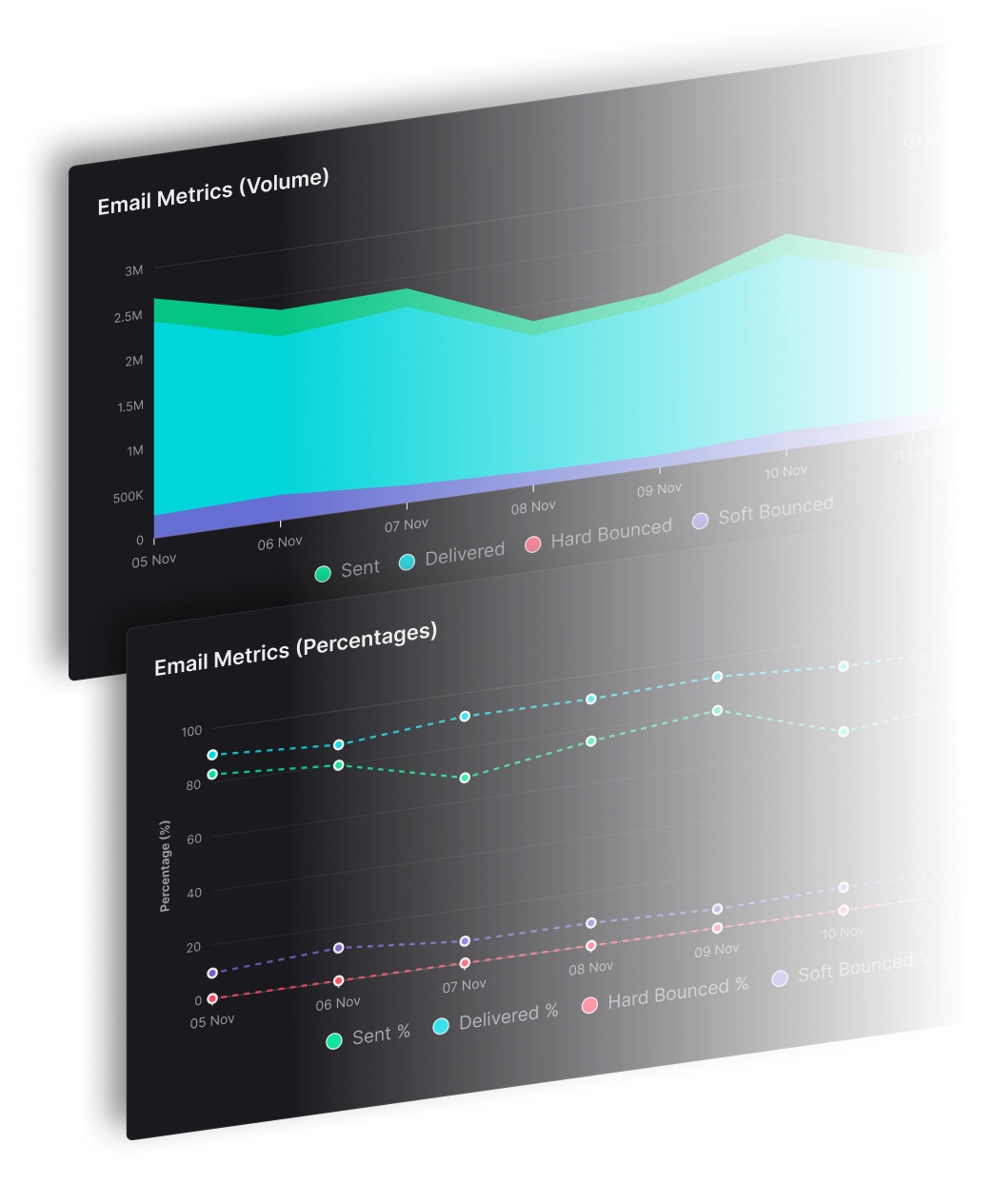


Does a clean account-level dashboard prove that every brand you send for meets Gmail's requirements?
For publishers, agencies and software businesses sending under several brands, the answer is usually no. Gmail evaluates each sending identity on its own: its authentication records, its unsubscribe path, and the spam complaints its recipients file. One brand can pass every check while another drifts toward enforcement, and an account-level average hides exactly that.
The spam rate is where this separation matters most. Under Google's email sender guidelines, senders should keep user-reported spam below 0.10% and prevent it from ever reaching 0.30% or higher, measured per sending identity rather than across the whole account.
SendX Infrastructure addresses the operational side of this problem: keeping each brand's identity, results and compliance status visible on its own. This guide walks through what Gmail checks at bulk volume, how enforcement works when a sender slips, and how to audit every brand you send for before Gmail does it for you.
Who Gmail Counts as a Bulk Sender
Gmail applies bulk-sender requirements based on traffic to personal Gmail accounts, not the size of a contact database or total sends across mailbox providers. Think of a toll gate, every sender passes through, but heavier traffic receives additional checks.
Under Google's bulk-sender guidance, sending 5,000 or more messages in a day to personal Gmail accounts qualifies a sender as a bulk sender. Beginning February 1, 2024, those senders needed SPF and DKIM, a DMARC record, aligned identity, wanted mail and a simple unsubscribe mechanism.
Count the Gmail share, not the whole campaign
For example, a hypothetical campaign sending 3,000 messages to Gmail and 2,500 to Yahoo stays below Gmail's bulk threshold for that day. A campaign sending 5,400 messages to Gmail crosses it, regardless of traffic elsewhere.
The operational mistake is measuring only campaigns. A useful volume report includes every sending stream associated with the identity, including newsletters, account notifications and automated messages.
| Sending situation | Authentication distinction |
|---|---|
| General sender below bulk volume | SPF or DKIM satisfies the baseline authentication requirement |
| Bulk sender | SPF and DKIM must be configured, with DMARC and aligned identity |
Don't confuse smaller volume with exemption
Being below the bulk threshold doesn't mean authentication is optional. Gmail still expects general senders to authenticate with SPF or DKIM.
Google introduced enforcement gradually rather than announcing an immediate universal block. Noncompliant senders could lose access to delivery-issue mitigation, meaning assistance addressing delivery problems.
For an established sending team, the next task is straightforward. Pull daily Gmail volume for the last month, identify the peak day and compare it with the bulk threshold. Use actual message counts, not the number of unique recipients.
Gmail Bulk Sender Requirements at a Glance
| Requirement | What Gmail checks | How to verify |
|---|---|---|
| SPF record | Sending servers authorized for the sending domain | Look up the domain's SPF TXT record |
| DKIM signing | Each message carries a valid signature | Inspect message headers for a DKIM pass |
| DMARC record | A published policy, with monitoring-only as the minimum | Look up the domain's DMARC record |
| From alignment | The visible From domain aligns with the SPF or DKIM organizational domain | Compare From with authenticated domains |
| Forward and reverse DNS | The sending IP resolves to a hostname that resolves back correctly | Check reverse and forward lookups |
| TLS | Mail travels over an encrypted connection | Inspect transport logs |
| One-click unsubscribe | Marketing email carries a working header-based unsubscribe | Inspect List-Unsubscribe and List-Unsubscribe-Post |
| Spam rate | Below 0.10%, never 0.30% or higher | Check daily Google Postmaster Tools data |
For a multi-brand sender, the table is a per-brand checklist. Each brand needs its own sending domain, its own unsubscribe path, and its own spam-rate view. A domain that passes DNS checks can still fail when the visible From domain, message signature, and unsubscribe behavior disagree with the identity recipients recognize.
The practical split is where the evidence lives. Authentication records sit in DNS. Message-level proof sits in headers. Unsubscribe handling sits in list logic. Complaint performance sits in Postmaster Tools. Treat those as separate control points, especially when several brands send from one platform.
Separate configuration from proof
A published DNS record says a domain has authorized a sending setup. A received, authenticated message shows that the live sending path matched that setup. Those are different checks, and a multi-brand sender needs both for every domain in use.
Domain Name System records hold the public instructions receiving systems use to check sending authorization. SPF identifies authorized sending servers. DKIM adds a verifiable digital signature to a message. DMARC connects authentication to the domain recipients see in From, publishes handling instructions, and enables reporting.
Keep the detailed setup sequence for authentication in the next section. At a glance level, the question is simple: can Gmail connect the visible sender identity to an authorized, signed message path? If the answer differs by brand, each brand has its own compliance gap.
Check the path as well as the domain
Transport security and DNS hygiene affect trust in the connection, even when authentication records are correct. TLS encrypts the connection carrying email between servers. A PTR record maps an IP address back to a hostname, and that hostname needs a matching forward lookup.
Those checks answer a different question from authentication. They show whether the delivery path is consistent and encrypted, while SPF, DKIM, DMARC, and alignment show whether the message identity is valid. For publishers and media companies managing several brands, this distinction matters because shared infrastructure can hide brand-level problems. One sending IP may support multiple domains, but each domain still needs its own records, headers, unsubscribe path, and complaint profile.
A practical audit routine follows this order:
- List every brand domain and subdomain currently sending mail.
- Confirm that each domain has its own records, signature, aligned From identity, and unsubscribe behavior.
- Inspect one delivered message per stream, including newsletters, account notifications, and automated mail.
- Review transport logs for encrypted connections and valid forward and reverse DNS.
- Track spam complaints per brand in Google Postmaster Tools and keep each brand below 0.10%, never reaching 0.30% or higher.
- Record the owner of each fix, because DNS, list handling, and campaign configuration often sit with different teams.
A green DNS checker only proves that a record exists. It does not prove that every production stream passes alignment, includes a working unsubscribe, or stays within complaint limits. Run the audit per brand, then compare the results across brands. That is how a sender with many identities avoids treating one clean domain as proof that the whole program is clean.
How to Authenticate Each Sending Domain
Publish authentication records, verify real traffic, and tighten policy only after legitimate sending sources are understood. Starting with rejection can interrupt valid mail from a forgotten billing system or publication.
The setup sequence follows the same logic as issuing staff badges, first identify authorized people, then test their access, then enforce restrictions.
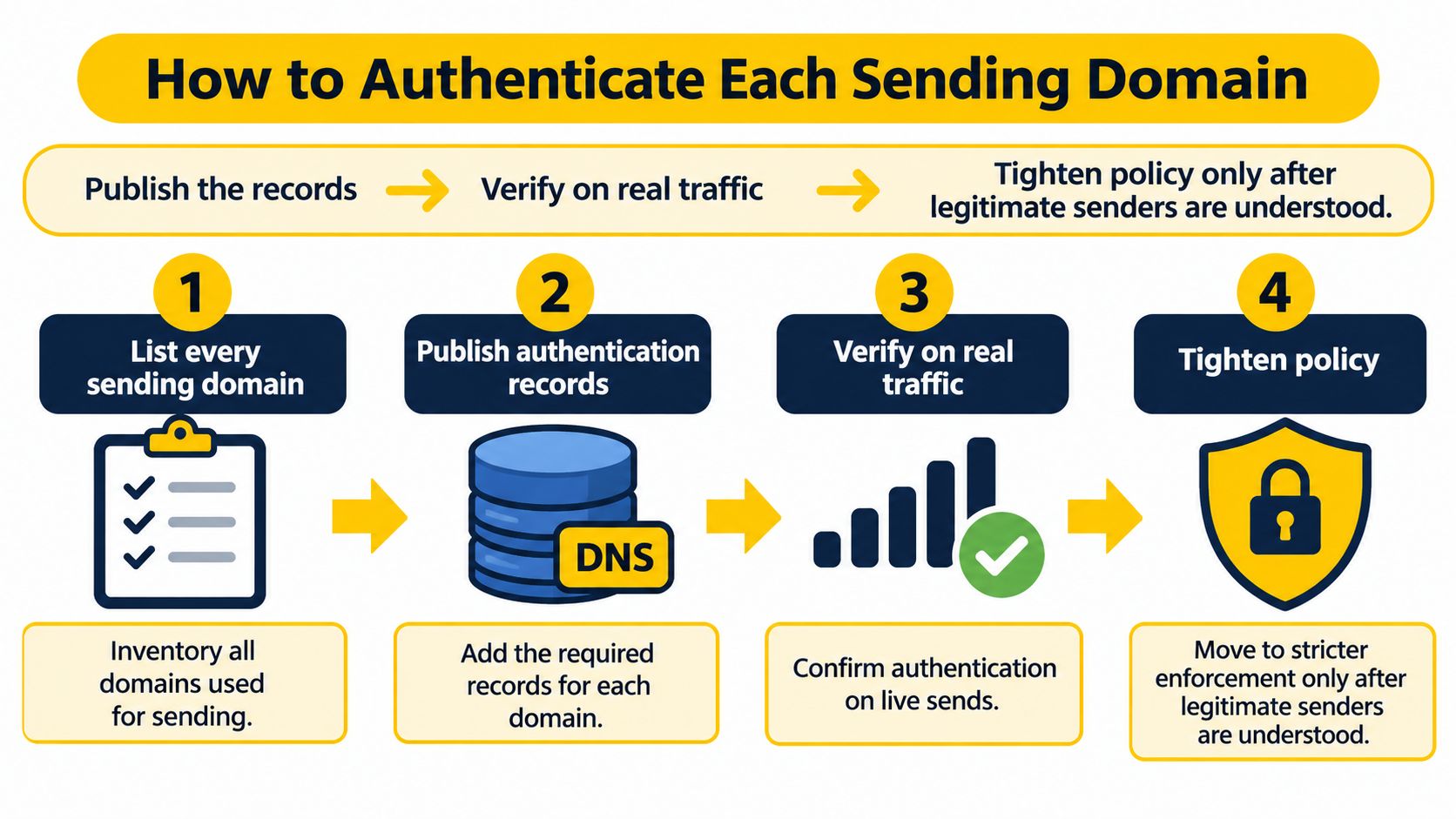
1. Inventory every sending identity
List sending domains, subdomains and every system sending for them. Record the owner of DNS, the sending IPs, forward and reverse DNS status, and whether transport logs confirm TLS.
2. Publish the SPF authorization
The sending software supplies the required authorization details, and the DNS owner publishes them. Maintain a single SPF record at each relevant domain rather than adding competing records for different services.
3. Enable DKIM signing
The sending software generates the signing configuration and public-key record. The DNS owner publishes the record, then enables signing and verifies that production messages carry the expected domain.
In SendX, the Infrastructure dashboard shows each sending domain's SPF, DKIM, DMARC, return-path and custom tracking domain settings. The reader can inspect those settings before sending through SendX Infrastructure.
4. Inspect a message received by Gmail
Send through the actual production route, then open the received message's original headers. Confirm SPF and DKIM results, and compare the visible From domain with the authenticated domains.
Alignment means the authenticated identity corresponds to the visible sender's organizational domain under the applicable matching rules. A valid signature for an unrelated domain doesn't provide that alignment.
5. Add DMARC reporting
Publish the monitoring policy and a reporting destination. Monitoring doesn't instruct receivers to quarantine or reject mail solely because of that policy, but receivers can still filter messages independently.
6. Resolve legitimate failures
Read reports by sending source and domain. Fix missing authorization, incorrect signing and unexpected routing before applying stricter handling.
7. Tighten policy after verification
Move toward quarantine or rejection only after legitimate traffic passes consistently. Google permits p=none for minimum bulk compliance and says correctly configured implementations typically achieve 95% or higher authentication success rates in Postmaster Tools.
The email authentication protocols guide provides additional setup context. Before any policy change, record each domain's Authentication dashboard results and investigate the failures behind the aggregate.
Unsubscribe and Wanted Mail Requirements
A visible unsubscribe link leading to a login page or a multi-step form doesn't implement header-based one-click unsubscribe. Marketing email needs a working automated removal path, not merely somewhere recipients can request help.
Think of the header mechanism as an exit door that opens from inside. The body link is the visible sign directing recipients toward an exit.
Make the headers perform the removal
List-Unsubscribe identifies the unsubscribe endpoint. List-Unsubscribe-Post declares the one-click POST mechanism so the mailbox provider can submit the removal request automatically.
The practical distinction is between showing an option and processing an instruction. A preferences page can offer choices, but the header-based request mustn't require a login, confirmation form or another decision.
Google's implementation deadline for marketing messages from senders already offering an unsubscribe link was June 1, 2024. That historical deadline isn't a grace period for current sending.
Test the complete unsubscribe path
- Inspect the marketing message. Confirm that List-Unsubscribe is present and points to the intended removal endpoint.
- Check the one-click declaration. Confirm List-Unsubscribe-Post declares the one-click behavior.
- Test the endpoint. It must accept the mailbox provider's POST request and suppress the address without asking again.
- Inspect a Gmail test message. Verify the delivered headers, not just a template preview.
- Apply the intended scope. Update every brand and list covered by the recipient's removal request.
Use the unsubscribe link guide when reviewing the visible body link alongside the headers.
Send only to recipients who opted in, and process removals immediately as an operating practice. Sharing an address across brands doesn't justify ignoring the request or automatically changing unrelated subscriptions. Test with a controlled address and confirm that the next relevant send excludes it.
Spam Rate Limits and Where to Watch Them
Keep the user-reported spam rate below the operating target rather than treating the upper boundary as room to spend. Gmail measures recipient behavior directly: every time someone marks a message as spam, that complaint counts against the sending domain, regardless of how valuable the sender considers the campaign.
| Spam rate | Status | What to do |
|---|---|---|
| Below 0.10% | Operating target with margin, not a delivery guarantee | Continue monitoring the daily trend |
| 0.10% to below 0.30% | Warning band in Google's guidance | Identify the campaign and segment responsible |
| 0.30% or higher | Boundary to avoid for mitigation eligibility | Pause the affected segment and fix its list source |
Google's spam-rate guidance recommends staying below 0.10% and preventing rates of 0.30% or higher. Beginning in June 2024, bulk senders above 0.30% became ineligible for certain delivery mitigations.
Read the denominator correctly
Postmaster Tools calculates the daily rate using messages delivered to engaged recipients' inboxes and subsequently marked as spam. It isn't complaints divided by every attempted send, so a large suppressed or undelivered portion of the list does nothing to dilute the rate.
In a hypothetical day with 40,000 messages delivered to engaged recipients' inboxes, 40 reports equal 0.10%, while 120 equal 0.30%. Those are arithmetic illustrations, not forecasts of recipient behavior. The point is scale: a publication sending at volume crosses the warning band on fewer complaints than expected, and a small list crosses it faster still.
SendX includes deliverability monitoring for each sending identity on the account, so a complaint spike on one publication stays visible instead of averaging away into the rest.
Investigate the segment, not just the average
An account-wide average can hide a publication whose recipients are objecting. Check each sending domain separately, then connect the change to campaign timing and audience selection.
Review whether the team mailed old addresses, expanded frequency or resumed sending to unengaged recipients. Pause the responsible segment before resuming, and repair the acquisition or permission issue rather than changing domains to continue. Gmail tracks reputation at the domain level, but a fresh domain with the same list reproduces the same complaints within a few sends.
The guide to managing email lists covers the segment hygiene behind this work. Keep the terminology straight when reading reports: delivered means the mailbox provider accepted the message, while in the inbox describes where it landed. A campaign can post near-perfect delivery while complaints climb, because acceptance and placement are separate outcomes.
Enforcement Problems and What Gmail Does
A rejected connection can be specific. A full Simple Mail Transfer Protocol, or SMTP, response in the sending log may identify why Gmail refused or delayed acceptance, which gives the team a concrete starting point before any retry.
| Issue | What Gmail checks | Possible response |
|---|---|---|
| From header misaligned | Organizational-domain alignment through SPF or DKIM | Failure code or spam placement |
| Both SPF and DKIM fail | Successful authentication with alignment | Failure code or spam placement |
| Missing forward or reverse DNS | Valid matching hostname and sending-IP records | Temporary or permanent failure |
| No TLS | Encrypted transport | Failure code |
| Message not RFC 5322 formatted | Valid header and body structure | Failure code or spam placement |
| DMARC or one-click unsubscribe missing | Published minimum policy and working unsubscribe mechanism | Denied delivery mitigation |
Google's enforcement documentation identifies these checks and possible outcomes, including RFC 5322 formatting and a minimum DMARC policy of p=none. The table lists possible responses, not a guaranteed outcome for every instance.
Read the response before retrying
Start with the complete SMTP response in the sending logs. Keep the affected domain, mailbox provider, campaign and timestamp together, because those fields separate a configuration failure from a traffic pattern tied to one brand.
For a multi-brand sender, that distinction matters. A publication, a client newsletter and a transactional service may share infrastructure while carrying different recipient expectations, unsubscribe paths and complaint histories. Retrying the same message through the same broken identity wastes sending time. Changing subject lines will not repair missing reverse DNS.
Fix causes in a consistent order
- Check alignment. Compare the visible sender with authenticated identities.
- Review SPF and DKIM together. Confirm both are configured and real messages authenticate.
- Inspect DNS and TLS. Validate the sending connection.
- Validate formatting. Check message construction and headers.
- Verify DMARC and unsubscribe. Test actual behavior rather than record presence alone.
That order keeps configuration work separate from reputation work. A stricter DMARC policy does not compensate for broken authentication. Correct the legitimate sending route before changing enforcement.
The sender reputation guide provides context for reputation work after configuration problems are resolved. Authentication establishes identity, but recipient behavior still affects how Gmail treats the mail.
How Do You Keep Several Brands Compliant on One Platform?
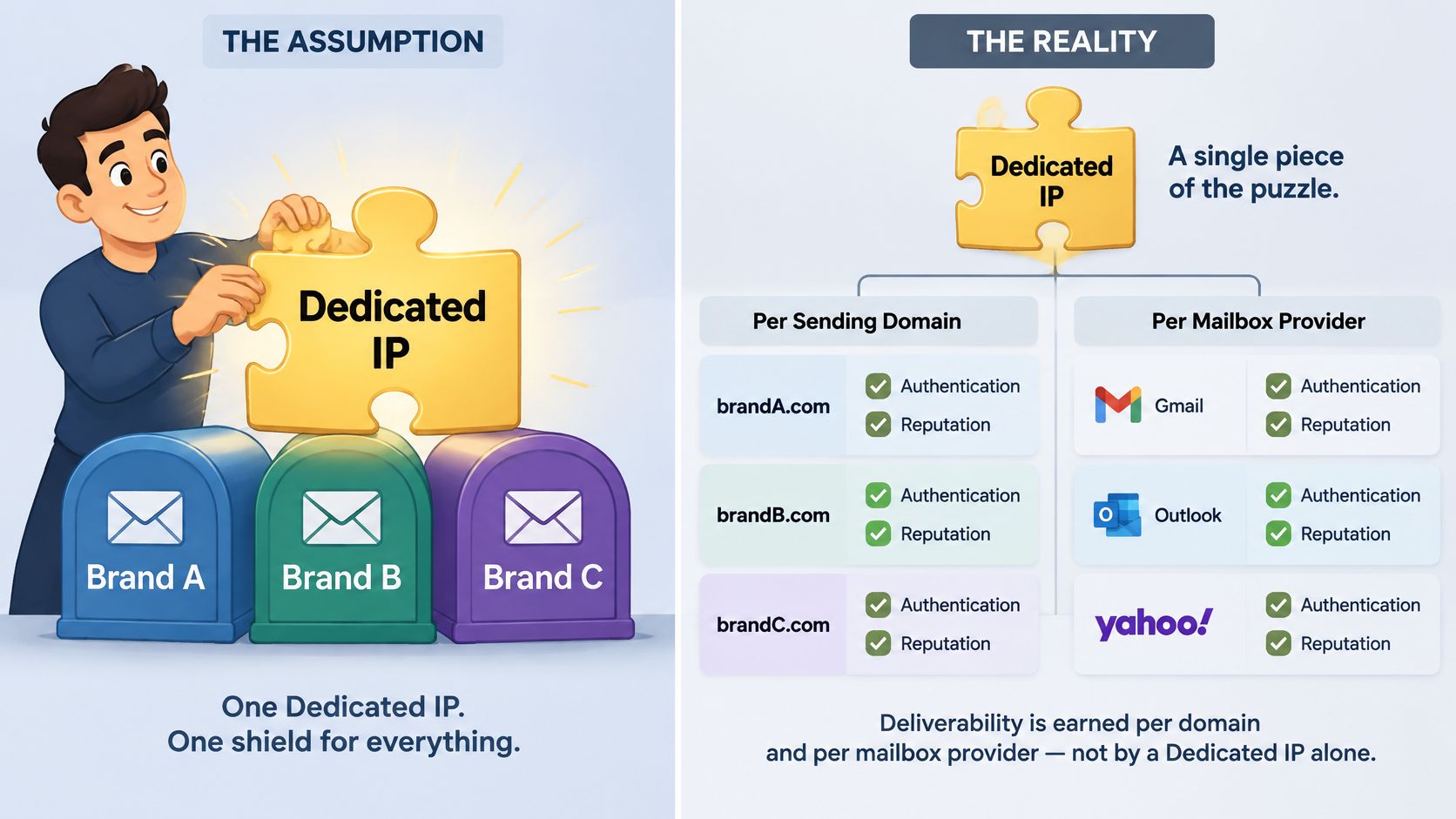
A dedicated IP separates part of the sending infrastructure, while Gmail still checks domain identity, recipient complaints and the path used to reach its mailboxes. Google counts messages from the same primary domain together when applying the 5,000-message threshold. Different subdomains can organize legitimate sending identities, but they do not create independent threshold allowances.
Assign responsibility before selecting infrastructure
The architecture decision starts with which identity each recipient recognizes. A publication and a software notification service may share a parent business without sharing audience expectations. That gap matters because complaint handling, unsubscribe behavior and sending controls need to follow the identity recipients see, not the reporting structure behind it.
Use the following decision sequence.
- Separate genuine identities. Assign domains or subdomains according to brands and sending purposes, not threshold avoidance.
- Name a DNS owner. Give someone responsibility for each domain's authentication records and change approvals.
- Attribute outcomes. Map complaints, bounces and unsubscribe events to the responsible brand.
- Evaluate shared dependencies. Identify where shared IPs, pools or operational controls could expose other brands to a sending problem.
Each brand can then be reviewed on its own record set, traffic pattern and complaint history. For agencies designing a branded service, white-label email marketing also requires distinguishing the software's presentation from the infrastructure responsible for delivery.
Use SendX Infrastructure to manage the separation
Checking records and complaint reports manually becomes repetitive across publications, clients and tenants. SendX is managed sending infrastructure for organizations that need sending software and the delivery engine underneath it in one product, with API and SMTP sending, transactional email and deliverability controls.
The team needs to identify a failing brand, control its sending and preserve the other brands' operating boundaries. A shared account total hides the problem until it spreads across the portfolio. Per-brand reporting gives the operator a place to act before unrelated audiences are pulled into the same incident.
See it means examining results per brand, per mailbox provider and per IP, down to the bounce code. When Gmail defers one publication's traffic, the team can investigate that publication's response codes rather than treating the entire account as the incident. Complaints need the same separation, because a spike tied to one sender identity should not be averaged into a cleaner portfolio number.
Switch it means proving the arrangement on one brand first, with the current provider still running underneath, and retaining the ability to switch back. That approach tests real traffic without requiring every publication to change its sending path together. The first brand should have clear domain ownership, working authentication and an unsubscribe path the team can test before volume moves.
Separate it means keeping each brand on its own domain, IPs, pool, warmup plan and throttles. This reduces shared-infrastructure exposure, but it does not erase relationships Gmail recognizes between domains. A parent domain can still connect the identities, so aggregate Gmail volume and domain-level reputation need their own review.
Managed deliverability can carry part of that separation in practice. Intelligent throttling and backoff adjust sending speeds automatically, which helps manage bounce rates while a domain or IP establishes its pattern. The operational goal is to keep publication identities and complaint handling separate rather than relying on an account boundary alone.
Run a per-brand audit routinely
Maintain an audit sheet with a named owner and evidence for each check.
- Authentication and alignment. Confirm the brand's published records and results from actual messages.
- Connection health. Verify forward and reverse DNS, plus encrypted transport.
- Unsubscribe behavior. Test headers, endpoint processing and suppression scope.
- Complaint trend. Review daily spam rates across the preceding week, not a weekly average that conceals a spike.
- Gmail volume. Check daily traffic and aggregate brands sharing a primary domain.
For a new domain or sending IP, use a managed warmup that increases volume gradually. SendX guides domain warmup and manages IP warmup rather than leaving the team to increase traffic without a plan.
The result is a compliance routine tied to accountable identities, with evidence showing which brand needs attention and controls that limit shared infrastructure exposure.
Start sending on SendX Infrastructure.
FAQs
How does a team add a sending domain to Google Postmaster Tools?
An authorized team member signs in with a Google account, adds the domain and publishes the TXT verification record Google supplies. After verification, Gmail traffic can populate daily reporting. An empty dashboard isn't proof that authentication or complaint rates are healthy.
Does a parent domain's DMARC policy cover subdomains?
A parent-domain policy generally applies when a subdomain doesn't publish its own DMARC record. Separate records let brands manage their own reporting and policy. The DNS owner should review inherited settings before assuming a subdomain is independently configured.
What happens when sending software signs DKIM with its own domain?
That signature doesn't provide DKIM alignment with an unrelated visible From domain. Configure custom DKIM signing for the sending domain, publish the supplied selector record and test a received message. DMARC can still pass through aligned SPF, but both authentication methods must remain configured for bulk sending.
Build per-brand Gmail compliance into sending operations with managed sending infrastructure from SendX. Keep domain identity, complaint monitoring and sending controls connected, and evaluate the setup with a brand whose results the team can audit.
