



Quick Answer
GetResponse pricing starts at $19/month for 1,000 contacts on the Starter plan. If you need advanced automation, expect to pay $59/month on Marketer ($48/month on annual billing). Webinar hosting requires the Creator plan at $69/month, or a paid add-on if you stay on a lower tier. A free plan covers up to 500 contacts and 2,500 emails a month. Annual billing cuts roughly 18% off every tier.
That's the short version. The longer version is where the bill actually grows, and GetResponse doesn't make that part obvious. The price you see on the homepage assumes a small list and annual billing. The price you pay depends on how many contacts you store and which features you actually need. If you've ever budgeted for an email tool and then watched the invoice climb, you already know the pattern.
If you're reading pricing data published before 2025, ignore it. GetResponse renamed and restructured its plans, so old "Basic / Plus / Professional" breakdowns no longer match what you'll see at checkout.
What Does GetResponse Cost? A Quick Price Table
GetResponse runs four standard plans plus a free tier. Monthly billing at 1,000 contacts: Starter at $19/month, Marketer at $59/month, Creator at $69/month. Annual billing saves 18% across all tiers. Enterprise is a custom quote. Here's the at-a-glance view.
Plan | Starting price (monthly) | Best for |
|---|---|---|
Free | $0 | Up to 500 contacts, 2,500 emails/mo, testing |
Starter | $19/mo | Growing lists, basic automation, list building |
Marketer | $59/mo | Advanced automation, unlimited workflows |
Creator | $69/mo | Webinars, course creators, paid newsletters |
Enterprise | Custom | High volume, dedicated IP and support |
Source: GetResponse.com, June 2026. Prices shown are monthly billing at 1,000 contacts. Annual billing saves 18%.
Prices scale as your list grows. Starter at 10,000 contacts runs $79/month, not $19. That gap between the advertised price and your real price is the single most important thing to understand before you sign up. GetResponse charges by the number of contacts you store, which is the standard model for most email platforms. If you want the mechanics of contact-based pricing explained in plain terms, we broke it down in how email marketing pricing is structured.
GetResponse Plan Breakdown: Feature Comparison
GetResponse separates its plans by feature gates, not just contact limits. Each tier unlocks a specific capability set, and the jumps matter more than the dollar amounts. Starter gives you email and one automation. Marketer opens up unlimited automation. Creator adds webinars and course tools. Knowing which gate you're trying to clear is how you avoid overpaying.
Starter Plan: Email Marketing Basics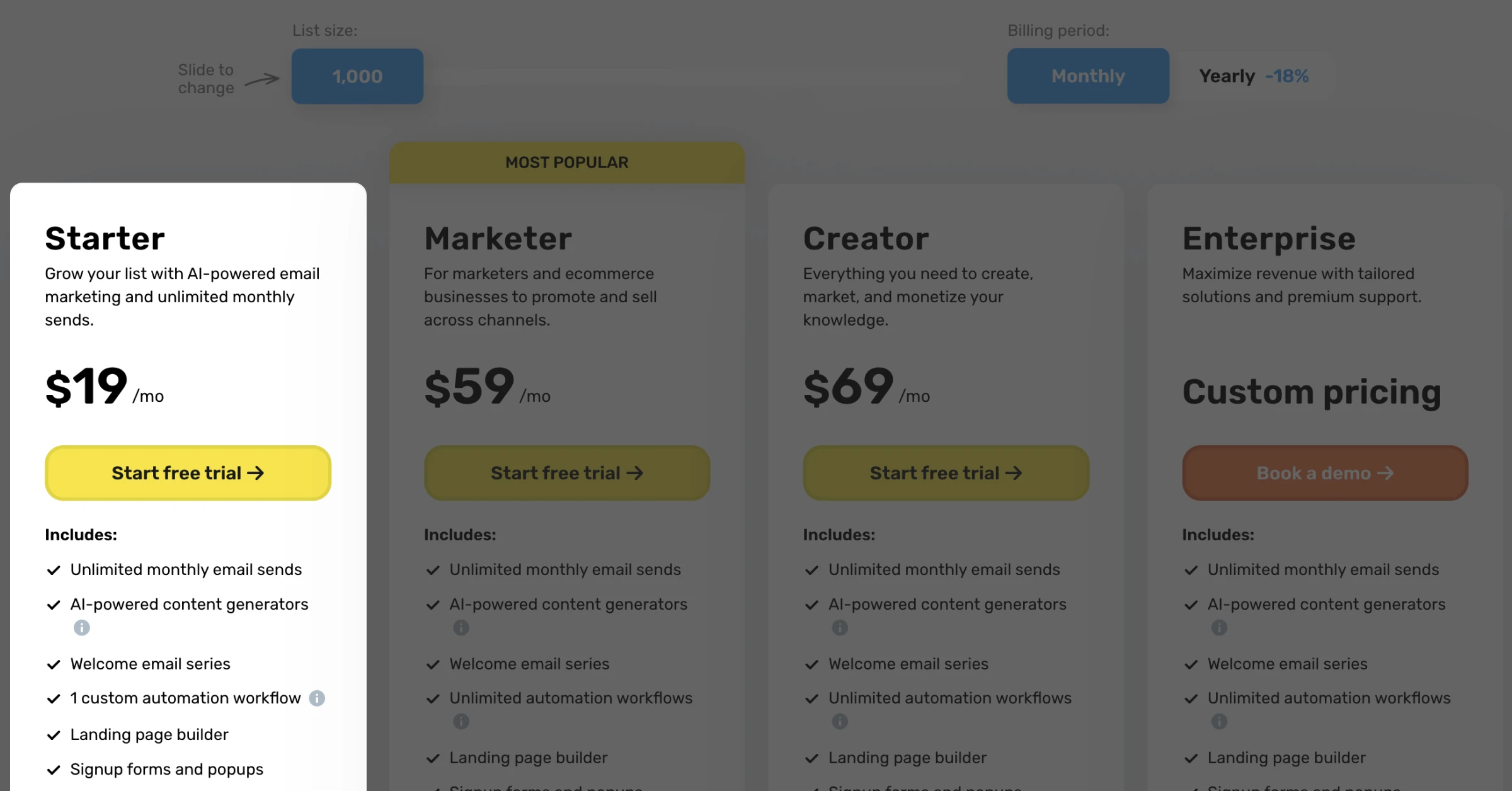
The Starter plan begins at $19/month for 1,000 contacts and is built for solo operators and early-stage lists. You get unlimited emails, the AI email generator, autoresponders, a website builder, signup forms, landing pages, and one automation workflow. That last number is the catch. One workflow is enough for a single welcome series and nothing else.
Here's what Starter costs as your list grows.
Contacts | Starter price |
|---|---|
1,000 | $19/mo |
2,500 | $29/mo |
5,000 | $54/mo |
10,000 | $79/mo |
Source: GetResponse.com, June 2026. Monthly billing.
What's missing on Starter: multiple automation workflows, webinars, advanced segmentation, and event-based triggers. If your marketing is more than a newsletter plus one welcome email, you'll outgrow Starter fast.
Marketer Plan: Marketing Automation
The Marketer plan starts at $59/month for 1,000 contacts on monthly billing ($48/month annual) and unlocks the automation engine. This is the tier most growing businesses actually land on. You get everything in Starter plus unlimited automation workflows, event-based automation, advanced segmentation, web push notifications, and paid ads tools.
What's still gated: webinars, course creation, and paid newsletters. Those stay locked behind Creator. At 10,000 contacts, Marketer runs $114/month. If you're running multi-step flows, lead scoring, and segmented campaigns, this is the plan that fits. If you're paying for it and only sending broadcasts, you're funding features you never touch.
Creator Plan: Webinars, Courses, Newsletters
The Creator plan costs $69/month for 1,000 contacts and is the only standard tier with built-in webinars. You get everything in Marketer plus webinar hosting for up to 100 attendees, course creation with paid course selling, premium newsletters with paid subscriptions, and multi-user access. At 10,000 contacts, Creator runs $134/month.
This is the right tier for course creators, webinar hosts, and paid-newsletter operators. For everyone else, it's a lot of capability you'll never open. The question to ask: do you need webinars badly enough to pay the Creator premium, or are you better off staying on Marketer? That decision is where most GetResponse buyers get the math wrong, which we'll cover next.
Enterprise Plan: High-Volume Custom
The Enterprise plan is a custom quote and means a sales call. It adds transactional email, a dedicated IP, custom DKIM and domain setup, and a dedicated account manager on top of everything in Creator. If you're sending at high volume and need dedicated infrastructure, this is the tier. If you're here, you already know your numbers, and so does their sales team.
How GetResponse Pricing Scales With List Size
GetResponse pricing climbs steadily with your contact count, and the jump from 10,000 to 25,000 contacts is steeper than most buyers expect. At 25,000 contacts, Starter alone runs $174/month, Marketer $215/month, and Creator $249/month. Here's the side-by-side at the list sizes people actually compare.
Contacts | Starter | Marketer | Creator |
|---|---|---|---|
1,000 | $19/mo | $59/mo | $69/mo |
2,500 | $29/mo | $69/mo | $79/mo |
5,000 | $54/mo | $95/mo | $109/mo |
10,000 | $79/mo | $114/mo | $134/mo |
25,000 | $174/mo | $215/mo | $249/mo |
50,000 | $299/mo | $359/mo | $414/mo |
Source: GetResponse.com, June 2026. Monthly billing. For annual pricing, subtract 18% across all tiers.
One more lever worth pulling: annual billing. GetResponse charges roughly 18% less on a 12-month prepay versus month-to-month. A team on Marketer at 10,000 contacts drops from $114/month down to roughly $93/month on annual billing — a savings of about $250 a year. If you're confident in the platform, annual is the obvious call. If you're still testing, the monthly premium is the price of the exit option.
The Webinar Add-On: GetResponse's Biggest Hidden Up-Sell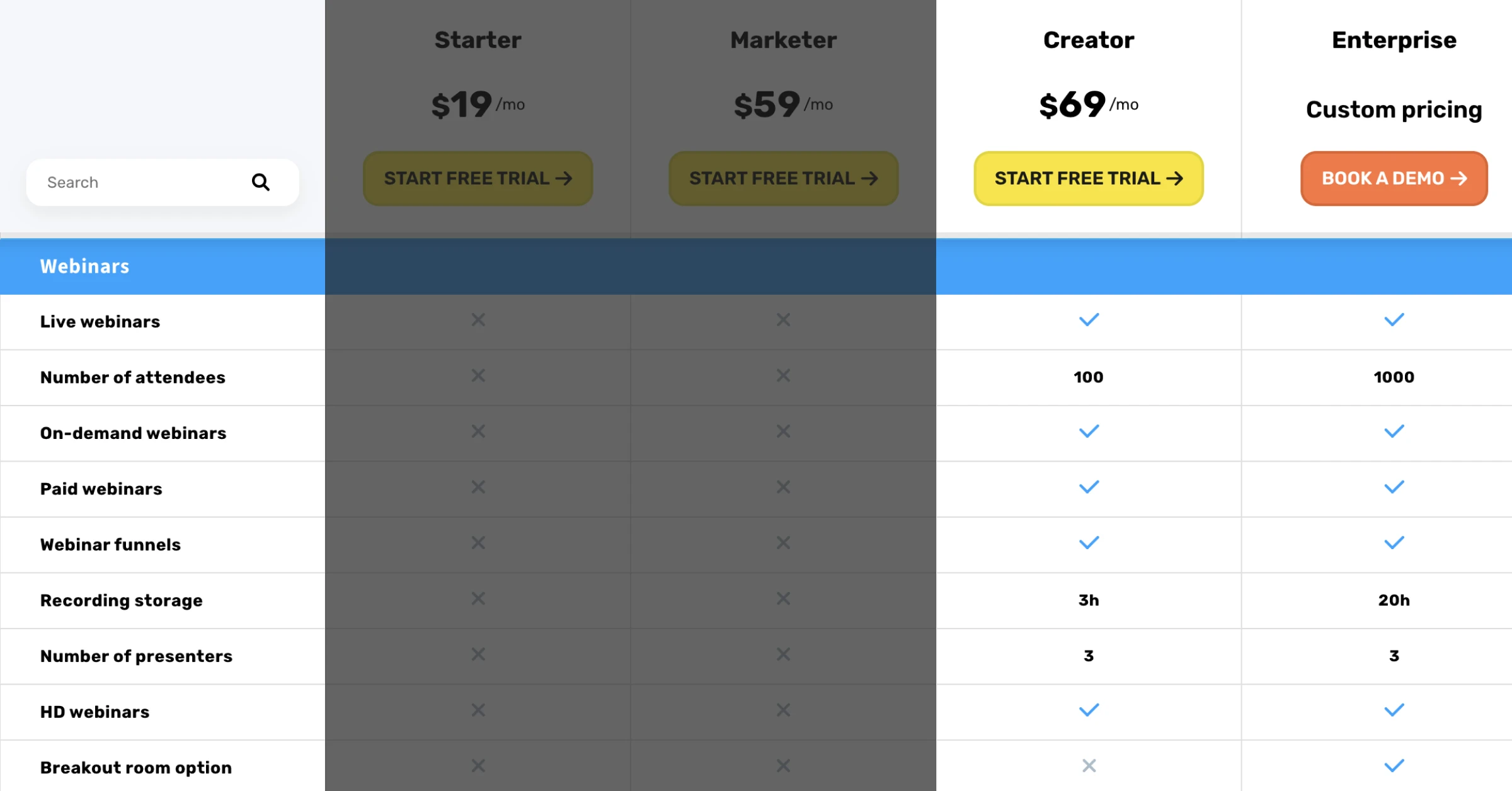
GetResponse markets hard on webinars, but webinars are not included in Starter or Marketer. To host one, you either upgrade to Creator at $69/month or buy the webinar add-on, which runs about $40/month for up to 100 attendees. This is the cost most buyers discover after they've already committed to a plan.
Run the math and the trap becomes obvious. A Marketer user at 1,000 contacts who bolts on Webinars 100 pays $59 plus $40, or $99/month. That's $30 more than the Creator plan at $69/month, which includes the same 100-attendee webinar cap plus course tools and paid newsletters. You'd be paying more for less. GetResponse doesn't surface that comparison anywhere near the add-on button.
This is the pattern across the whole pricing page. The plan you start on is rarely the plan you end up paying for, and the gap between them is filled with add-ons. That dynamic isn't unique to GetResponse, and it's exactly the friction we talk about internally when we look at how email platforms price.
All these variables create not just complexities in selling, closing, and pricing. They create complexities in managing the account, supporting the account, and upselling the account.
— Trevor Hatfield, SendX, on a 2025 pricing strategy call
His point applies straight to GetResponse's tier-plus-add-on structure. Every gate and every bolt-on is another variable the buyer has to track, and every variable is a place the bill can grow without warning.
GetResponse Free Plan: What You Actually Get
The GetResponse free plan covers up to 500 contacts and 2,500 emails per month, with a landing page, a website builder, and signup forms. It's genuinely useful for testing the platform and running a tiny list. What you don't get: advanced automation, A/B testing, webinars, or depth in analytics. GetResponse branding also appears on your emails and landing pages on the free tier.
The honest verdict: the free plan is a trial that doesn't expire, not a business plan. Once you cross 500 contacts or want a single automation beyond the basics, you're on Starter. For comparison, MailerLite's free plan covers up to 1,000 contacts, double GetResponse's free ceiling, which matters if free-tier headroom is your deciding factor.
GetResponse Pricing vs. Alternatives
GetResponse sits in the mid-priced range for all-in-one email platforms, and whether it's worth the premium depends on whether you use the webinar and funnel features you're paying for. At small list sizes, MailerLite starts cheaper and offers a more generous free tier. At the creator end, Kit (formerly ConvertKit) targets newsletters more narrowly. Here's how the landscape looks.
MailerLite starts cheaper at small lists and offers a free plan up to 1,000 contacts versus GetResponse's 500. The full breakdown is in our MailerLite pricing guide.
Kit (ConvertKit) is priced near Creator but built around creators and paid newsletters specifically. See the Kit pricing breakdown for the side-by-side.
ActiveCampaign offers deeper automation than Marketer but costs more at scale.
SendX charges a flat rate per contact tier with automation included at every paid level. No feature gating between tiers means no surprise upgrade to unlock workflows.
If you want a full grid comparing these platforms feature by feature, the email marketing software comparison lays them out together. The thing to weigh isn't the headline price. It's how much of each platform's stack you'll actually use.
Is GetResponse Worth the Price?
GetResponse earns its price for a specific buyer and overcharges everyone else. The deciding factor is whether you need webinars and funnels in the same tool as your email, because that bundle is what you're paying the premium for.
GetResponse is the right choice if:
You want built-in webinars without a third-party tool and will pay for Creator.
You need conversion funnels and automation in one platform.
You run online courses or paid newsletters.
GetResponse is the wrong choice if:
You're on Marketer but never run a webinar. You're funding the tier above you.
Your list is over 25,000 and you're price-sensitive. Per-contact costs compound fast.
You want pure email deliverability without paying for funnel and webinar infrastructure you don't use.
How to Get the Best Price on GetResponse
The fastest way to cut your GetResponse bill is annual billing, which saves 18% versus paying monthly. A few more levers worth pulling:
Use the 14-day free trial before committing. No credit card required.
Start on the free plan if your list is under 500 contacts and stay there until you hit a real limit.
Right-size your contact tier. GetResponse allows downgrades, so don't over-buy list capacity you don't have yet.
Skip the webinar add-on. If you need webinars, price out Creator first. It's usually cheaper than Marketer plus the add-on.
The broader lesson holds across every platform on this list: the advertised price is the floor, not the bill. Map your real contact count and the exact features you need before you compare tools, or you'll compare the wrong numbers.
The Bottom Line
GetResponse is a capable all-in-one platform with a pricing page that rewards careful reading. Starter at $19/month is a fair entry point for list building, Marketer is the practical home for most automation users, and Creator earns its keep only if webinars and courses are core to your business. The webinar add-on is the trap to watch. It almost always costs more than just upgrading.
If you're tired of feature gates and add-ons deciding your bill, SendX takes the opposite approach: automation is included at every paid tier, with flat per-contact pricing and no upgrade required to unlock workflows. You can see the full breakdown on the SendX pricing page. Whatever you choose, price it on your real list size and your real feature needs, not the number on the homepage.
FAQs
How much does GetResponse cost per month?
GetResponse offers a free plan for up to 500 contacts. Paid plans on monthly billing start at $19/month (Starter), $59/month (Marketer), and $69/month (Creator) at 1,000 contacts. Prices scale with your list — Starter reaches $79/month at 10,000 contacts and $174/month at 25,000 contacts. Annual billing saves 18% across all tiers.
Is there a free GetResponse plan?
Yes. The free plan covers up to 500 contacts and 2,500 emails per month. It includes a landing page builder, website builder, and signup forms, but GetResponse branding appears on your emails. Automation is limited to basic autoresponders. Once you cross 500 contacts or need more than one workflow, you're on a paid plan.
What is the difference between GetResponse Starter, Marketer, and Creator?
The plans gate features, not just contact limits. Starter ($19/month at 1K contacts) includes email, autoresponders, and one automation workflow. Marketer ($59/month) unlocks unlimited automation workflows, advanced segmentation, and event-based triggers. Creator ($69/month) adds webinars for up to 100 attendees, course creation, and paid newsletters on top of everything in Marketer.
Is the GetResponse webinar add-on worth buying?
Rarely. Adding the Webinars 100 add-on ($40/month) to a Marketer plan ($59/month) costs $99/month — $30 more than the Creator plan at $69/month. Creator includes the same 100-attendee webinar cap plus course creation and paid newsletters. Unless you need specific Marketer features without the Creator extras, upgrading to Creator is almost always the better deal.
How can I get the best price on GetResponse?
The biggest lever is annual billing, which saves 18% versus month-to-month. Beyond that: start on the free plan if your list is under 500 contacts, use the 14-day free trial before committing to a paid plan, and size your contact tier accurately — don't over-buy capacity you don't have yet. If you're on Marketer and never running webinars, you're paying for the plan above you.
