

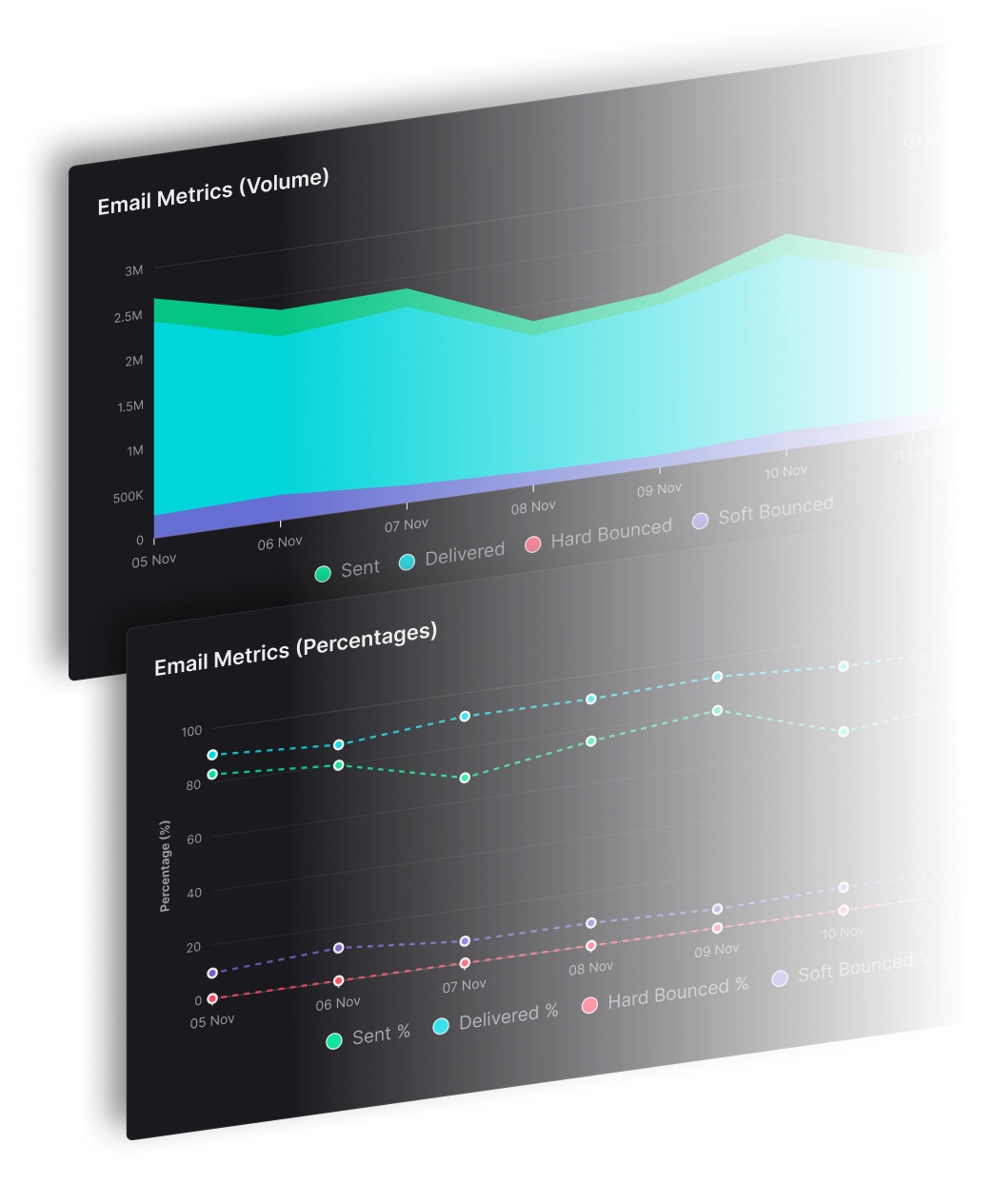


Personalized email marketing means changing an email's content, offer, or send timing using data you hold on each recipient, such as a name, a segment, or a recent action, so every message feels useful to that person and earns more clicks, conversions, and revenue than one broadcast sent to your whole list. Why, then, do so many marketing teams drop a first name into a greeting and watch engagement stay flat?
Inserting a merge tag is easy when you run a small list with 1 newsletter. Once you manage 20K+ contacts or send millions of messages a month across several titles or client brands, the work changes shape. Segments go stale between exports. Manual CSV transfers delay emails that depend on timing, and Gmail, Yahoo, and Outlook read the weak engagement that follows as a reason to filter you. SendX Marketing takes that manual overhead off your team, so dynamic segments, behavior-triggered workflows, and clean reporting run in one place.
This guide walks you through the full build: checking whether your data can support the personalization level you picked, building lifecycle campaigns with a named trigger and metric for each, proving lift with a control group, and sorting customer data within privacy and compliance limits.
What Personalized Email Marketing Means and Does It Still Pay Off
Does a first name in the greeting still count as personalization, or has that move already worn out?
A stored name in the salutation is the weakest version you can ship. Recipients see their name in almost every marketing email, so the greeting rarely changes how they treat the rest of the message. Mailbox providers score your reputation on clicks, replies, and low complaint rates, not on whether the hello looked polite.
Personalization works more like a bookstore clerk than a name badge. Saying the shopper's name at the door is polite. Pointing them to the finance shelf is useful. Handing them the sequel they browsed twice last week is what earns the sale. You can run the same idea at 4 levels, and each level needs a different kind of data.
- First-name token: You drop a stored name field into the greeting of a monthly digest. It takes 1 merge field and almost no setup, yet it rarely changes how a recipient interacts with the body of the email.
- Segment-based: You group the list by attributes such as plan type, location, or declared interest, then send a customized edition to each group. A business publication, for example, sends its finance digest only to readers tagged as finance instead of mailing every subscriber the same headline.
- Behavior-triggered: You react to observed intent with a timely email after a click, page view, or purchase. When a visitor views the same software plan or jacket twice in 1 week, an automated message follows up on that exact item.
- Dynamic content: You assemble individual content blocks inside 1 template from preference history and past clicks. Each reader sees their top 3 topics at the top of the newsletter without your team building a separate campaign for every combination.
| Level | Data it uses | Example | Effort to run |
|---|---|---|---|
| First-name token | Name field | Greeting with the reader's first name in a monthly digest | Low, 1 merge field |
| Segment-based | Plan, location, or interest tags | Finance edition sent only to readers tagged as finance | Medium, needs clean tags |
| Behavior-triggered | Clicks, page views, purchases | Email about a product viewed twice in 1 week | Medium to high, needs event tracking |
| Dynamic content | Preference history and past clicks | Top 3 topics chosen for each reader | High, needs content rules |
Does personalized email still pay off
Adapting a message to recipient intent still beats one generic broadcast, if you read the result with clear eyes. Industry reporting on personalized versus non-personalized sends shows a higher open rate for the personalized versions, but that gap is a directional sign, not final proof. Apple Mail Privacy Protection pre-loads tracking pixels for Apple Mail users, which inflates open counts whether or not a person read the message. Broader email marketing ROI benchmarks help a marketing lead weigh setup effort against expected channel returns before committing engineering time.
Start with the highest level your current contact data can reliably support, and build that 1 campaign first. A finance edition sent only to readers tagged as finance is a better first test than a dynamic newsletter your tags cannot yet fill.
Check Whether Your Data Can Support the Level You Picked
Before you draft a single template, answer 1 blunt question: do you hold clean, up-to-date data for the personalization level you chose? Many teams jump straight to dynamic blocks or behavioral triggers, discover their event feed updates once a week, and conclude that personalization fails for their audience.
Matching your campaign to the freshest data you actually own beats building a complex workflow on stale spreadsheets.
Audit your 4 contact data sources
Every personalized campaign pulls from 1 or more of 4 data categories. Walk through your current stack and verify how each source enters your email software.
- Profile data: Attributes like job role, region, or plan tier usually sit inside your contact record already. Check how many records are blank before you rely on a field in your copy.
- Engagement data: Clicks, replies, and recent activity live inside your email software automatically. Because mailbox privacy features inflate opens, rely on clicks and conversions to judge real interest.
- Event data: Actions such as page views, cart updates, or plan upgrades happen on your website or inside your product. Using them requires live tracking connected to your sending software, and a solid CRM automation guide for sales teams can help align how sales and marketing teams pass those live contact events without duplicates.
- Purchase or transaction history: Order dates, item categories, and renewal cycles live in your store or billing system. Until that billing feed syncs directly with your contact list, lifecycle reminders stay stuck in manual exports.
Respect data freshness and group size
Behavior-triggered and dynamic campaigns need event and purchase data that syncs within hours, not through a Friday afternoon CSV upload. A cart reminder that arrives 3 days after a shopper left your checkout reads like a stray broadcast and pushes recipients toward the spam button. Mailbox providers track those complaints immediately and throttle future inbox placement.
Splitting your list also carries a statistical trade-off. More segments and triggers make each message more specific to that recipient, yet every split shrinks the group receiving each version. Only carve out a separate segment when it holds enough contacts to produce a readable test result instead of noisy guesses. List the data you hold today, mark which of the 4 sources update automatically, and start building at the highest level your live data supports this month.
Segment Your Audience and Pick the Campaigns Worth Building
A retail brand sends its spring promotion to everyone on the list. Repeat buyers who ordered last week get the same "discover us" pitch as first-time visitors, and the loyalty offer lands in inboxes of people who have not opened an email in months. The copy is fine. The targeting is the problem, and no amount of clever personalization inside one undifferentiated broadcast fixes it.
Segments decide who receives which version. Campaign selection decides which flows earn revenue first. Get those two decisions right before writing a single personalized line.
Segment your list in 4 practical ways
Each of these 4 methods depends on a different data source, so pick the ones your systems already feed.
- Profile attributes: Group contacts by role, location, or plan tier. A software business separates active trial users from paying accounts so trial users receive setup guidance instead of renewal notices.
- Recent engagement: Track who clicked a link in the last 30 days. A digital publisher tags readers who clicked tax or policy coverage and sends deeper follow-ups only to that interested group.
- Lifecycle stage: Separate new signups, active buyers, and lapsed subscribers. A retail brand groups repeat buyers by product category so first-time visitors do not get advanced loyalty offers on day 2.
- Purchase or transaction history: Use billing dates and order frequency to time your outreach. A subscription business flags upcoming renewal dates 30 days out to confirm value before the card charges.
The payoff concentrates quickly. Industry benchmarks consistently attribute the majority of email revenue to segmented, targeted, and personalized sends rather than to batch campaigns, and the gap in transaction volume between customized and generic email is wide enough that even a rough first segmentation pays for itself. Revenue gathers around messages built for audience fit. For deeper structural tactics, review these email list segmentation strategies before locking in your tag taxonomy.
Teams running multiple publications or client brands face an extra hazard at volume. Never pool engagement tags across separate sending identities, because a subscriber who reads your daily tech newsletter may ignore your weekly retail digest. One brand's sloppy tagging can also drag down the rest when they share infrastructure, so keep each identity's segments isolated. Following proven practices for scaling outbound personalization with clean data keeps attributes consistent as lists grow past 20K contacts.
Contacts who fit no specific segment should receive your broad editorial send, never a broken or forced personalized template. Set clear rules for when a contact moves between segments, such as shifting automatically from a prospect group to a buyer group the hour an order completes. Write those rules down before you build anything, because ambiguous transitions are where duplicate sends and contradictory messages come from.
Match lifecycle campaigns to triggers and metrics
Use the lookup table below to pick which personalized campaigns to build first based on the data you already sync.
| Campaign | Trigger | Data used | Personalized element | Metric to track |
|---|---|---|---|---|
| Welcome series | New signup | Signup source and chosen topics | Topic of the first 3 emails | Click rate on the first email |
| Browse abandonment | 2 views of 1 product or category | Page views and category | Recently viewed items block | Conversion per delivered email |
| Cart abandonment | Cart left without purchase | Cart contents and price | Items and total in the cart | Recovered revenue per recipient |
| Post-purchase follow-up | Order delivered | Order history | Usage tips for the product bought | Repeat purchase rate |
| Replenishment reminder | Expected run-out date | Purchase interval | Reorder block with the last item bought | Reorder rate |
| Win-back | 90 days with no opens or clicks | Engagement history | Best-performing topic and 1 offer | Reactivation rate and unsubscribe rate |
| Editorial newsletter | Topic clicked in past issues | Topic click history | Top 2 topics placed first | Click-through rate by topic |
Read the table from right to left when prioritizing. If a campaign's metric is one you cannot currently measure, build it later even if the trigger looks easy. A flow you cannot evaluate is a flow you cannot defend when results get questioned.
Build 3 high-return campaigns step by step
Welcome series: Set your signup form to ask 1 simple topic question, then branch the first email to lead with that chosen topic. Use the recipient's first click inside email 1 to tailor email 2. Avoid the classic failure of sending the exact same 3 generic introductions to every new subscriber regardless of why they joined. A reader who signed up for pricing updates and a reader who signed up for tutorials should diverge by the second email at the latest.
Browse abandonment: Trigger an automated follow-up displaying the 2 items or articles a visitor viewed, along with 1 helpful comparison detail. Wait until the visitor has left your site for a set cooling-off window, such as 2 hours, because emailing while they are still scrolling feels intrusive. If the same visitor browses again the next day, suppress the duplicate rather than stacking reminders.
Win-back: After 90 days with no opens or clicks, send a plain message leading with the recipient's highest-clicked past topic and 1 clear reason to stay. If the recipient still does not click, remove or suppress that address immediately. Continuing to mail silent contacts drags down domain reputation with Gmail and Yahoo, which pushes your emails to active readers out of the inbox.
Each of these 3 campaigns works because it responds directly to the recipient's most recent action, reading like a natural continuation rather than an interruption. Pick 1 campaign from the table this week, build it cleanly, and hold back a random share of eligible contacts as a control group to verify real lift.
Personalize the Elements That Earn Opens and Clicks
Greeting a reader by name does nothing if the subject line, preview text, and opening block feel generic. Focus your effort on the visible elements that earn the open and drive the click. While your chosen segment and lifecycle campaign govern the hero block, recommendations, and call to action, you still control how each element presents the right detail.
Rank the 6 email elements by impact
Work through these 6 elements in order of how strongly they influence recipient action.
- Subject line: Pull the product category, recent topic, or account stage a recipient interacted with. A subject line naming the exact report a visitor downloaded outperforms a vague weekly roundup headline.
- Preview text: Use the second line visible in the inbox to extend the subject line with a specific detail, such as the recipient's city or renewal month, instead of letting "View in browser" waste prime space.
- Opening hero block: Swap the lead headline and image based on plan tier or region. A subscriber on an enterprise plan sees multi-team governance features, while a solo publisher sees list-growth tips.
- Product or article recommendations: Populate 2 or 3 links drawn directly from category click history or recent purchases so each reader sees material matched to proven interest.
- Call-to-action wording: Match button copy to lifecycle stage. A new trial user clicks "Finish workspace setup," whereas an active subscriber clicks "Add a second domain."
- Send time and sender name: Adjust delivery time to the recipient's time zone or past engagement window, and match the From name to the specific newsletter editor or account rep the recipient recognizes.
Test name-based subject lines against behavioral lines
Name tokens in subject lines are an experimentally tested tactic, not a universal law. In a peer-reviewed Marketing Science study, adding the recipient's name to the subject line increased open probability from 9.05% to 10.80%, a relative lift of about 20%, increased sales-lead generation from 0.39% to 0.51%, or 31%, and cut campaign unsubscribes from 1.2% to 1.0%, a 17% drop.
Context still decides whether that tactic holds up for your list. A later replication documented alongside the Stanford Graduate School of Business working paper found no significant lift from first-name subject lines, proving that audience expectations vary. Test a first-name subject line head-to-head against a behavior-based subject line before rolling either pattern across every send.
Avoid the most common testing mistake: changing 5 elements in the same campaign. If you alter the subject line, hero image, recommendations, button text, and send time together, you will never know which edit earned the clicks. Change 1 element per test so you can repeat what works.
In SendX, the email personalization feature inserts contact attributes directly into subject lines and dynamic body blocks, so your team skips building and maintaining separate templates for every segment.
Trigger Emails From What Readers Do
A shopper leaves a cart at 2:14 p.m. One hour later, a single email names the items still sitting there and cancels itself the moment they pay. A triggered email fires from a specific action, so the send matches live intent instead of your weekly publishing calendar.
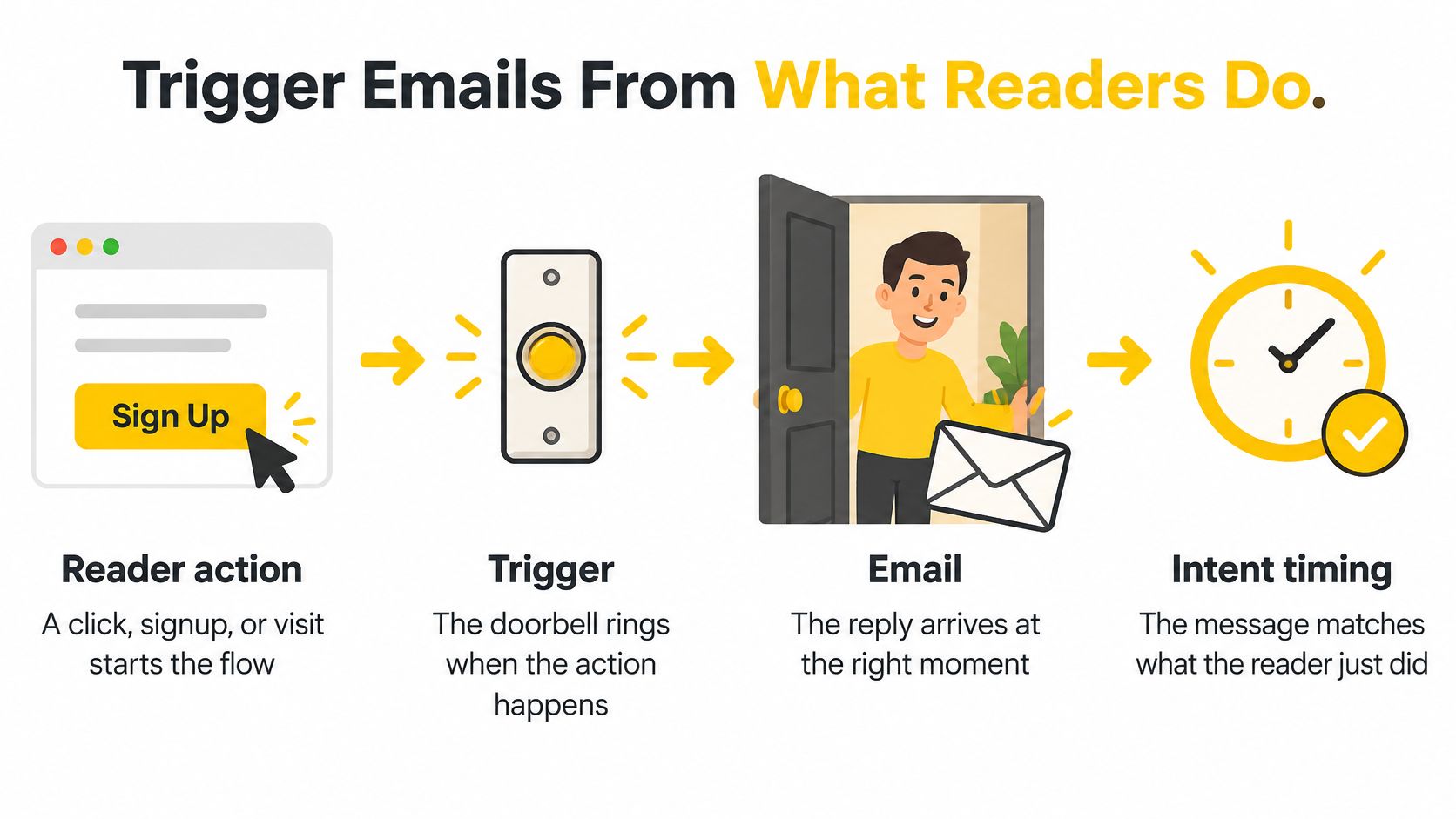
Name the campaign before you build it. A cart reminder uses an abandoned-cart event, the product names in that cart, a 1-hour delay, and completed checkout as the result you watch. A post-delivery setup guide uses a completed order, a 24-hour delay, and whether the buyer opens the guide link. A pricing-page follow-up uses two views of that page and answers the two questions that stall buyers, with a booked call or a purchase as the result.
Set up a behavioral trigger in 5 steps
Once the lifecycle campaign is chosen, build the trigger in 5 steps.
- Choose the exact event: Pick 1 clear action that signals intent, for example a form signup, 2 product page views, an abandoned cart, or a completed order. Your tracking setup sends that event to your email software, and the software queues the contact for the workflow.
- Set a purposeful delay: Pause before sending so the message feels helpful rather than invasive. Use a 1-hour delay for a cart reminder so the shopper has time to finish checkout, or a 24-hour delay after delivery for a setup guide.
- Write the message around the action: Reference what the reader just did in plain terms and drop unrelated offers. If someone left a pricing page, answer the 2 questions that stall buyers instead of pitching a blog post.
- Add an exit rule: Tell the software when to pull a contact out of the sequence immediately. The moment a recipient completes a purchase or books a call, the exit rule cancels every remaining reminder.
- Apply a frequency cap: Limit how many triggered emails 1 recipient can receive in a 7-day window. When an active reader clicks across 4 product categories in 1 afternoon, a cap stops those workflows from flooding the inbox and drawing spam complaints.
Account for intent bias before celebrating lift
Behavioral automation produces striking results, and those results are easy to misread. People who abandon a cart or inspect a pricing page twice already show buying intent. Comparing them with a cold broadcast audience mixes that intent with the effect of the email.
Hold out a random slice of eligible contacts and send them your regular broadcast instead of the trigger. Then compare the action that campaign was built to earn, such as completed checkouts or booked calls. See how triggered emails work across lifecycle flows when you plan those holdouts, so each flow has one entry event and one result.
Never launch a triggered workflow without an exit rule. Emailing a cart reminder to someone who already paid is the fastest way to earn a spam complaint.
SendX drip campaigns send when a reader acts, including a welcome after signup, a win-back after a lapse, or a follow-up after a click, with the delay and the exit rule on that path.
Measure Personalization With a Control Group and the Right Metrics
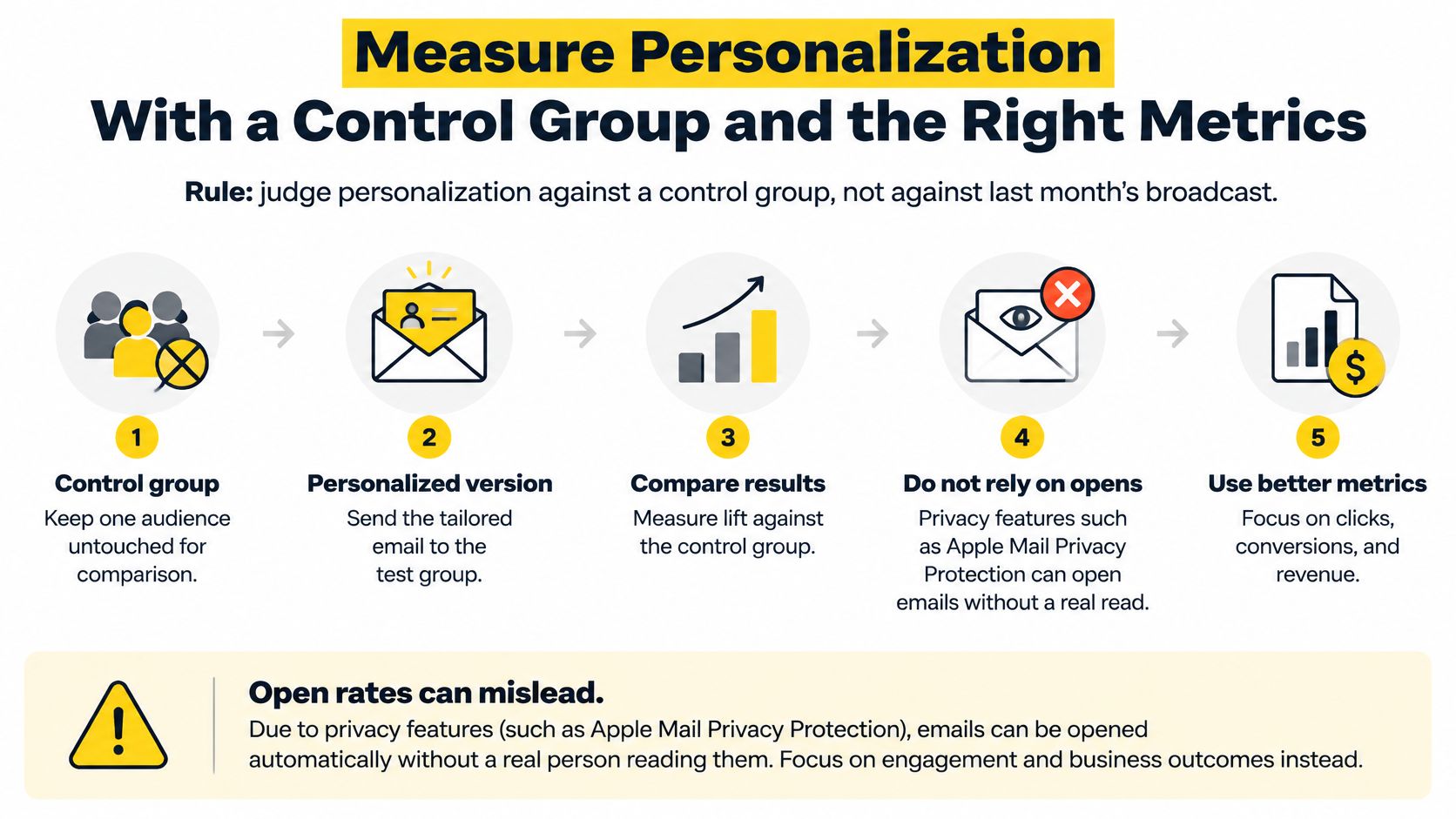
A personalized campaign earns its keep only when you score it against a live control drawn from the same audience. Seasonality, list growth, and mailbox filtering shift week to week. Last month's generic broadcast is a different test, so it cannot tell you what this send changed.
Choose metrics that resist privacy noise
Treat opens as a secondary signal, since mailbox privacy features can inflate them, as covered earlier. Put the scoreboard on actions a person takes after delivery, plus the negative signals that wear out a list. Read those results through actionable email marketing metrics that connect the send to revenue and list health.
| Metric | What it tells you | Why it can mislead | Baseline to compare |
|---|---|---|---|
| Click-through rate | Whether the content matched reader interest | Shifts with list size and audience mix | Control group |
| Conversion per delivered email | Whether the click led to a target action | Needs tracked conversions and a set attribution window | Control group |
| Revenue per recipient | Business value generated by the send | Attribution window changes the reported total | Standard broadcast to the same audience |
| Unsubscribe rate | Whether messages are tiring your list | Small lists produce noisy percentage swings | Previous send to the same segment |
| Complaint rate | Whether recipients trust your sending behavior | Rare events look flat at low volume | Control group |
| Open rate | Initial subject-line interest | Inflated by privacy features that open messages automatically | Use only as a secondary signal |
Run a 4-step control-group test at scale
Use one test design for segmented campaigns and for behavioral trigger holdouts. The whole team then reads lift the same way.
- Split eligible contacts at random: Divide the qualifying audience so both groups share the same mix of signup dates, engagement levels, and mailbox providers.
- Send both variants simultaneously: Deliver the personalized version to the test group and the standard version to the control group at the same hour. Same hour removes timing as the reason one side wins.
- Run for 1 full send cycle: Wait through the full purchase or engagement window before calling a winner. Early clickers rarely behave like the rest of the list.
- Compare conversions and unsubscribes: Judge the test by incremental clicks, conversions per delivered email, revenue per recipient, unsubscribes, and spam complaints. Leave opens out of the winner call.
Small relative gains stack once the list is large. Point the unique-open and unique-click lift from the promotional benchmark earlier at your own baseline, instead of pasting that study in as this week's result. On 1,000,000 delivered messages, a modest 10% relative lift on a 2% baseline click rate is 2,000 extra clicks from one send.
High-volume and multi-brand senders should break every test dashboard out by segment, sending domain, and mailbox provider. Blended averages hide the split. Gmail users can convert while Outlook users file complaints because a trigger fires too often, and inbox placement drops before the average looks bad. Keep a weekly view of click-through rate, conversion per delivered email, and unsubscribe rate for each segment and each mailbox provider.
Use Customer Data Within Privacy and Compliance Limits
A recommendation feels helpful when it matches something the reader already told you. The same sentence feels like surveillance when it quotes a page they barely glanced at. That gap, between useful and watched, is where personalization starts driving unsubscribes and spam complaints that damage the sending domain. Extra fields in the database do not repair a message the recipient never agreed to see.
Readers usually accept a relevant offer when they can tell where the detail came from, know it will not be handed to outside companies, and can change what you keep. Hide any of those three and the offer starts to look like a trap.
Sort your data into 3 visibility tiers
Sort each field the way a careful host sorts what they know about a guest. What the guest said out loud is safe to repeat. What you guessed is not.
- Tier 1, explicit preferences and purchase history: Topics a subscriber picked on your signup form, plan tier, and items they bought from you. Recipients expect you to remember these details and generally view them as helpful. A bookstore can name the two novels someone purchased last month.
- Tier 2, observed behavior: Email clicks, webinar attendance, and on-site category browsing. Use these signals when your privacy notice explains tracking and the copy stays grounded rather than overly specific. "You opened our workshop series" is fair. "You paused on slide 4" is not.
- Tier 3, inferred traits and sensitive characteristics: Guessed life events, financial stress, health assumptions, or hyper-specific page-scroll behavior. Leave these out of marketing email unless you have explicit consent and a clear, justified reason.
Meet legal and mailbox provider rules
Personalization does not exempt a marketing email from federal rules or inbox requirements. Under the CAN-SPAM Act compliance guide published by the FTC, every marketing email must use accurate From, To, Reply-To, and routing headers, a subject line that accurately reflects the message, a clear advertisement disclosure, and a valid physical postal address. Your opt-out link must remain functional for at least 30 days after the send, and you must honor opt-out requests within 10 business days.
Mailbox providers add technical bars on top of that law. Under Google's email sender guidelines, bulk senders delivering 5,000 or more messages per day to Gmail accounts have been required since February 2024 to authenticate outgoing email, avoid unwanted sends, display a visible unsubscribe link in the body, and support one-click unsubscribe via the List-Unsubscribe-Post header set to List-Unsubscribe=One-Click. A segment name and a custom greeting do not replace that header.
A visible preference center and a working unsubscribe protect the readers you still want. Someone who can narrow topics or leave in one click has little reason to use the spam button, and fewer complaints help active readers keep landing in the primary inbox. SendX's dedicated deliverability expert provides in-depth analysis of email campaigns and customized strategies for improved delivery rates. For the day-to-day setup across headers, addresses, and opt-outs, follow these email compliance best practices.
Run a 4-point check before using personal data
Confirm these four items before any personal attribute enters a live template.
- Verify consent: Confirm you have documented opt-in permission for marketing email and that the contact has not opted out of that brand or topic.
- Audit the data tier: Keep the field to explicit preferences, purchase history, or clearly disclosed site behavior. Drop inferred guesses.
- Check fallback values: Send a test with the attribute blank so nobody receives broken syntax or an awkward empty space, such as "Hello," with nothing after the comma.
- Confirm opt-out mechanics: Verify that your physical address, visible unsubscribe link, and one-click unsubscribe header work on every sending identity.
Choose Software That Runs Personalized Campaigns at Volume
A small list forgives manual work. Several newsletters, or client brands on one account, do not. Personalization at that volume depends on software that updates contact data by itself, before anyone opens a spreadsheet. Before you shortlist email automation tools, confirm that merge fields and dynamic content are built in, so one template can swap a body block from a contact attribute instead of cloning the campaign.
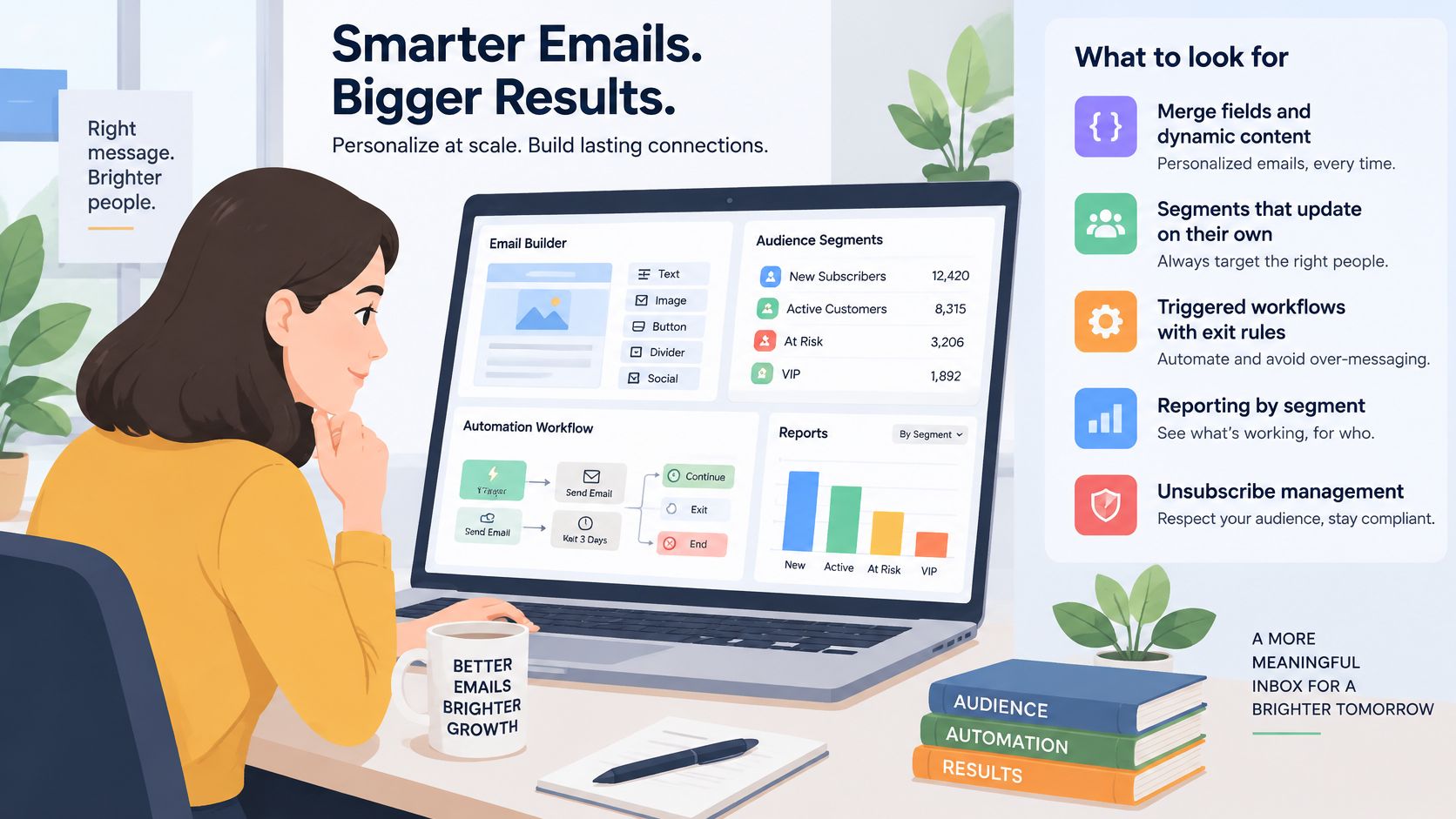
Hand-run personalization breaks in a predictable way. A coordinator exports a CSV, rebuilds the segment, uploads it, and repeats that before the next send. A reader who already bought stays in the offer sequence until someone notices. Hours go to file cleanup, not to the message.
The fix is a segment that moves on its own. With Segmentation, a lapsed subscriber enters a win-back audience as soon as the tag or purchase attribute changes. Nobody re-uploads the list.
Automated email then sends because the reader did something: a welcome after a new subscribe, a win-back after a lapse, or a follow-up after a click. Drip campaigns and visual workflows carry those sequences and stop them once the goal is met, so the new buyer drops out of the promo. Smart send delivers each email when that contact is most likely to open it, instead of one clock time for every time zone.
SendX is email marketing software for campaigns, list building, and automation, on managed sending infrastructure for organizations that send under several brands, so one brand does not have to drag down the rest. Email analytics tracks opens, clicks, and conversions in real time, including segment reports you can export, so a winning variant shows up without a side spreadsheet. A dedicated deliverability expert can analyze a campaign and recommend delivery changes when placement slips. Price follows contact list size, not how many marketing emails you send, and every plan includes unlimited marketing sends.
FAQs
What is the 80/20 rule in email marketing?
Send 80% useful, educational, or entertaining content that helps your audience and reserve 20% for direct promotional offers. The split only pays off when each segment gets the right side of it. A new subscriber still in a welcome sequence should receive mostly educational content, while a lapsed subscriber in a win-back segment can carry a higher share of promotional messages because the offer itself is the reason to return. Check your data before applying the ratio: if you cannot tag contacts by lifecycle stage or topic interest, you cannot control which readers see the 20%, and the rule becomes a guess.
What should a personalized email show when a contact field is blank?
Configure a clean fallback value for every merge tag before scheduling any send. Replace a missing first name with a neutral opener like "Hello" or omit the greeting entirely, and route contacts without topic tags into your general editorial segment so nobody sees broken tokens or empty placeholders.
How should multi-brand teams handle personalization across separate publications?
Keep contact tags, behavioral events, and suppression lists isolated per brand or sending domain. A reader who unsubscribes from a daily finance newsletter may still want a weekly retail digest, and mixing behavior across identities distorts your segments while confusing mailbox provider reputation scoring.
How do you know whether personalization is actually working?
Compare personalized sends against a control group that receives the unpersonalized version of the same campaign, then measure clicks and conversions per segment rather than opens alone. If the personalized variant does not beat the control, the problem is usually the data behind it: stale tags, missing behavioral events, or segments too broad for the content to feel relevant.
Build a personalized email program that updates segments automatically, triggers timely workflows from real reader behavior, and keeps your deliverability clean at scale. Explore how SendX pairs email marketing software with managed sending infrastructure for teams running 20K+ contacts and multiple brands.
