



An email blast sends 1 marketing email at a chosen time to a large list or segment, usually to announce an offer, event or update. Sending successfully doesn't mean reaching the inbox. For an established publisher or marketing team, the audience selection and delivery checks matter as much as the message.
For publishers managing large lists across several titles, a poorly targeted campaign can put recurring audience revenue at risk. SendX Marketing helps teams manage that sending work without coordinating each campaign through spreadsheets. This guide covers targeting, consent, campaign setup, content and delivery diagnosis.
What Is an Email Blast and When Should You Use One?
Use an email blast when the same announcement matters to a chosen audience at a specific moment. It's useful for registration deadlines, product launches and offers with a genuine end date, not for messages that should change after each recipient's actions.
A blast works like a station loudspeaker announcement. Everyone in the selected area hears the same announcement together, although email recipients can still reply individually when the sender accepts replies.
The defining characteristics are straightforward.
- One message. Recipients receive the same core offer or announcement, with optional personalized fields.
- One send time. The sender schedules a campaign rather than starting an ongoing sequence.
- One broad audience. A selected list or segment receives the campaign together.
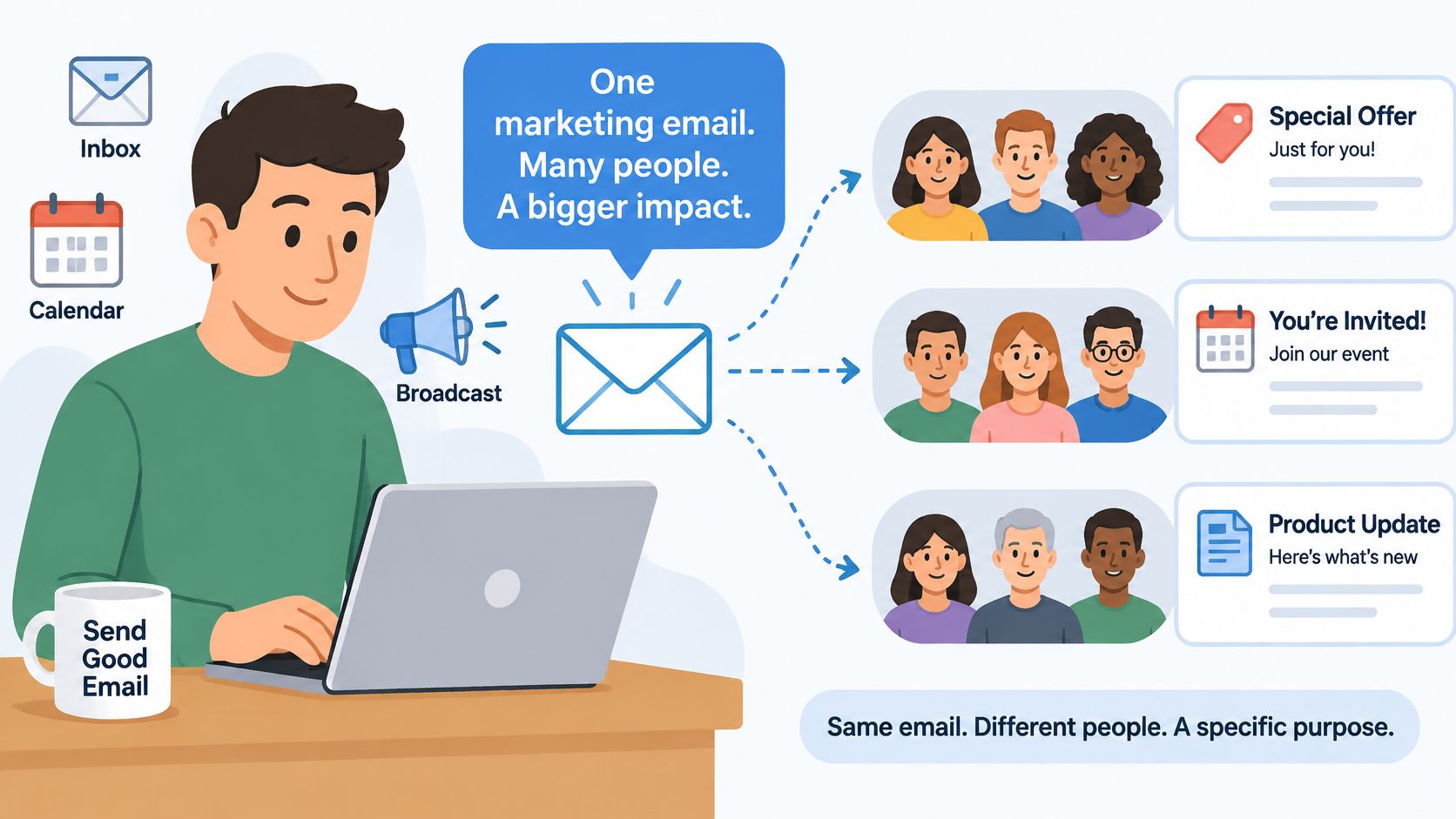
The illustration shows how a shared message can serve different business goals when the audience is chosen deliberately.
How does an email blast compare with other send types?
Email blast compared with other send types
| Send type | Who receives it | When it goes out | Best for |
|---|---|---|---|
| Email blast | Everyone on a chosen list or segment | Once, at a time the sender picks | Announcements, offers and event invitations |
| Newsletter | Subscribers who opted in to a regular series | On a set schedule | Ongoing content and editorial relationships |
| Drip campaign | Contacts who enter a sequence | Timed steps after a trigger, such as a sign-up | Onboarding and nurture |
| Transactional email | One recipient, triggered by an action | Right after the action | Receipts, password resets and alerts |
These categories can overlap. A scheduled newsletter can use broadcast sending, while a launch campaign can include a broadcast followed by behavior-triggered messages.
The trade-off is speed versus individual adaptation. A broadcast reaches a group quickly, but its shared message won't automatically change because someone registered, purchased or lost interest.
Use a blast when everyone selected needs the announcement now. Use a drip when the next message depends on an action, and a newsletter when recipients expect an ongoing editorial schedule.
Which Consent and Opt-Out Rules Apply to an Email Blast?
Consent belongs in campaign planning because a valid address isn't permission to send. Each campaign must satisfy applicable consent and opt-out rules, while mailbox providers impose additional sending requirements.
What does the CAN-SPAM Act require?
For US marketing email, the FTC's CAN-SPAM Act compliance guide requires opt-outs to be honored within 10 business days, with the mechanism remaining operational for at least 30 days after sending.
The unsubscribe process must also meet these conditions.
- Clear access. Every marketing email must explain conspicuously how to stop future marketing email.
- No unnecessary barriers. The process can't charge a fee or demand identifying information beyond an email address.
- Simple completion. Replying to the message or visiting a single webpage must be sufficient.
- Complete withdrawal. Topic preferences must still include an option to stop all marketing messages.
Every promotional email from SendX contains a link to opt out of receiving it. The sender still needs an operational suppression process, meaning a record that prevents opted-out addresses from entering future campaigns.
How do UK consent requirements differ?
For UK individual subscribers, the ICO's PECR guidance makes prior consent the default unless every soft opt-in condition applies. That exception covers an existing customer who bought or negotiated to buy similar products or services, with an opt-out offered at collection and in every subsequent message.
The sender must identify itself. Consent must be specific to the organization and communication type, involve positive action and remain withdrawable.
The ICO's electronic-mail marketing guidance permits a clear unsubscribe link or reply route and requires prompt action on withdrawals. Email opt-outs can apply specifically to email when that scope is clear.
Record the acquisition date, source and exact consent wording. A purchased address list doesn't establish those permissions, and a privacy-policy link doesn't replace consent.
A documented email compliance process should connect acquisition records, campaign approval and suppression handling. Gmail's authentication and complaint requirements add a separate operational check.
How Do You Choose Who Gets Each Blast?
Audience selection deserves attention before copywriting. Sending to everyone treats list membership as evidence that every offer matters to every recipient, which isn't a sound targeting rule.
Like seating people in the right workshop, segmentation groups contacts by a shared characteristic or action. A reporting-product announcement belongs with recipients interested in reporting, not everyone who ever downloaded unrelated content.
Which audience signals should determine eligibility?
A team can build campaign segments around these signals.
- Engagement. Recent human clicks, replies or purchases identify recipients with observable activity. This prevents spending the campaign's attention budget on an audience whose interest hasn't been established.
- Acquisition source. A webinar registration and a pricing enquiry create different expectations. Matching the message to the entry point helps prevent surprise and complaints.
- Declared interest. A selected topic or product category identifies what the recipient asked to receive. Reporting announcements can go to reporting readers rather than unrelated editorial subscribers.
- Buyer status. Existing buyers, trial users and lapsed buyers need different requests. Excluding current subscribers from an introductory subscription offer prevents an unsuitable promotion.
The email list segmentation guide provides a framework for turning these signals into reusable audience rules.
How much personalization is appropriate?
Personalization should clarify the message, not demonstrate how much information the sender holds. A first name, supplied location or expected product recommendation can help the recipient understand the offer.
Avoid sensitive attributes and guesses about income or health. Data should come from information recipients supplied or activity they reasonably expect the organization to use.
A personalized greeting won't rescue an unwanted campaign. From a mailbox provider's perspective, recipient complaints are evidence that the sender's targeting failed.
Before approval, record the segment size, expected action and exclusions. Check sample records from inside and outside the segment, then verify that suppression rules override campaign eligibility.
What Are the Steps to Plan and Send an Email Blast?
Each blast is a deliverability event, scored separately by every mailbox provider on the sending domain and IP behind it. Much of that score is set before anyone presses send, in the audience chosen, the state of the list and the expectations recipients already hold.
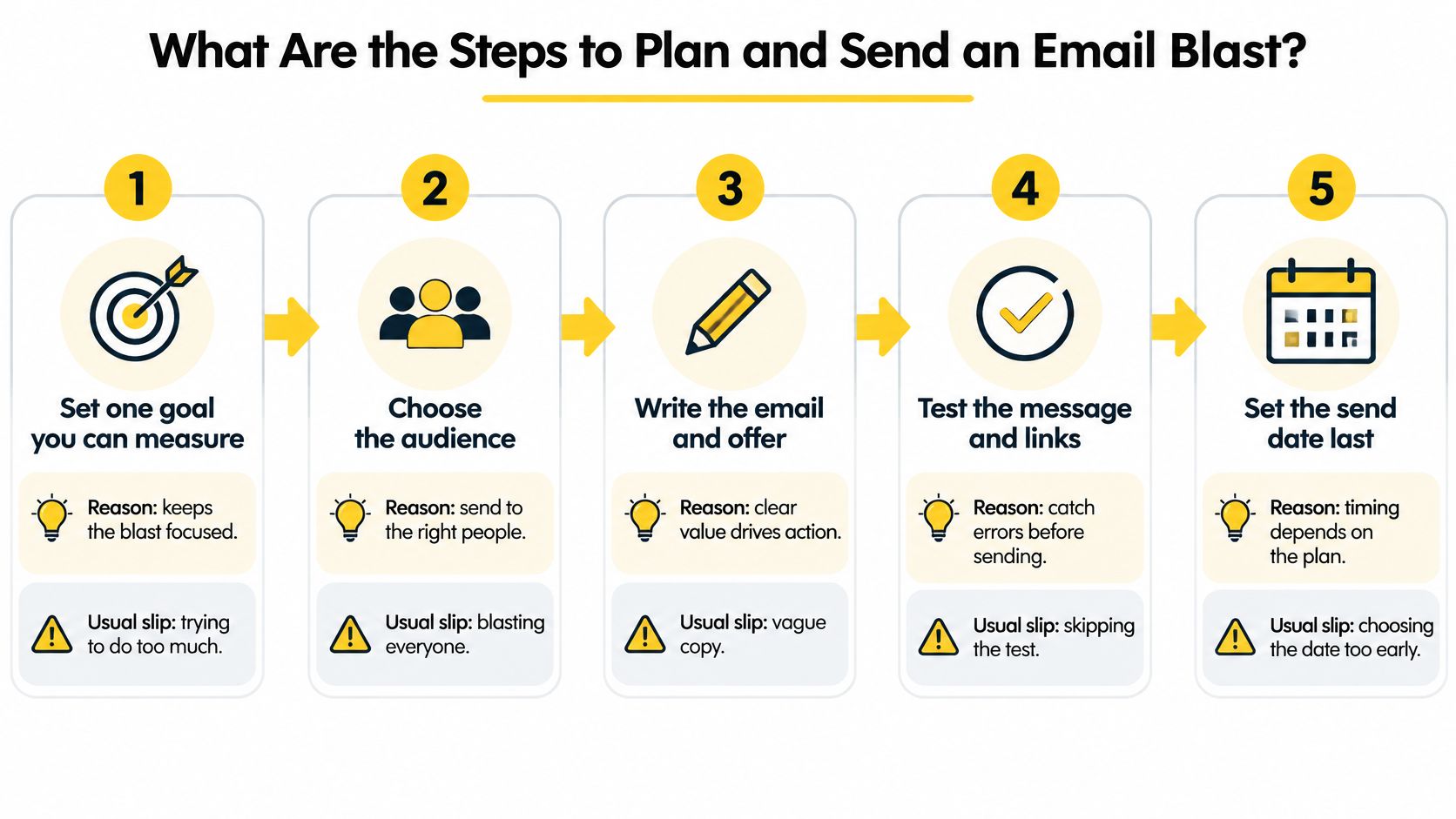
That is why the send date comes last. Lock the audience, the message and the test first. An early calendar commitment should never pressure a team into skipping checks because the segment or landing page isn't finished.
How should the campaign move from planning to approval?
Set a measurable goal. Choose an outcome the campaign report can attribute to this send, such as completed registrations. A goal like "more engagement" survives any result, which makes it useless for judging the campaign.
Choose a named audience. Save the segment and its exclusions before writing. Sending to the full list because segmentation takes longer replaces a targeting decision with a scheduling shortcut.
Clean the list. Remove addresses behind permanent delivery failures and contacts that fail the organization's inactivity policy. A hard bounce means the address itself is invalid, and retrying it only adds another failure to the sending domain's record. Opted-out recipients are already suppressed by consent status, so cleaning exists to catch what consent cannot: dead addresses and disengaged contacts.
Write the message and send a proof. Open the proof in real test inboxes at Gmail, Yahoo and Outlook. Check the sender name, reply address, mobile layout, images, destination links and unsubscribe path. The editor preview shows what the email should look like; test inboxes show what recipients get.
Test subject-line alternatives. Send variants to a slice of the eligible audience while keeping the body unchanged. Decide the winning metric before the test runs, and treat privacy-generated opens as noise rather than human interest.
Choose the delivery window. The segment's own engagement history beats a company-wide default. A morning editorial audience and an evening leisure audience peak at different hours, and recipient timezones spread one send across a day of local delivery times.
Send, then review on a schedule. Watch for delivery problems while the campaign is sending, check inbox placement by mailbox provider, sending domain and IP the following day, then review again after delayed responses arrive. A clean aggregate delivery rate can hide a campaign that landed in spam at one provider.
In SendX, the same sequence maps to built-in tools: list cleaning flags unengaged and risky addresses before a send, A/B test campaigns handle the sample split and apply the winning subject line automatically, and sending in each contact's timezone covers regional delivery windows without separate regional campaigns.
What makes a campaign ready to send?
Approval runs on named requirements, each checked before the send date is confirmed. A campaign is ready when it has:
- A named audience with its exclusions saved.
- A subject line that beat an alternative on a metric chosen before the test.
- An authenticated sending domain.
- An assigned reporting owner who will read results per mailbox provider and domain.
- A destination page that works for the exact recipient group receiving the offer.
The campaign walkthrough provides another way to review the sending workflow.

How Do You Keep a Large Email Blast Out of Spam?
A campaign can meet Gmail's delivery requirements and still miss the inbox. Track inbox placement by mailbox provider, sending domain, and IP, rather than relying on one account-wide delivery rate.
SPF identifies authorized sending systems, DKIM verifies a domain's message signature, and DMARC sets a policy for authentication and alignment failures. Check authentication on received messages, not just DNS records. A passing record alone does not confirm that the visible From domain aligns.
Google's sender guidelines require SPF or DKIM for all senders and additional authentication for bulk senders. For bulk sending, configure both SPF and DKIM, publish DMARC, check reverse DNS, and verify alignment with the visible From domain.
Which Gmail thresholds should govern sending?
Gmail deliverability thresholds for a blast
| Check | Target | Hard-risk level |
|---|---|---|
| User-reported spam rate | Below 0.1% | 0.3% or higher |
| Complaints per 100,000 delivered messages | Fewer than 100 | 300 |
| Authentication | SPF or DKIM pass for all senders; both plus DMARC for bulk senders over 5,000 messages daily to Gmail | Authentication or alignment failures at bulk volume |
Sources: Google sender guidelines and Gmail spam-rate documentation.
The complaint counts illustrate threshold arithmetic, not a replacement for Gmail's reported spam-rate denominator. Use the mailbox provider's reporting to guide operational decisions.
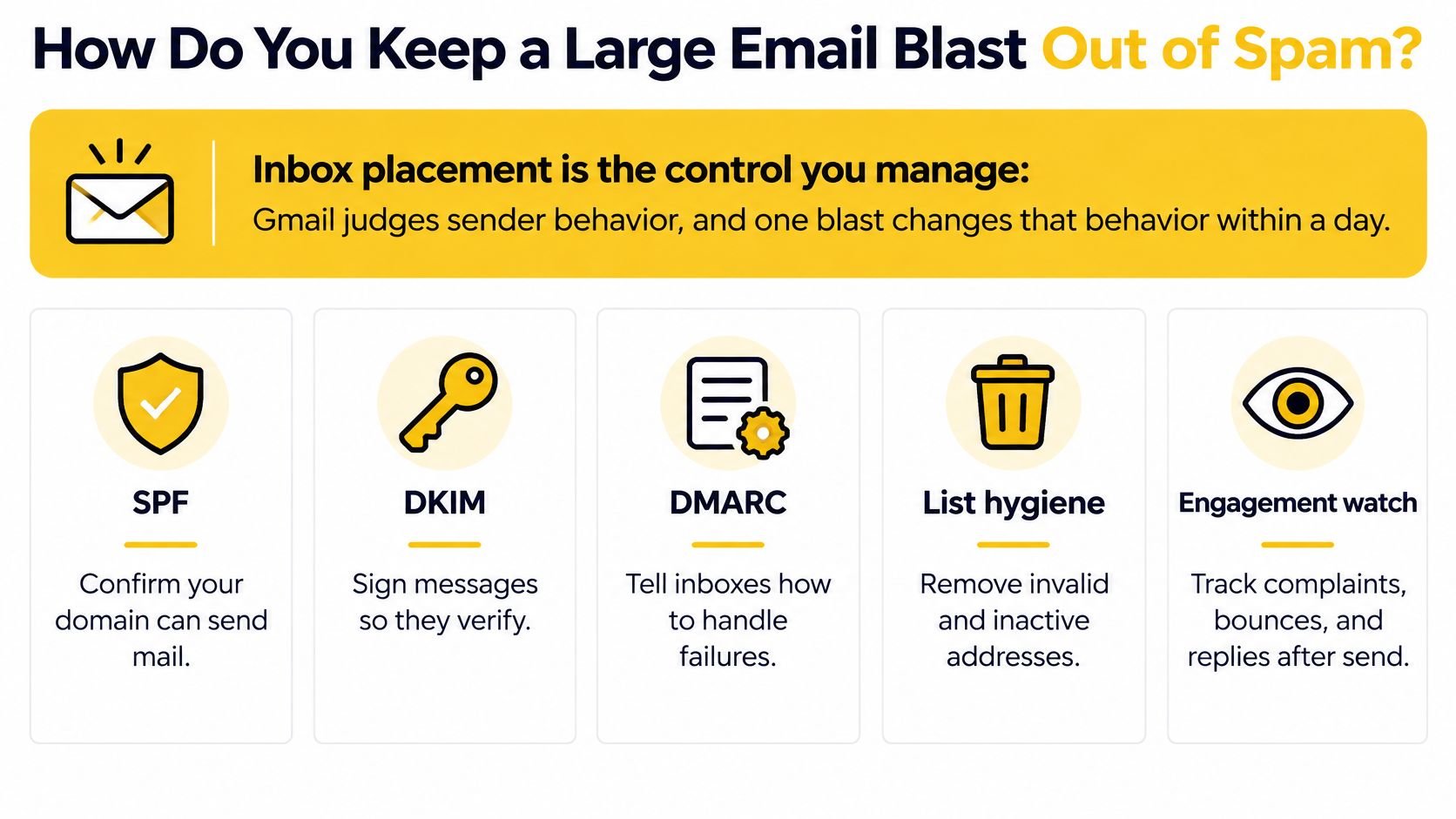
The infographic below summarizes controls to check before increasing volume.
Which controls reduce avoidable filtering risk?
- Authenticate every sending domain. Verify received messages and alignment. This makes it possible to identify which domain sent the campaign.
- Match the audience to the announcement. Unexpected content gives recipients a reason to report spam.
- Monitor each sending identity. An account-wide average can hide a complaint increase tied to one title, brand, or domain.
- Increase volume gradually. A new domain or list needs a controlled sending pattern before it is treated as production-ready.
- Keep unsubscribing easy. A visible opt-out gives recipients an alternative to reporting unwanted email.
For a complementary operational checklist, Lead Printer's email deliverability guide covers sending practices to review alongside provider requirements. The SendX email deliverability guide provides additional context on maintaining sending quality.
Set a pause threshold before the campaign goes out. For example, if the spam rate reaches 0.1%, pause the affected segment's next campaign and investigate its acquisition source, content expectations, frequency, and unsubscribe friction before resuming.
What Should an Email Blast Say, and What Should It Ask Readers to Do?
Give the email a single primary job. An offer announcement should explain the offer and move eligible recipients toward claiming it, not compete with unrelated editorial links and social requests.
The first screen should establish what changed, why it matters to this audience and what happens next. Use live text for essential details, a readable mobile layout and preview text that adds information rather than repeating the subject.
What makes the subject line and call to action useful?
A subject line should name a specific reason to open. Keep its opening words meaningful on a phone's lock screen, and don't use fake reply prefixes to imply an existing conversation.
A call to action, or CTA, tells the reader what to do next. Start with a verb and name the result, for example, Save your seat rather than Click here.
Use a primary button and, if needed, a text link supporting the same goal. Adding unrelated offers divides attention and makes campaign attribution harder to interpret.
Which templates fit common campaign goals?
Email blast templates by goal
| Blast type | Example subject line | Primary call to action | Check before sending |
|---|---|---|---|
| Product launch | Our reporting dashboard is live | See what's new | The link opens the feature page, not the homepage |
| Event invitation | Registration closes Friday | Save your seat | The date and time show in the recipient's timezone |
| Time-limited offer | Last 48 hours for the annual rate | Claim the offer | The offer applies only to this segment |
| Service or policy update | Changes to how we handle your data | Read the update | Only recipients affected by the change receive it |
The deadline in the offer template is illustrative and must match the actual offer. A necessary service or policy notice also shouldn't automatically be treated as marketing email; classify it by its purpose and content.
What would a targeted offer look like?
For example, a newsletter could offer an annual subscription to recent human clickers who don't already hold that subscription. Its subject could announce the closing deadline, with a Claim the annual rate button leading directly to the eligible checkout.
The decisive pre-send check is whether existing annual subscribers were excluded. Copying the appropriate template is only the starting point; eligibility, terms and destination-page behavior must agree.
How Do You Measure a Blast Beyond Open Rate?
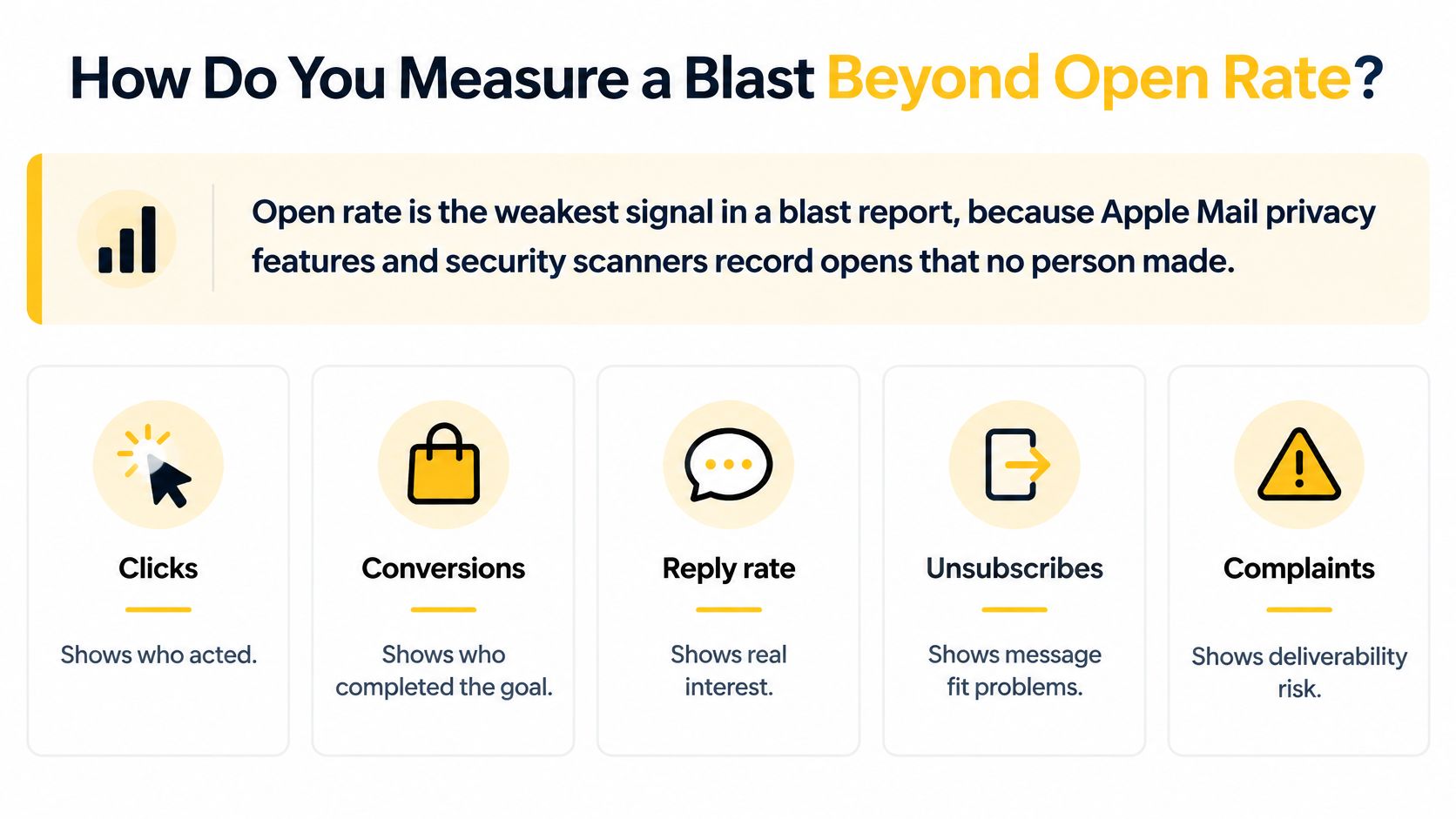
Don't treat reported opens as proof that recipients read the message. Apple Mail privacy features and automated security activity can generate tracking events without the intended human action.
Prioritize verified clicks, conversions, replies, unsubscribes and complaints. Even clicks need checking against downstream behavior, because automated scanners can follow links before a person ever sees the message. A click that leads to a purchase counts; a scanner firing the tracking link does not.
Why isn't delivered the same as in the inbox?
Delivered means the mailbox provider accepted the email. Inbox placement describes where it landed after acceptance: the inbox, the spam folder, or nowhere visible at all. A provider can accept every message and still file most of them away from the inbox.
Validity's global benchmark reported 86.0% inbox placement in 2025, with 4.8% in spam and 9.2% missing. These are benchmark findings, not a forecast for an individual sender.
One aggregate delivery rate hides the split: a provider filing you to spam and a provider inboxing you can average out to a number that looks healthy. Judge the blast instead by the outcome it was meant to produce: a purchase, a registration, a renewal, a reply that continues a conversation. Validity's State of Email 2025 reported that 22% of marketers struggle to measure or prove email return on investment.
How should a multi-brand team diagnose a disappointing send?
Treat each brand, domain and sending IP as a separate investigation path. The same blast is a different deliverability event at each combination. Break reports down by mailbox provider, then inspect bounce and deferral codes, which explain permanent failures and temporary sending delays.
- Gmail declines while Outlook holds. Check Gmail complaints and domain signals before rewriting the entire campaign.
- Deferrals increase. Inspect sending pace, the affected IP and the receiving provider's response.
- Clicks rise without conversions. Test the landing page, eligibility rules, tracking and checkout.
- One publication underperforms. Compare its acquisition sources and sending identity instead of relying on the portfolio average.
Use actionable email marketing metrics to connect the report to a decision. Change one variable deliberately, record it, and compare the result against recent campaigns sent to the same audience.
Which Email Blast Service Should You Choose?
A long feature menu answers the wrong question. The deciding factors for an established sender are narrower: whether the service can prepare a campaign against a controlled audience, and whether it can show where that campaign landed after the send. A practical email marketing service selection examines both sides of that workflow.
- Audience controls. Reusable segments and suppression lists determine eligibility before anyone writes a subject line.
- Sender identity and separation. Sending domains need authenticated configuration, and each brand or publication should send on an identity it owns, so one property's complaint spike stays off the rest of the account.
- Diagnostic reporting. Complaints, bounces and results broken down by mailbox provider, sending domain and IP turn a disappointing blast into an investigation with a starting point.
- Support depth. Deliverability questions need people who can read deferral codes and reputation signals, with a defined owner on the vendor side.
- Recipient choice. Every marketing send needs a working unsubscribe path.
- Measurement quality. Reporting should separate opens, clicks and downstream outcomes, and treat an accepted message as distinct from an inbox placement.
Weight those criteria by sending pattern. A team mailing one list weekly can prioritize editor speed and analytics. A publisher running several newsletters should ask each vendor how complaints on one brand affect the rest of the account, and whether delivery review happens per provider and per identity or only as a portfolio average.
SendX Marketing is built for that second pattern: newsletter campaigns, audience segmentation, email analytics and inbox testing run on infrastructure designed for senders operating under several brands.
Start a free trial to build the next campaign around a tested segment.
FAQs
Can a team use BCC instead of campaign software?
BCC conceals recipient addresses, but it doesn't provide the campaign controls an established sending operation needs. Audience exclusions, unsubscribe processing, testing and delivery diagnosis require more than an address field.
Should an expired offer stay in a sending queue?
No. Delayed delivery can put an expired promotion in front of recipients who can no longer use it. Set an expiry policy and stop queued promotional messages when their destination or offer is no longer valid.
Does adding a first name make a campaign individually triggered?
No. A personalized field changes part of the content, not the sending logic. A scheduled group campaign remains a broadcast even when each recipient receives a different greeting.
Build the next campaign around an eligible audience, a tested message and a delivery review. Visit SendX to explore email marketing software for preparing campaigns, managing audience segments and measuring recipient actions.
