SendX gives you three email editors instead of forcing everyone into one. Design visually with drag and drop, write plain personal newsletters in the rich text editor, or hand-code the whole thing in HTML. Same campaign, same audience targeting — you just pick how you want to build.
Every editor produces a mobile-responsive email that renders cleanly across major email clients. The difference is how much control you want, and how fast you want to move.
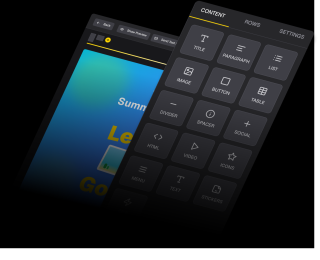
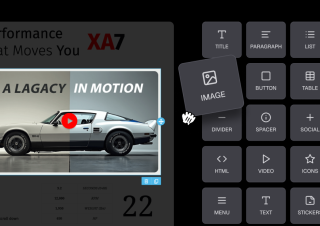
Build your email by dragging content blocks onto the canvas — text, images, buttons, dividers, and social links. Powered by the Beefree SDK, the same engine behind the 400+ templates included on every plan. Start from a template or an empty canvas, adjust fonts and colours to match your brand, and preview on desktop and mobile before you send.
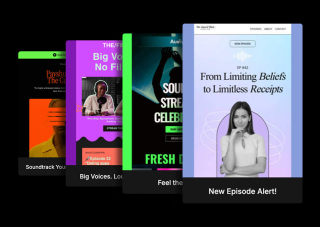
Not every newsletter should look designed. The rich text editor is a clean writing surface for founders, creators, and solo operators whose readers expect a message that looks like it came from a person, not a marketing department. Type, format, add an image or a link, and send. No blocks, no layout decisions, nothing between you and the writing.
Write or paste your own HTML and keep complete control over markup, inline styles, and structure. Use it when you have an existing template system, a design your marketing team already signed off on, or a layout the visual editors will not produce. Preview renders the same way the drag-and-drop editor does, so you can check your work before it goes out.
Your editor choice changes how you compose. It changes nothing about how the email is personalized, checked, or sent.
Build the email however your chosen editor works — drag blocks, type prose, or write markup. Then drop in merge tags to pull each contact's first name, company, or any custom field you store, with a fallback value so an empty field never leaves a gap mid-sentence. Personalization is not tied to one editor; it works the same way in all three.
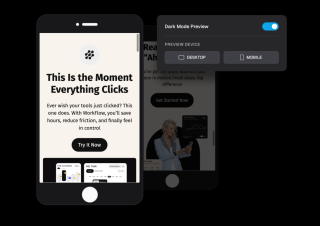
Preview how the email renders on desktop and mobile, then send a test to your own inbox to check it for real. From there it is the standard campaign flow — pick your list, tag, or segment, then send now or schedule for later. Nothing about your editor choice changes what happens after this point.
Build the email however your chosen editor works — drag blocks, type prose, or write markup. Then drop in merge tags to pull each contact's first name, company, or any custom field you store, with a fallback value so an empty field never leaves a gap mid-sentence. Personalization is not tied to one editor; it works the same way in all three.
Preview how the email renders on desktop and mobile, then send a test to your own inbox to check it for real. From there it is the standard campaign flow — pick your list, tag, or segment, then send now or schedule for later. Nothing about your editor choice changes what happens after this point.
Everything you need to know about SendX and our services. Last updated June 2026.
Match the editor to the email. Use drag and drop when the email is visual and layout matters — product launches, promotions, designed newsletters — and you would rather not write code. Use the rich text editor when the message should read like a personal email, which suits founder updates, creator newsletters, and anything where a heavily designed template would feel wrong. Use the HTML editor when you already have markup, need precise control, or are working from a design system your team maintains. All three produce mobile-responsive emails and all three support merge tags, so the choice is about how you want to work, not what you give up.
Yes. Every editor includes desktop and mobile preview, so you can check alignment and readability before anything goes out. You can also send a test email to your own inbox to see exactly how it renders in a real email client, which is worth doing whenever you have changed a layout or are sending from a new template.
No. The drag-and-drop editor ships with 400+ professionally designed templates, free on every plan, so most people start from one rather than from an empty canvas. Templates are organized by industry, layout, and use case, and every one is mobile-responsive out of the box. You change the text and images to yours and the design holds together. A built-in stock photo library is included as well, so you do not need a separate image subscription.
Yes. SendX includes a dedicated HTML editor for full control over markup and inline styles. It is the right choice when you have an existing template, need a layout the visual editors will not produce, or want your email to match a design system exactly. If you would rather generate and send email programmatically instead of composing it in the app, the SendX email API covers that case.
Yes, importing your contacts is easy. You can upload a CSV file with your subscriber lists, and our system will securely import them. We also help ensure a smooth transition by guiding you through the process of warming up your sending domain to maintain high deliverability.
Still have questions? We're here to help.
"SendX was by far the best option for my team to use for both lead generation and increase in subscribers. The drag-and-drop editor and list segmenting features were much better than some of the competitors I have used with other teams in the past."

A/B Split Test is one of five campaign types in SendX. Write two or more subject lines, send them to a slice of your list, and the winner goes out to everyone else automatically. Included on every plan, not held back for a higher tier.
Automatically ramp sending volume to earn a rock‑solid sender reputation—no spreadsheets required.
Write, publish, and track articles without leaving SendX—turn readers into subscribers in minutes.
Filter out security‑scanner noise and see the clicks that actually matter.
Auto‑expire unsent emails so your audience only sees timely, relevant messages.
Give every campaign its own reply‑to address and make sure answers land in the right inbox—every time.
Drag and drop, write, or code it — all three editors are included on every plan. Start your free trial, no credit card required.