



Your sending app should submit mail on port 587 with STARTTLS, or on port 465 with implicit TLS when your provider documents that mode. Port 25 is the relay path between mail servers, not a setting your app should save. The box labeled SSL on the form is a client mode, not a port name.
Getting this right for one app is easy. Keeping it right across dozens of brands or tenants, each copied from a shared default, is where sends start failing. SendX Infrastructure offers an email API, while its SendPost infrastructure manages IP reputation, warmup, and throttling. That gives teams a way to reduce the SMTP settings they maintain in each sending app without confusing a successful connection with inbox placement.
This guide covers which port to pick, how each one starts encryption, the mismatch that breaks the session, and the checks mailbox providers still run after the connection works.
Which SSL SMTP Port Should You Use
Save the account the way your provider documents it. For an authenticated app or SMTP client, use port 587 with STARTTLS, or port 465 with implicit TLS if the provider says the session starts encrypted. Use port 25 only when a mail server you operate relays to another mail server. Port 2525 is a fallback some providers publish when a network blocks 587. It isn't an IANA assignment for SMTP.
Think of two doors. Port 25 is the door between post offices, where one mail server hands mail to the next. Ports 587, 465 and 2525 are the counter where your app shows ID before anyone accepts the envelope. Mixing up those doors is how a sending tool ends up talking to a relay listener, or a relay ends up asking an app for a password it was never meant to send.
The lookup
| Port | Name | Encryption | Who connects |
|---|---|---|---|
| 25 | SMTP | Cleartext, optional STARTTLS | Mail servers relaying to other mail servers |
| 465 | submissions | Implicit TLS from the first byte | Apps and clients submitting authenticated mail |
| 587 | submission | SMTP greeting, then STARTTLS | Apps and clients submitting authenticated mail |
| 2525 | Alternate submission, not an IANA SMTP assignment | Usually STARTTLS, same pattern as 587 | Apps on networks that block 587 |
Sources: RFC 6409 and RFC 8314 for the port assignments.
RFC 6409, published in November 2011, keeps relay on port 25 and designates port 587 as a dedicated submission service. Submission servers can apply login rules and rate rules that a server-to-server relay doesn't use. That's why a high-volume sender treats 25 as an infrastructure channel and 587 as the usual authenticated endpoint.
What the SSL box actually means
A common belief is that SSL means 465 and TLS means 587. That belief is wrong. Both a 465 session and a successful STARTTLS session on 587 are TLS. On a settings form, SSL usually means implicit TLS, the mode that encrypts from the first byte. TLS or STARTTLS on that form usually means the client speaks SMTP first, then upgrades.
Mail submission is the authenticated handoff from your app to the first server. That's the job of 587 and 465. After that server accepts the message, later hops are a different conversation, and they don't inherit the checkbox you just saved.
So match the mode to the row. 465 means implicit TLS. 587 means STARTTLS. Don't infer either one from a generic SSL checkbox.
Confusing 25 with 587 leads to connection blocks, authentication failures or policy violations, especially where a network restricts outbound port 25 to cut abuse. If the provider's docs name 465, use implicit TLS and leave certificate checks on. If they name 587, require STARTTLS and do the same. Port 2525 follows the 587 pattern only when that provider documents the number.
How 465 and 587 Start Encryption
The port chart names the mode. The bytes on the wire have to follow that mode, or the server never reaches AUTH.
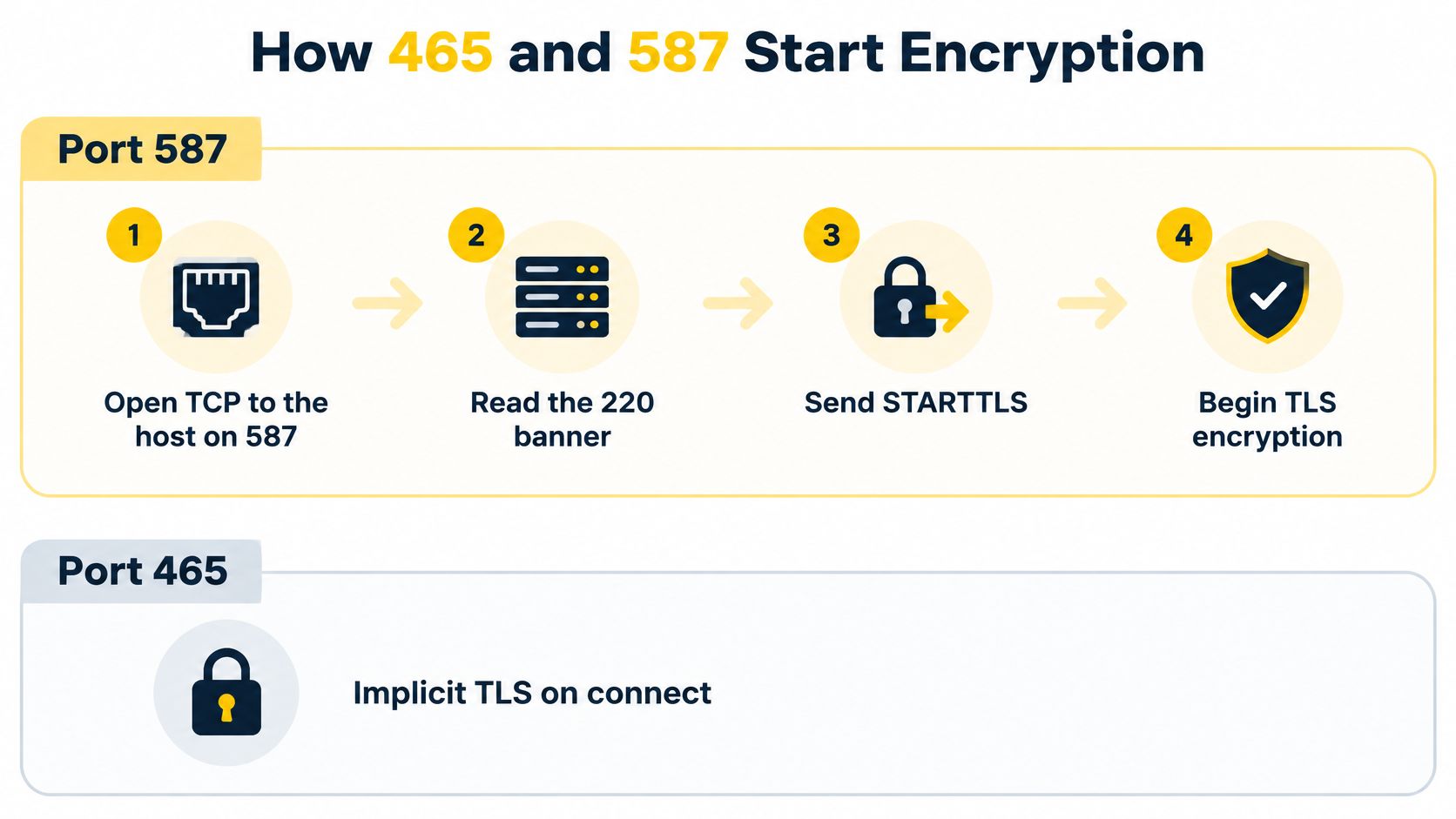
RFC 8314, published in January 2018, assigned the service name submissions to TCP port 465 and specified that the TLS handshake begins as soon as the connection opens. The same standard kept STARTTLS on port 587, because clients already used both mechanisms. Software may still label 465 as SSL, SMTPS or SSL/TLS because the port was briefly registered as smtps. The current name is submissions.
Port 587, step by step
You set the host, the port and STARTTLS. The provider presents a certificate and should accept AUTH only after encryption.
Open TCP to the host on 587.
Read the 220 banner the server sends in the clear.
Send EHLO and confirm the reply advertises STARTTLS.
Send STARTTLS and finish the TLS handshake, including the certificate check.
Send EHLO again on the encrypted session, because the earlier capability list no longer counts.
AUTH, then MAIL FROM, RCPT TO and DATA. A good session shows a 235 on AUTH and a 250 when the message is queued.
Say your sending software uses smtp.example.net, port 587, STARTTLS required, and the username is the full sending address. Credentials go out only after step 4. Sending AUTH before the upgrade is the mistake to avoid. The server may be willing to read a password in the clear, and you shouldn't offer one.
Port 465, step by step
The same host on 465 does less talking before the lock.
Open TCP to 465.
Start the TLS handshake immediately. There's no banner and no EHLO yet.
After the handshake, read the banner, then continue with EHLO and AUTH, with certificate validation left on.
You still set host, port and mode. The provider still presents the certificate and still returns 235 and 250 when the session is healthy. The difference is who speaks first. On 465 the client speaks TLS first. On 587 the server speaks SMTP first.
Both ports support authenticated submission, but they don't share a client setting. A library that only has an SSL toggle needs the toggle mapped to the port you stored, not guessed from the word SSL.
Mismatched TLS Modes and What Breaks
Checking SSL doesn't make every port safe. The checkbox decides who speaks first. Get that wrong and both sides wait for a greeting the other side will never send.
Implicit TLS pointed at 587 fails because the server sends an SMTP banner and the client sends TLS bytes. STARTTLS pointed at 465 fails because the server waits for a handshake and the client waits for a banner. RFC 8314 treats cleartext submission as obsolete and tells clients and servers to support both encrypted mechanisms.
What each pairing does
| Client mode | Port | Server expects first | Result |
|---|---|---|---|
| Implicit TLS | 465 | TLS handshake | Encrypted session, then SMTP |
| STARTTLS | 587 | SMTP banner and EHLO | Upgrade, then AUTH |
| STARTTLS | 2525 | SMTP banner and EHLO | Same path as 587 when the provider supports it |
| Implicit TLS | 587 | SMTP banner | Handshake failure or timeout |
| STARTTLS | 465 | TLS handshake | Reset, timeout or garbled banner |
| No encryption | 587 | STARTTLS before AUTH | AUTH refused or credentials exposed |
Both failures look like a timeout, a reset or a garbled greeting. Retrying the password won't help. Read the row, then change the mode or the port so they agree. A server can accept the TCP connection on 587 and still refuse AUTH until STARTTLS, which is what the obsolete-cleartext rule looks like in a log.
Store the mode beside the port
This is where one app's setting becomes a fleet problem. For every brand or tenant, store the mode next to the port, for example 465 with implicit TLS and 587 with STARTTLS, with certificate checks left on. One shared default that says SSL for every tenant can break every client that inherits it. A new brand copied from a 465 account onto a 587 host fails on the first send, and the error looks like a network problem.
When the log shows a timeout or a reset, compare it with known SMTP errors before you rotate a password or open a firewall ticket. Encryption on this hop doesn't encrypt every hop after your provider relays the message.
Port 25 Blocks and the 2525 Fallback
A timeout is often the network, not a bad password. Many cloud hosts and office firewalls block outbound port 25 so a compromised machine can't spray mail. If your app times out on 25, move it to 587 or 465. Don't ask the host to open 25 for an application.
Port 25 still matters for a mail server you operate. That server receives inbound mail on 25 and delivers to other domains on 25, ideally upgrading when the remote side offers STARTTLS. A block on outbound 25 stops delivery from that server. The fix is a firewall exception for the mail server, or a smart host your server is allowed to use. It isn't a change inside your sending software.
When 2525 is the right number
Port 2525 is the fallback some providers publish when 587 is filtered. Treat it as 587 with a different number. Use STARTTLS, authenticate and validate the certificate. It isn't a secret encrypted port, and it isn't a reason to leave 465 on the wrong mode. If the provider doesn't document 2525, don't invent it.
A short test order
Run the checks in this order before you file a ticket.
Confirm DNS for the SMTP host you were given, and confirm the certificate name matches that host.
Try 587 with STARTTLS and certificate checks on.
If 587 is blocked and your provider supports 465 on that host, try 465 with implicit TLS.
Try 2525 only if the provider documents it, using the STARTTLS pattern.
Leave 25 for server relay tests, not for the app.
Implicit TLS on 587 and STARTTLS on 465 time out or reset the same way a block does, and a new password won't fix that. Match the client mode to the port before you ask a network team to open anything. If 587 works from one network and dies from another, check for filtering on the path; a provider-supported 465 or 2525 endpoint may be an alternative.
What the Port Can't Fix for Inbox Placement
A clean 465 or 587 session only proves the path from your app to the first server. Gmail, Yahoo and Outlook still judge the domain and the IP after that. A correct SSL SMTP port doesn't establish who you are, protect every later hop or put you in the inbox.
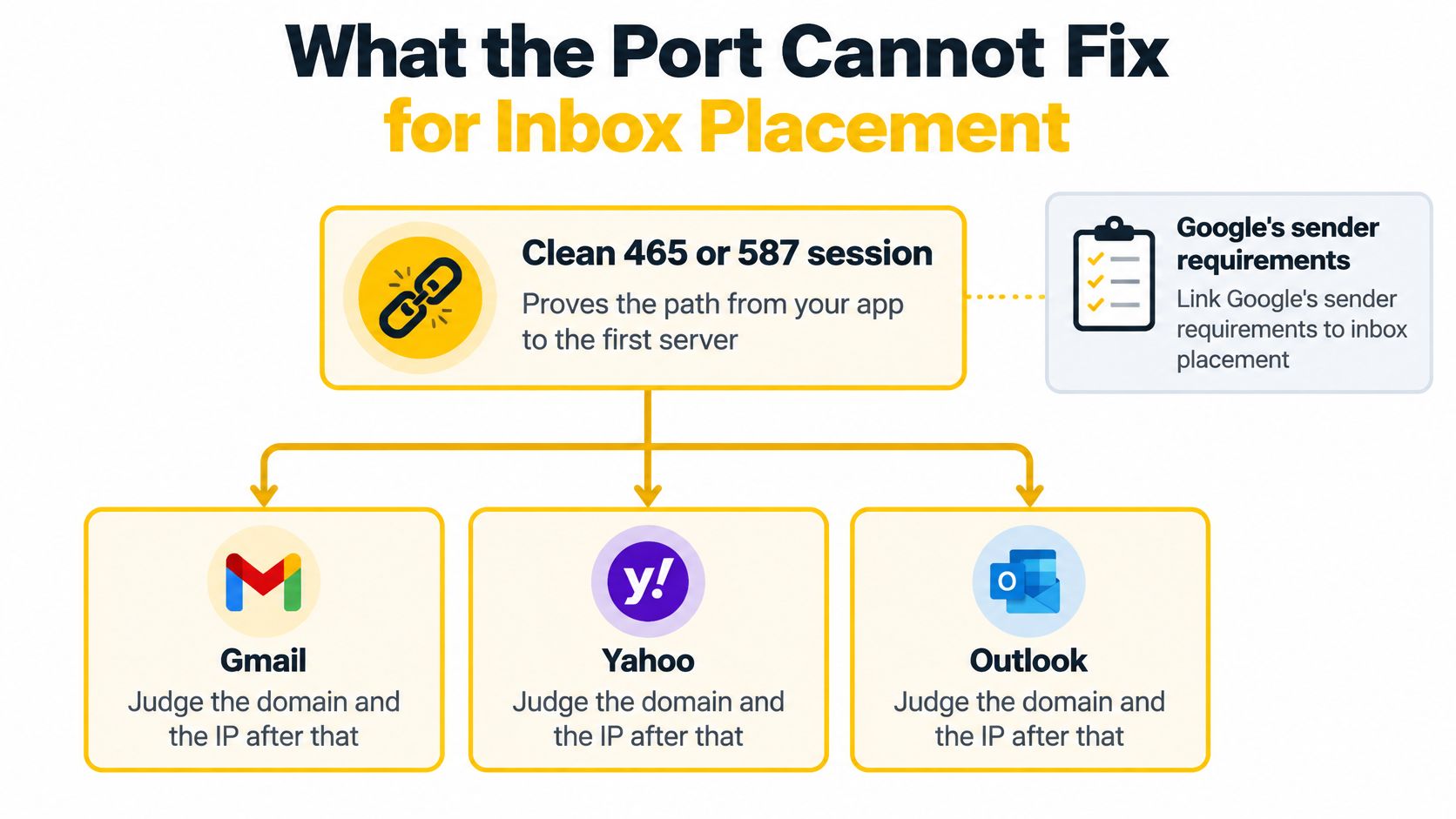
Sender guidelines for personal Gmail accounts include a TLS connection, SPF or DKIM, valid forward and reverse DNS, correct message formatting, and a spam rate below 0.3%. Bulk senders also need DMARC alignment and a one-click unsubscribe. Google's email sender guidelines set out its current requirements, while Yahoo's sender requirements cover its own checks. The mailbox provider is scoring identity and complaints, not the port number on your form.
Three identity records, in order
Set these up with the authentication protocols your domain publishes.
SPF is the envelope permission. It lists which servers may send for the domain.
DKIM is the signature. It ties the message to a key you control.
DMARC is the published policy. It tells receivers how the From domain should line up with SPF or DKIM, and what to do when it doesn't.
A brand can submit on 587 with TLS and still fail because the DKIM key belongs to a different domain than the From address. Gmail sees a signed message that doesn't match the brand in the header. The port log stays green. The placement doesn't.
LoriBeth Blair, SendX's deliverability consultant, tells senders to watch TLS success, alignment and complaints per domain and per IP. The point is that a shared port setting hides which brand started the problem. Repeated authentication failures and complaint spikes look, to the mailbox provider, like a sender that doesn't control its mail, and the port can be perfect while that signal gets worse.
Watch this distinction before you add another checkbox to the SMTP form.

Keep three checks separate. The connection works. The identity aligns. Recipients complain. A dashboard that only says the SMTP port is up won't tell you which of the three moved.
SMTP SSL Ports Aren't IMAP or POP
A port list labeled SSL often mixes sending ports with mailbox ports. The split belongs next to any SMTP chart, because the numbers look similar and the protocols don't.
IMAP and POP download mail a person reads. SMTP on 465 and 587 submits mail you're sending. SMTP is the handoff for outbound mail. It isn't a way to open a mailbox.
If the app sends campaigns or API mail, ignore 993, 995, 143 and 110. Those ports don't accept an SMTP send.
If the screen is an incoming mailbox, 993 with implicit TLS is IMAP and 995 is POP3. Neither one stands in for 587.
One provider can use related host names and still expect different ports, for example imap.example.net on 993 and smtp.example.net on 587 with STARTTLS.
Putting 993 in the SMTP port field fails because that server speaks IMAP. You won't get a 220 SMTP banner, and a TLS handshake there still won't lead to EHLO, AUTH or DATA. The usual cause is copying an SSL port from a mailbox setup guide into a sending integration.
Hand the Submission Port to Managed Infrastructure
Keeping a host, a port and a TLS mode right for every brand is only part of the job. Someone still has to warm IPs, read bounce reasons and catch the tenant that got copied from the wrong default. One wrong SSL box can then fail every brand that inherited it, and the log may only say timeout.
SendX Infrastructure is an option for teams managing sending across brands or tenants. Its email API offers a RESTful API, webhooks, SDKs for popular programming languages and a developer sandbox. SendPost infrastructure manages IP reputation, warmup and throttling. The decision is whether your team keeps configuring SMTP connections in each app, or uses an API for submission and spends its time on sending identities and delivery performance.
A platform sending for many clients can use the API instead of storing a fragile SSL checkbox in each sending app. Managed deliverability includes intelligent throttling and backoff, while SendX also offers infrastructure consultation on IP strategy, domain structure and sending topology. Those are separate from getting the SMTP handshake right: a port number doesn't warm an IP or tell you why a recipient server rejected a message.
If you want the full picture of how relay fits in, read how an SMTP relay works. The aim is a submission setup your team can audit without retyping the port and TLS mode for every integration.
Review your submission setup with SendX Infrastructure
Questions the Port Chart Doesn't Answer
Do brands need different SMTP ports?
No. Many brands can share 587 or 465. Separate them with credentials, a From domain each brand is allowed to use, and that brand's own DKIM and IP plan. The port number doesn't isolate reputation. Two titles on the same submission port still look like two senders to Gmail if the domains and IPs differ, and they look like one sender if they don't.
What should you do when the certificate name fails?
The certificate must match the host you dialed. Don't change ports to dodge the error, and don't turn validation off. Point the host at the name the provider put on the certificate, then retry the same TLS mode. A name mismatch on 465 and a name mismatch on 587 are the same identity failure, and switching the number only hides it until the next library checks the name.
Is old SSL still a current SMTP setting?
No. Encrypted submission today is TLS. A form that says SSL on 465 means implicit TLS, not SSL 3.0. Prefer TLS 1.2 or TLS 1.3 when the provider supports it. If you're wiring this from code, an email API for developers is an alternative to configuring a checkbox labeled with a retired protocol.
SendX Infrastructure offers an API-based submission path, and SendPost infrastructure manages IP reputation, warmup and throttling. If SSL SMTP ports are a setting your team keeps getting wrong across sending apps, compare that API path with another shared SMTP default. Visit SendX when you're ready to review your setup.
