


Bot clicks can inflate your newsletter's performance numbers and make your sponsorship reports difficult to trust. How do you remove those, and earn the trust of your sponsors?
When you report clicks that came from automated security scanners as reader engagement, you're giving sponsors an inaccurate picture of how their placement performed. That can lead to disputes over click counts, questions about what they're paying for, and difficult conversations when it's time to renew.
And this is a bigger issue than you might think.
Across 4,664 email campaigns analyzed by SendX, 48% of recorded clicks were flagged as bot activity.
That's why filtering bot clicks matters, especially when advertisers are paying for results.
SendX's free Bot Detection add-on identifies suspected automated opens and clicks and excludes them from your campaign reports. Here's how it works, how to enable it, and how to report more reliable click numbers to sponsors.
What are bot clicks in email newsletters?
A bot click happens when automated software follows a link in your email without a reader intentionally clicking it. For example, a corporate email security system might scan the links in your newsletter to check whether they're safe. During that process, it may open the email and follow its links.
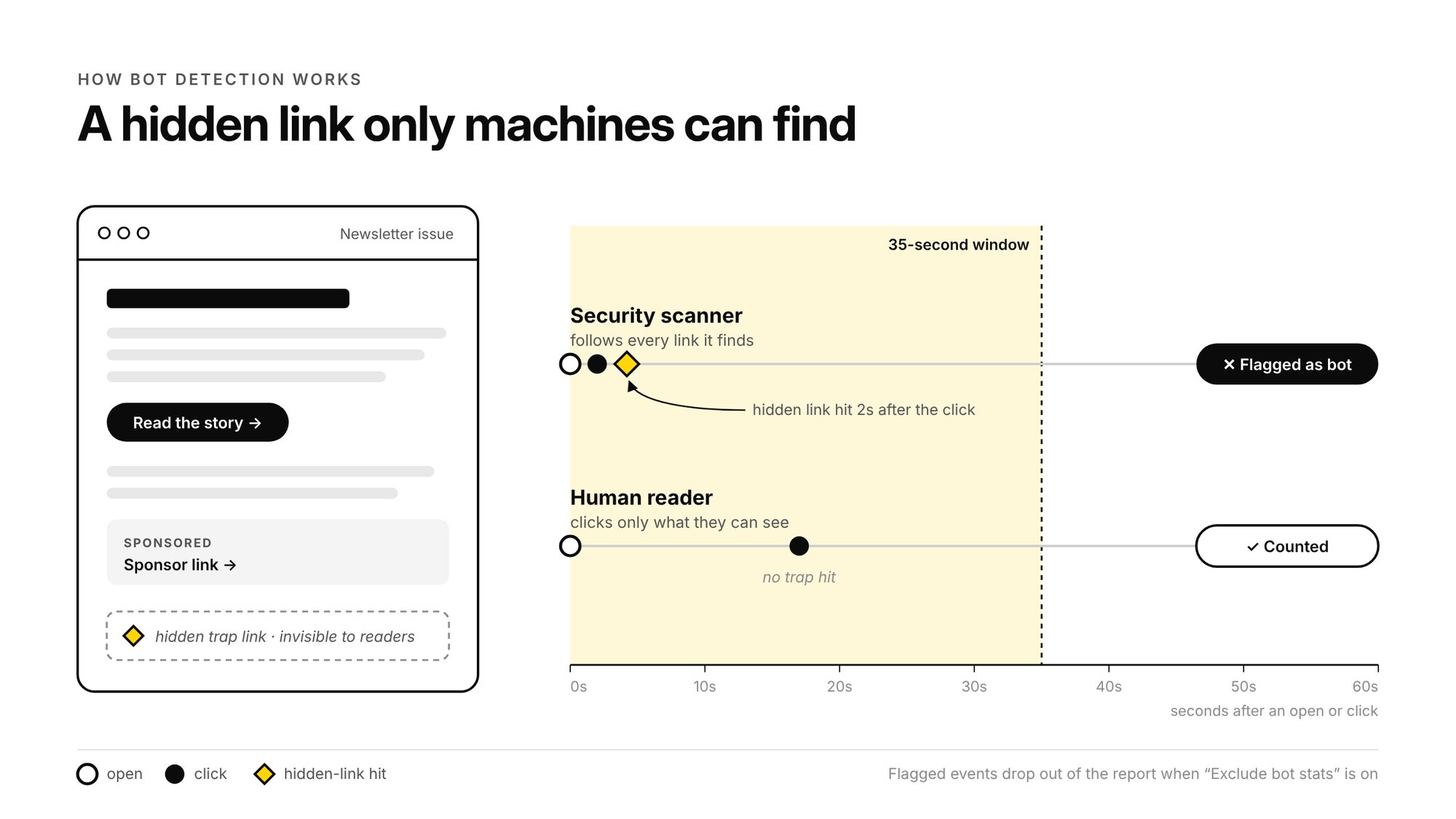
SendX can record these actions as opens or clicks, even though no reader interacted with the content.
This becomes a problem when you sell newsletter sponsorships.
Suppose you sell a placement for $2 per click. Your newsletter reports 1,000 clicks, but some of those clicks came from automated scanners. Your sponsor may have a different number on their side, and that difference can affect how they evaluate the placement.
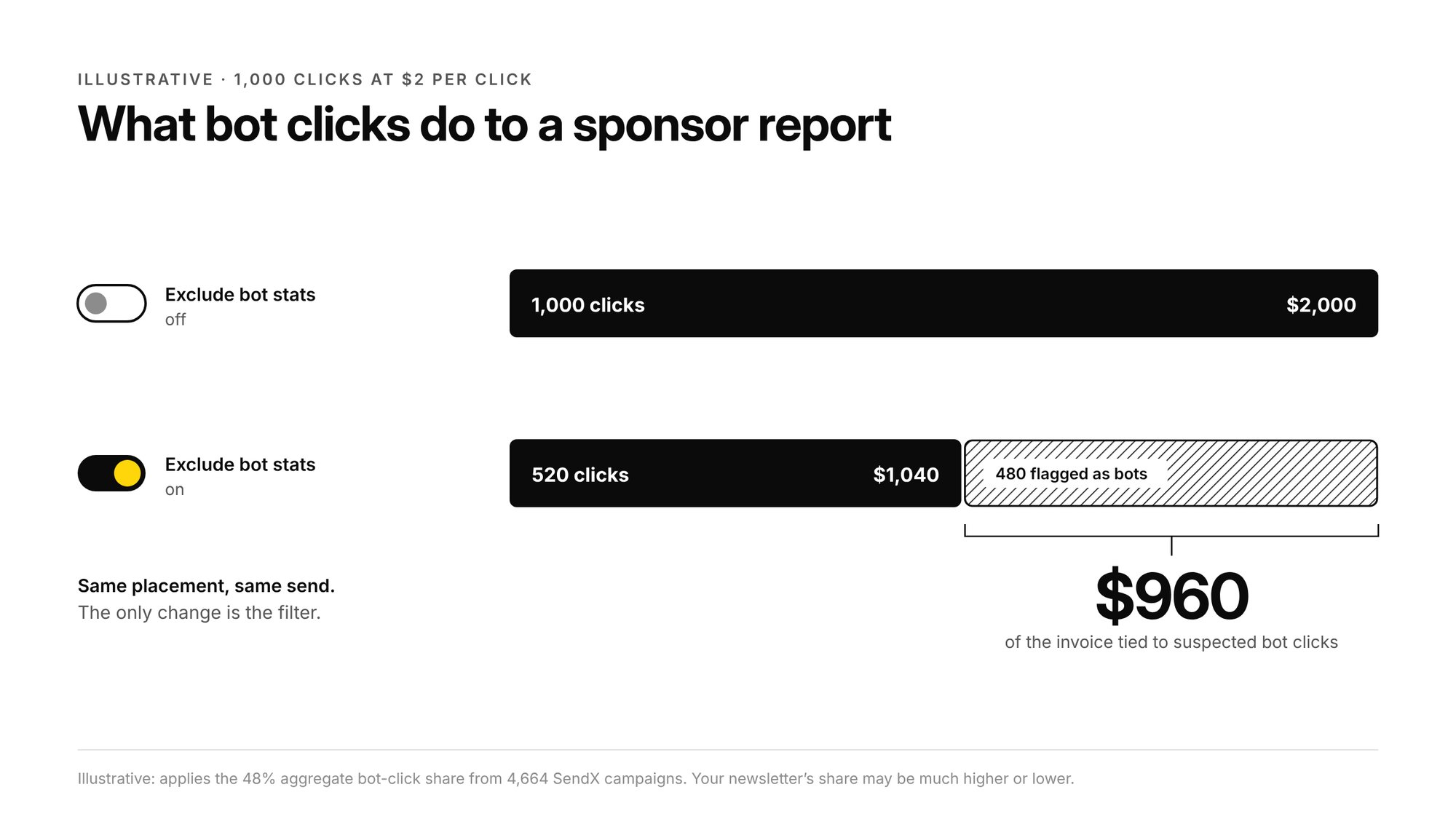
Filtering suspected bot activity helps you report a more reliable measure of engagement.
How many newsletter clicks are bots?
We analyzed 4,664 email campaigns across 96 SendX accounts where Bot Detection was enabled. The campaigns were first sent between July 15 and October 12, 2026, with clicks and opens recorded through October 13.
| Metric | Total recorded | Flagged as bots | Share |
|---|---|---|---|
| Clicks | 15,164,192 | 7,282,867 | 48.0% |
| Opens | 14,972,888 | 1,688,062 | 11.3% |
48% of recorded clicks were flagged as bot activity and removed from the filtered campaign numbers.
The percentage varies considerably between senders. Across individual accounts, the median share of clicks flagged as bots was 45%, with the middle half of accounts ranging from 21% to 72%.
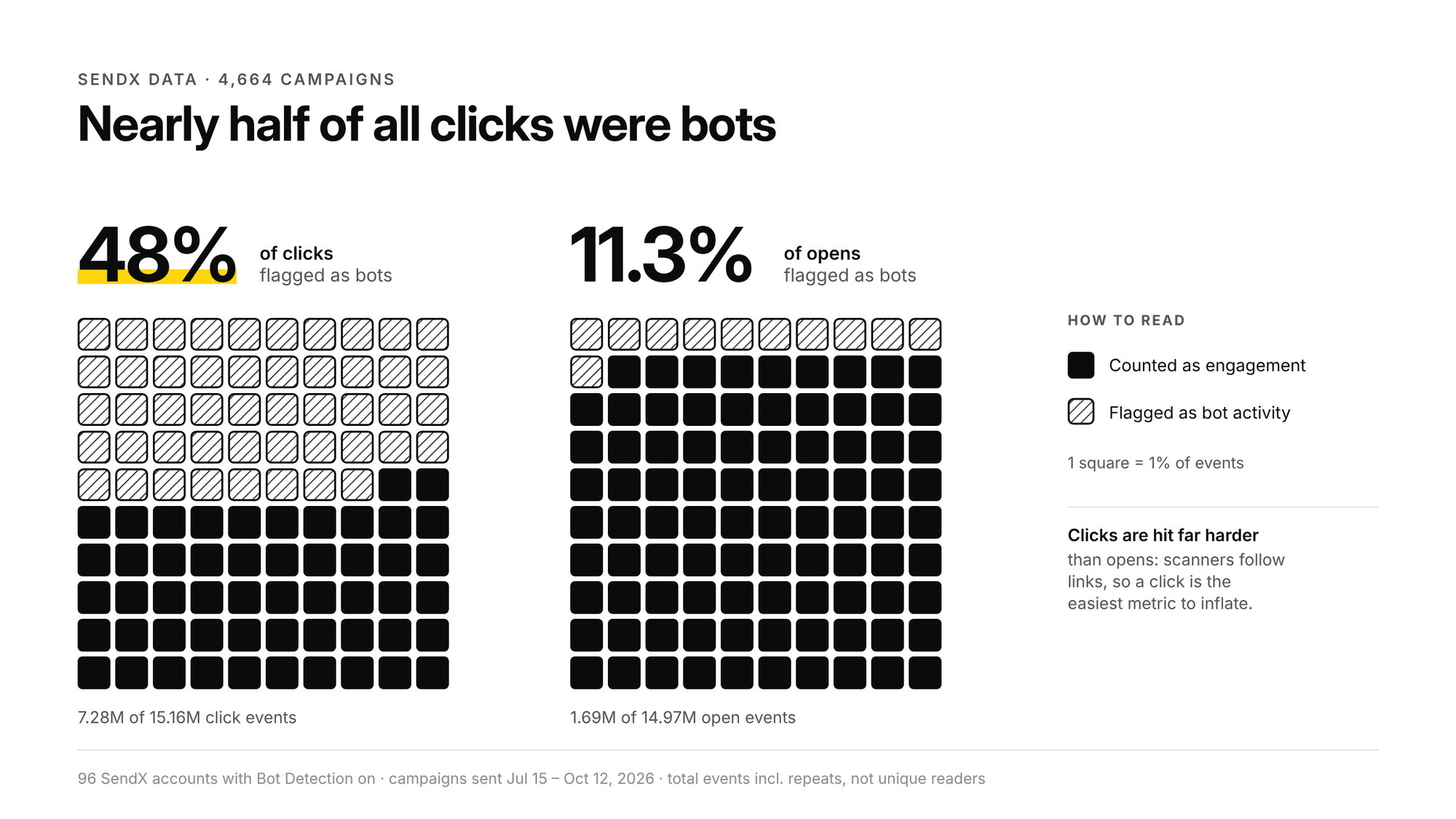
These figures count total click and open events, including repeat activity. They do not represent unique readers. The sample includes only campaigns where the Bot Detection add-on and click tracking were active at send time.
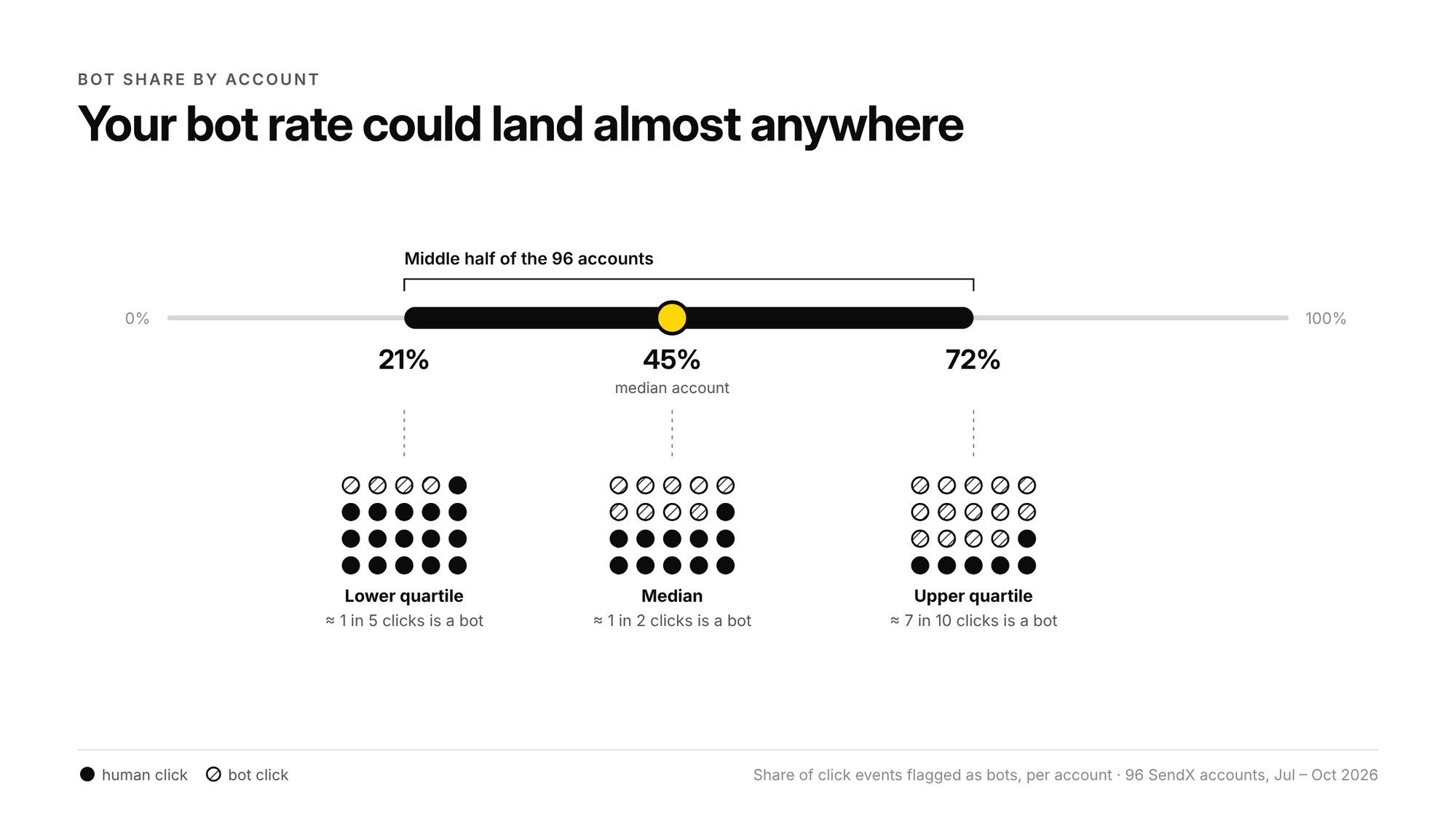
Your own newsletter's percentage may be much higher or lower.
How does SendX detect bot clicks?
SendX's Bot Detection add-on uses a hidden link in the newsletter to identify suspected automated activity.
Here's how it works:
- When the add-on and click tracking are enabled, SendX includes a hidden bot-trap link in the email.
- Automated security scanners that follow links may also access this hidden link.
- If the same contact accesses the hidden link within 35 seconds of an open or click in the same campaign, SendX flags the associated event as bot activity.
- When you turn on "Exclude bot stats" in your campaign's Performance dashboard, SendX excludes flagged bot activity from the displayed metrics.
You can switch between the original and bot-filtered numbers in your campaign report.
This method helps identify automated activity, although it cannot catch every bot. You should treat the filtered results as a more reliable measure of engagement, rather than a guarantee that every remaining click came from a person.
How to enable Bot Detection in SendX
The Bot Detection add-on is free and can be enabled in your SendX account settings.
- Log in to your SendX account.
- Go to Settings.
- Select Addons.
- Find “Remove Bot Opens & Clicks”
- Turn the add-on ON.
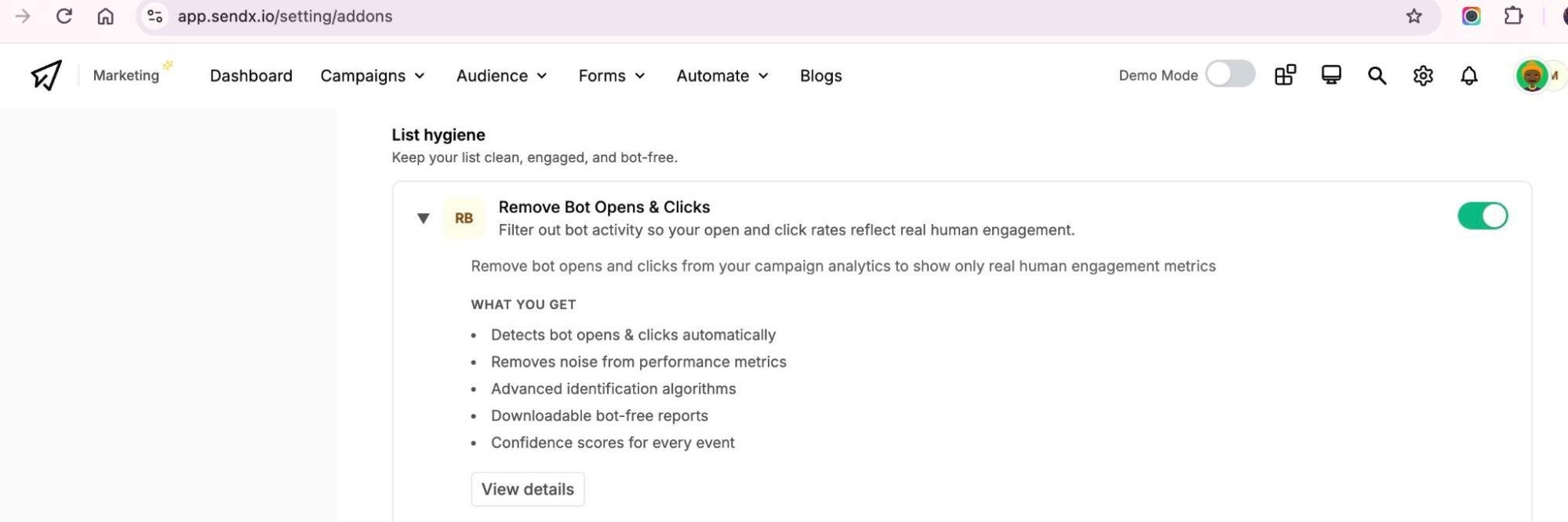
Once enabled, Bot Detection operates on future campaigns. Make sure click tracking is also enabled.
Bot Detection isn't retroactive. If you sent a newsletter before enabling the add-on, SendX cannot apply this detection method to that earlier campaign. For additional setup information, see our guide on how to filter bot opens and clicks.
How to see your newsletter clicks without bots
Once you've sent a newsletter with Bot Detection enabled, you can view the filtered performance numbers.
- Open Campaigns → Newsletters in SendX.
- Select the newsletter issue you want to review.
- Open its Performance tab.
- Find the Exclude bot stats toggle in the upper-right corner.
- Turn it ON.
Your performance report will update to exclude activity SendX has flagged as bot-related.
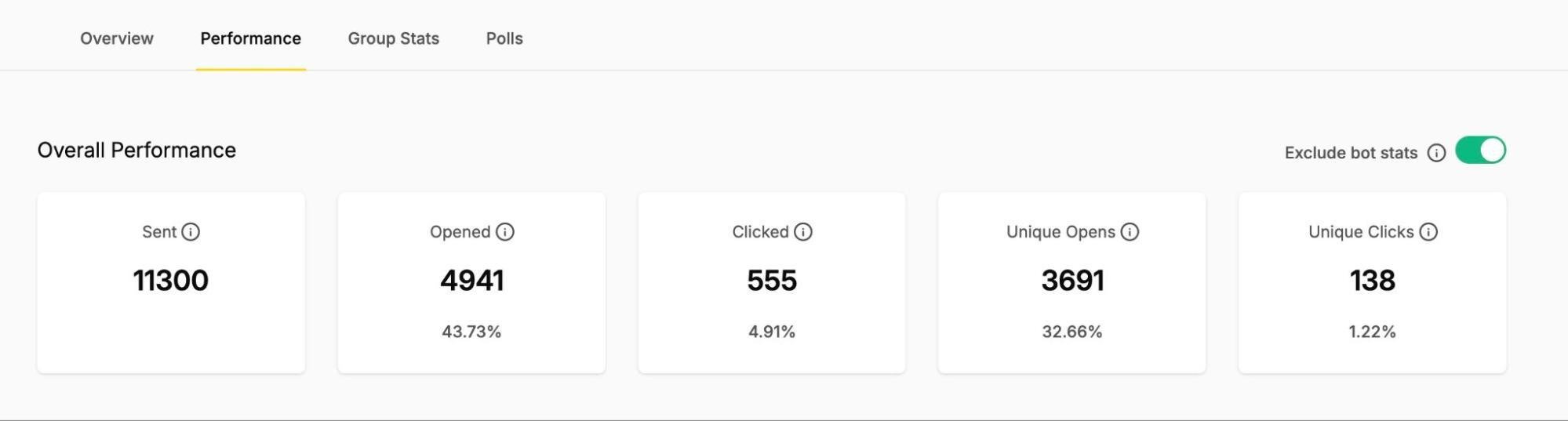
You can compare the following metrics:
- Clicked: Total click events recorded in the campaign, including repeat clicks.
- Unique Clicks: Number of contacts who clicked at least once.
- Opened: Total recorded open events.
- Unique Opens: Number of contacts who opened the newsletter at least once.
With Exclude bot stats enabled, the report displays these metrics after applying SendX's bot filter. Turn the toggle off to see the unfiltered numbers again.
How to show sponsors your bot-filtered click numbers
When reporting a newsletter placement to an advertiser, start with the issue's Performance report.
Turn on Exclude bot stats and check the filtered click metrics.
If you ran a dedicated sponsor email, these campaign-level numbers can help explain the engagement generated by that send.
For newsletters containing several links or multiple sponsor placements, be more specific.
The campaign's total clicks include activity across its tracked links. That total should not be presented as the click count for one sponsor's placement.
Check the click activity for the sponsor's individual link and confirm that the figure you're sharing uses the appropriate bot filtering.
When presenting results, include:
- The newsletter name and issue date.
- The sponsor's tracked link or placement.
- The click count and whether it represents total or unique clicks.
- Whether bot filtering was applied.
You can also share your campaign's Performance report using Share → Get Report Sharable Link. Check the shared report before sending it to confirm which numbers the sponsor will see. Anyone with the link can access it, and the link expires after 30 days.
Give your sponsors click numbers they can trust with SendX
When sponsorship revenue depends on newsletter performance, you need to know how readers are engaging with every issue and have reliable numbers to share with advertisers. SendX helps publishers track opens, clicks, and subscriber engagement, with a free Bot Open/Click Tracker that filters suspected automated activity from campaign reports.
Beyond bot detection, SendX gives you tools to manage large subscriber lists, segment your readers, monitor domain reputation, and keep an eye on email deliverability. You can track campaign performance and use those insights to improve future sends.
Explore SendX to see how you can manage your newsletters, monitor performance, and give sponsors more reliable engagement data.
FAQs
Does SendX automatically remove all bot clicks?
SendX flags activity matching its detection method and excludes those events from bot-filtered reporting. Some automated activity may remain undetected, so the results should not be treated as a perfect count of human clicks.
Is SendX's Bot Detection add-on free?
Yes. The Remove Bot Opens & Clicks add-on is available at no additional cost.
Why did my click rate drop after I excluded bots?
Your original report may have included automated clicks from email security scanners. Turning on Exclude bot stats removes the events SendX flagged, so your displayed click rate may decrease.
Can I filter bot clicks from an old newsletter?
Only if Bot Detection was active when that newsletter was sent. Enabling the add-on today will not identify bot clicks in campaigns sent before activation.
Why might my sponsor's click count differ from SendX's?
Different systems measure clicks differently. A sponsor's analytics platform may apply its own bot filtering, attribution rules or other tracking restrictions.
Bot filtering helps reduce one source of disagreement, but it does not guarantee that both systems will show identical numbers.
