SendX gives you unlimited contacts, unlimited custom fields, and behavior-based tags on every plan. Import your existing data, organize your audience in three layers, and send targeted campaigns from day one.
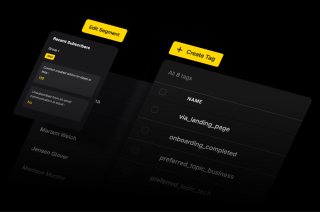
Most platforms give you basic list filters. SendX gives you the full audience organization system — unlimited custom fields, behavior-based tags, lists with double opt-in, and smart segments that update automatically.
SendX imposes no caps on contacts, lists, tags, or segments across all plans. Every contact can belong to multiple lists, accumulate unlimited tags, and qualify for any number of segments — all updated automatically as they engage. No tier restrictions, no upgrade walls.
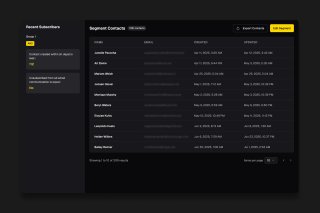
Every contact holds unlimited custom fields. Store purchase history, onboarding stage, plan tier, industry, or any data point specific to your business — then use any field in segments, personalisation, or automation triggers.
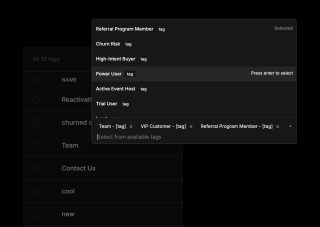
Tags capture what contacts do — clicked a link, attended a webinar, purchased a product. Lists manage who they are and how they subscribed, with double opt-in to keep lists clean and compliant from day one.
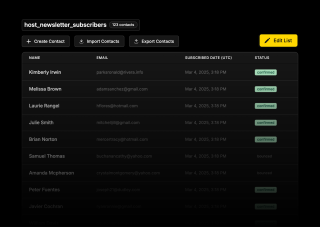
Three layers work together — lists for subscription management, tags for behavioral tracking, and smart segments that combine both for precise targeting.
Upload a CSV or connect via API. Your existing columns map directly to SendX custom fields — plan tier, signup source, industry, purchase history. From the moment contacts arrive, that data is available in segments, personalisation tags, and automation triggers. Nothing gets lost in the import.
Set automation rules once: apply a tag when someone opens an email, clicks a specific link, submits a form, or triggers a custom event. Tags accumulate over time, building a detailed behavioral profile for every contact without any manual work. The longer someone is on your list, the more precisely you can target them.
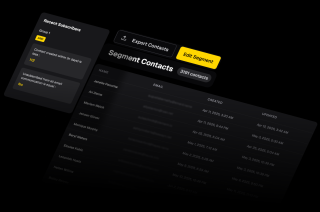
Use any combination of lists, tags, and custom fields to define your audience for a campaign or automation. Segments stay current automatically — contact data changes are reflected immediately. When you are ready to send, your audience is already accurate. No manual exports, no list rebuilding, no stale data.
Upload a CSV or connect via API. Your existing columns map directly to SendX custom fields — plan tier, signup source, industry, purchase history. From the moment contacts arrive, that data is available in segments, personalisation tags, and automation triggers. Nothing gets lost in the import.
Set automation rules once: apply a tag when someone opens an email, clicks a specific link, submits a form, or triggers a custom event. Tags accumulate over time, building a detailed behavioral profile for every contact without any manual work. The longer someone is on your list, the more precisely you can target them.
Use any combination of lists, tags, and custom fields to define your audience for a campaign or automation. Segments stay current automatically — contact data changes are reflected immediately. When you are ready to send, your audience is already accurate. No manual exports, no list rebuilding, no stale data.
Everything you need to know about SendX and our services. Last updated June 2026.
Lists are fixed groups — contacts subscribe to a list via a signup form and stay until they unsubscribe or are removed. Tags are flexible labels applied manually or by automation rules, capturing what a contact has done (clicked a link, purchased, attended a webinar). Segments are dynamic queries that pull together any contacts who currently match a set of conditions across lists, tags, custom fields, and engagement history.
A contact can be on one list, have dozens of tags, and qualify for many different segments at the same time. In SendX, all three work together: lists handle subscription and double opt-in compliance, tags track behavior over time, and smart segments combine both for precise campaign targeting.
Upload a CSV or connect via the SendX API. During import, map any column from your file to a SendX custom field — plan tier, signup source, industry, or any data your business tracks. Contacts are added immediately and become available in lists, segments, and automation rules. Re-importing the same contact updates their record instead of creating a duplicate.
When double opt-in is enabled on a list, new subscribers receive an automated confirmation email before they are added. Contacts who do not confirm remain in a pending state and are never sent campaign emails. Confirmed contacts are added to the list and available for segmentation and targeting immediately. Double opt-in is available on all SendX plans and is the recommended setup for GDPR-compliant list building.
No. SendX does not restrict the number of tags or custom fields. You can create as many tags as your business needs, apply them via automation rules or bulk actions, and store as many custom fields per contact as your data requires. Tags, custom fields, and unlimited list creation are available on all SendX plans — there are no feature-gate restrictions based on pricing tier.
Yes, importing your contacts is easy. You can upload a CSV file with your subscriber lists, and our system will securely import them. We also help ensure a smooth transition by guiding you through the process of warming up your sending domain to maintain high deliverability.
Still have questions? We're here to help.
"After testing out SendX for 1 month it was clear that this is the right system for us. We went ahead with the full implementation and did a deep integration of SendX with our in-house CRM.
I would recommend [SendX] to anyone who has a marketing automation use case. "
Improve your campaigns by testing different emails with A/B Testing and hit the mark every time.
Automatically ramp sending volume to earn a rock‑solid sender reputation—no spreadsheets required.
Write, publish, and track articles without leaving SendX—turn readers into subscribers in minutes.
Filter out security‑scanner noise and see the clicks that actually matter.
Auto‑expire unsent emails so your audience only sees timely, relevant messages.
Give every campaign its own reply‑to address and make sure answers land in the right inbox—every time.
Join 3,000+ businesses that have sent over 4.4 billion emails through SendX — with 95–98% inbox placement, unlimited sends, and 24/7 live support on every plan.